



 647-812-5125


How Much Does Shopify Migration Cost?
Shopify migration costs usually range between $1,000 and $15,000+, but the actual number depends less on Shopify itself and more on how your store is built today.
A simple store with clean data and minimal integrations can be moved quickly. But once you factor in custom design, integrations, and data cleanup, the cost can increase significantly.
Shopify Migration Cost by Store Complexity
- Smaller stores (basic setup): $1,000 to $5,000
Using pre-built themes, minimal customization, and limited integrations. Best suited for stores with a small catalog and clean data. - Growing stores (customized setup): $5,000 to $15,000
Includes theme customization, essential apps (reviews, email, subscriptions), and basic SEO preservation. This is where most Shopify migrations fall. - Complex or enterprise-level stores: $15,000+
Involves custom design or theme development, advanced integrations (ERP, CRM, B2B), large or complex catalogs, and detailed SEO migration planning.

Shopify Migration Cost Breakdown
If you’re trying to get a quick estimate of your Shopify migration cost, this is where most of the budget typically goes:
- Platform setup: $0 – $3,000
Store configuration, payments, shipping, and basic setup. Costs stay low unless there are custom requirements. - Theme or custom design: $0 – $8,000+
Free or paid themes keep costs low. Custom design increases cost significantly based on UX and branding needs. - Data migration: $1000 – $5,000+
Products, customers, and orders. Costs increase with data cleanup, restructuring, and large catalogs. - Apps & integrations: $150 – $700/month
Recurring costs for tools like reviews, subscriptions, search, and automation. Varies based on stack complexity. - SEO migration: $500 – $3,000+
Redirects, metadata, and structure preservation. Critical for maintaining rankings during migration. - Custom development: $3,000 – $15,000+
Custom theme development, advanced features, integrations, and workflows—often the biggest cost driver in complex projects.
In most Shopify migration projects, design and development tend to account for the largest share of the total cost—especially when the store is being rebuilt, not just moved.
5-Factor Shopify Migration Cost Model
Shopify migration costs for every project are driven by a few key factors that shape the scope of the project. Understanding these early helps explain why some migrations stay under $5,000, while others exceed $20,000.
During the Shopify migration process, these 5 factors determine how simple or complex the project becomes.
Shopify Migration Cost Drivers at a Glance |
||
|---|---|---|
| Factor | What It Covers | Cost Impact |
| 1. Store Size | # of products, customers, and orders volume | Medium–High |
| 2. Current Platform | WooCommerce, Magento, or custom builds | Medium–High |
| 3. Design Choice | Theme-based (Free or Paid) or fully custom design | Low–Very High |
| 4. Data Migration | Products only or full dataset including SEO | Medium–High |
| 5. Integrations/Custom Development | Apps, CRM, ERP, subscriptions, shipping, custom development | Medium–Very High |
In Simple Terms
- Bigger stores and complex platforms require more effort
- Design, integration, and custom development tend to cost the most
- More data means more time to clean up, transfer, and test
In practice, these factors rarely exist in isolation. For example, a larger store often also has more integrations and more complex data—meaning costs increase across multiple areas at the same time, not just one.
Where Does Your Shopify Migration Budget Go?
Shopify migration costs don’t come from a single decision—they build up across a few core areas. What varies from store to store is how much effort each part requires.
In most projects, the budget is typically distributed as follows:
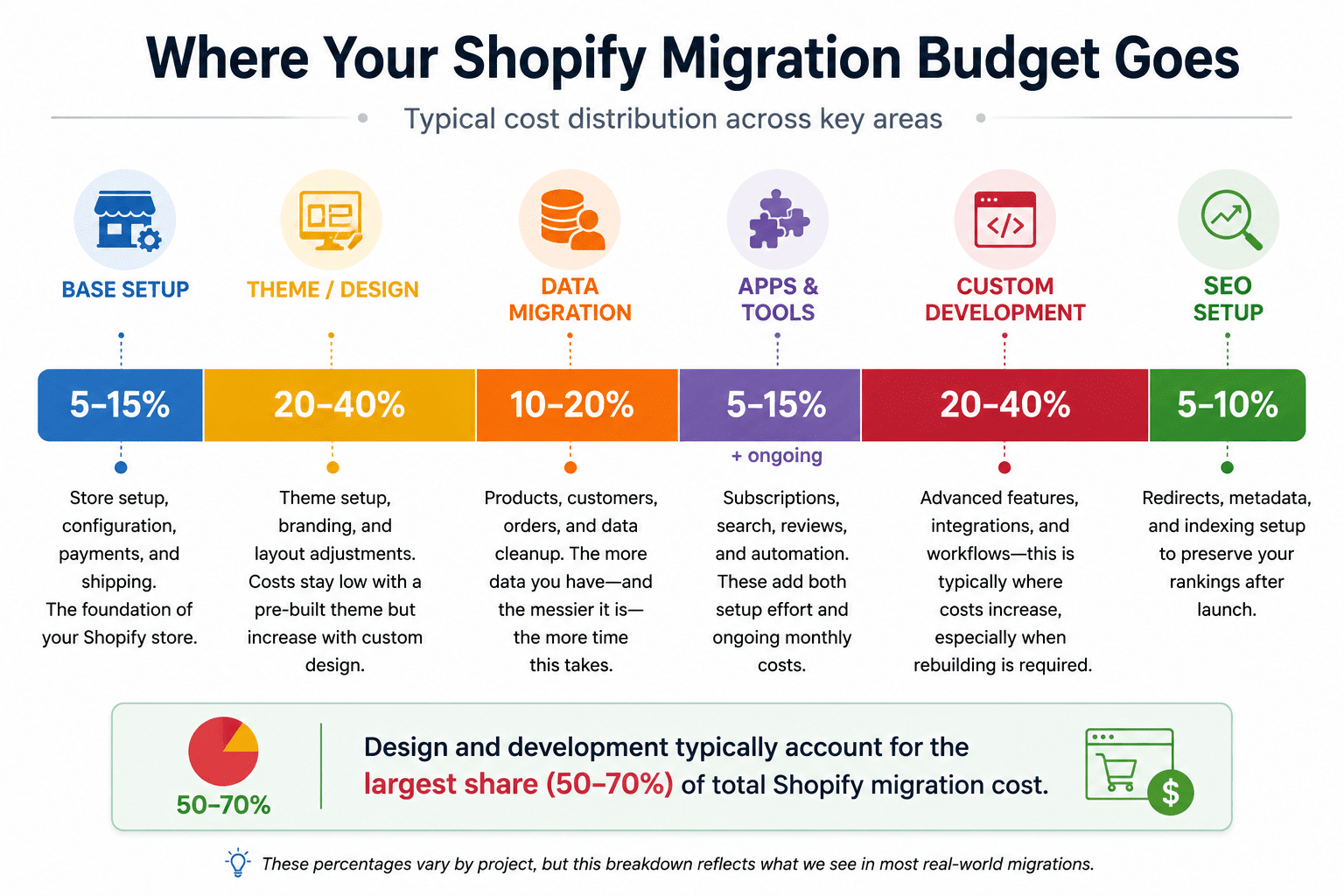
Shopify migration cost breakdown by budget category
How your Shopify migration cost builds up
- Base setup
(typically ~5–15%)
Store setup, configuration, payments, and shipping. This is the starting point for any Shopify store. - Theme or design
(typically ~20–40%)
Theme setup, branding, and layout adjustments. Costs stay low with a pre-built theme but increase quickly with custom design. - Data migration
(typically ~10–20%)
Products, customers, orders, and data cleanup. The more data you have—and the messier it is—the more time this takes. - Apps and tools
(typically ~5–15% + ongoing)
Subscriptions, search, reviews, and automation. These add both setup effort and ongoing monthly costs. - Custom development
(typically ~20–40%)
Advanced features, integrations, and workflows—this is typically where costs begin to increase, especially when rebuilding is required. - SEO setup
(typically ~5–10%)
This includes redirects, metadata, and indexing setup, which are important if you want to preserve your rankings after launch. A proper Shopify migration SEO setup helps make sure nothing critical is lost in the transition.
These percentages vary by project, but in most cases, design and development together account for the largest share of the total Shopify migration cost—especially when the store is being rebuilt rather than simply moved.
Why Shopify Migration Costs Go Higher in Real Projects
These cost components don’t stay fixed. In real Shopify migration projects, certain decisions and complexities tend to push costs higher than expected—especially around design, integrations, and data handling.
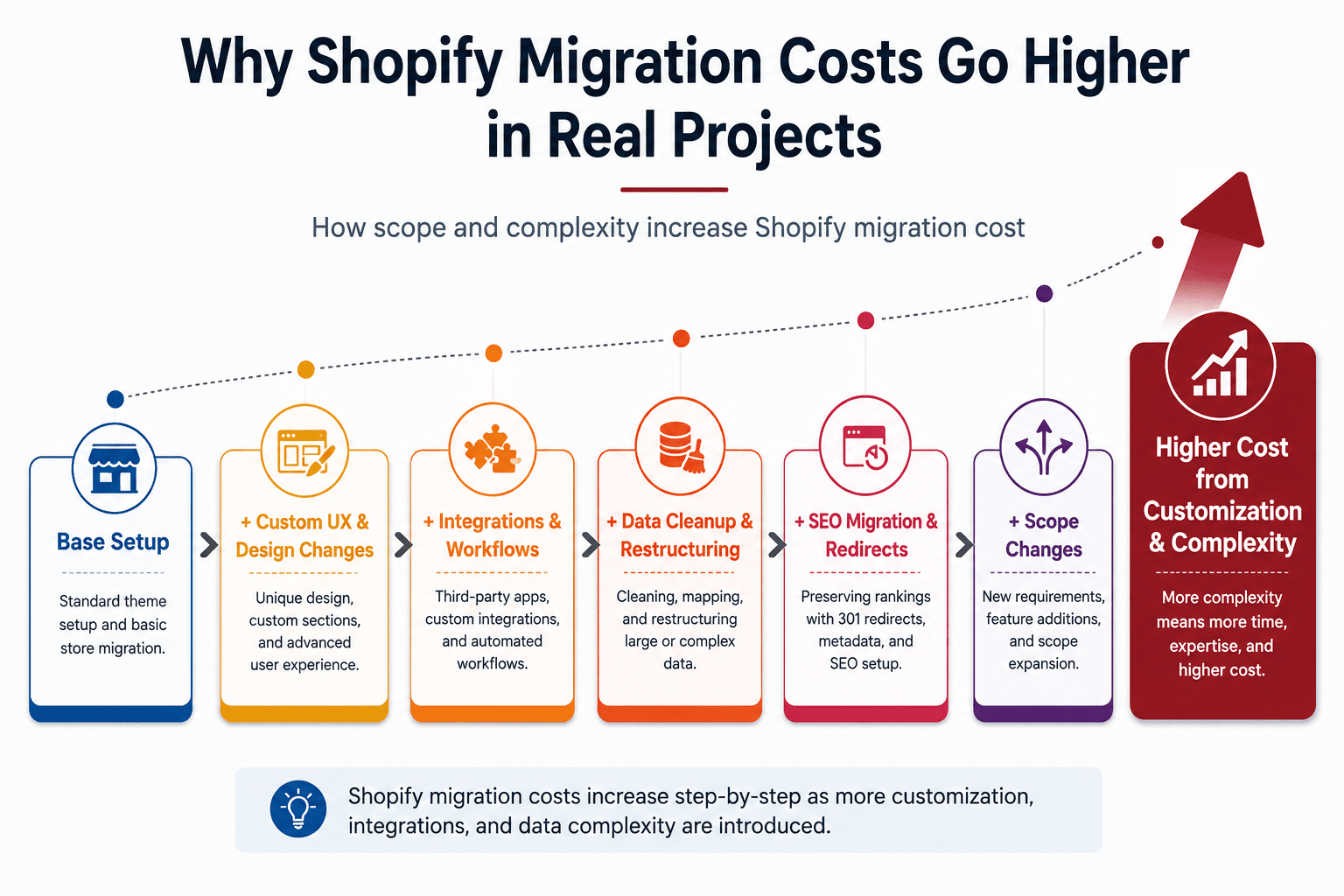
How Shopify Migration Costs Increase with Scope and Complexity
Custom design instead of a theme-based setup
Many Shopify migrations begin with the idea of using a pre-built theme to keep costs low. But as the project progresses, that approach often changes.
Once real requirements come into play—branding, layout flexibility, conversion goals—the limitations of a theme become more obvious. What starts as a “quick setup” gradually shifts toward custom design.
That shift typically brings:
- New page structures and layouts
- More UX and conversion-focused decisions
- Additional design and development work
This transition—from using a theme to building a tailored experience—is one of the most common reasons Shopify migration costs increase beyond the original estimate.
Complex integrations and workflows
If your store relies on external systems like CRM, ERP, subscriptions, or custom shipping logic, these need to be rebuilt in Shopify.
Some can be handled with apps. Others need a custom setup or middleware. The more systems involved, the more time and coordination required.
For example, stores using subscriptions, advanced shipping rules, or CRM integrations usually require rebuilds to recreate the same functionality.
The more systems involved, the more coordination, testing, and development effort required—making integrations a major driver of cost.
Large or unstructured data
Data migration to Shopify is rarely a simple transfer. The complexity usually comes from how the data is structured in your current platform.
Migration costs tend to increase when:
○ Product data isn’t consistent
○ Variants are not structured properly
○ Historical data needs to be cleaned and validated
In many cases, preparing the data takes longer than the migration itself.
A common issue we see is inconsistent product variants or locked-in different plugins, which increase setup/cleanup time before migration.
Migrating more data than necessary
Not everything from your current store needs to be carried over. Migrating outdated or unused data adds effort without improving the new store.
This often includes:
- Old or inactive products
- Years of order history
- Outdated customer records
Beyond increasing migration effort, unnecessary data can also impact ongoing costs—especially with apps that charge based on product count, customer count, or usage.
SEO preservation requirements
For stores that depend on organic traffic, SEO must be carefully managed during migration. Even small gaps can impact rankings after launch.
SEO preservation involves:
- Setting up 301 redirects for all existing URLs
- Preserving metadata (titles, descriptions, structured content)
- Maintaining or improving URL structure
SEO work adds both planning and validation effort. When done right, rankings are protected. Done poorly, it can lead to traffic loss after launch. A structured Shopify migration SEO approach helps make sure these elements are handled correctly.
Shopify Migration Cost by Store Type & Platform
The ranges below give a practical way to estimate where your store might fall. It really comes down to how your setup looks and how much work is involved.
Shopify Migration Cost by Store Type |
|||
|---|---|---|---|
| Store Size | Catalog Size | Typical Cost | What It Includes |
| Small Store | Up to ~100 products | $1000 – $5,000 | Using pre-built themes, minimal customization, and limited integrations. Best suited for stores with a small catalog and clean data. |
| Mid-Sized Store | ~100 – 1,000 products | $5,000 to $15,000 | Includes theme customization, essential apps (reviews, email, subscriptions), and basic SEO preservation. This is where most Shopify migrations fall. |
| Enterprise Store | 1,000+ products | $15,000+ | Involves custom design or theme development, advanced integrations (ERP, CRM, B2B), large or complex catalogs, and detailed SEO migration planning. |
Cost Differences by Platform
Where you’re migrating from does matter, but not always in the way people expect. It’s less about the platform itself and more about how your store is structured and what needs to be rebuilt.
1. WooCommerce → Shopify (usually simpler & lower Cost)
WooCommerce migrations are typically more straightforward because:
- Data is easier to export
- Migration tools support it well
- Fewer rigid dependencies compared to other platforms
Because of that, the overall effort is lower—and so is the cost in most cases. You’ll see this more clearly in a WooCommerce to Shopify migration, especially in how quickly data and basic functionality can be moved across.
2. Magento → Shopify (more involved & higher Cost)
Magento stores usually need more work before anything can be migrated.
- More complex product structures
- Larger and heavier databases
- Greater reliance on custom features
This added complexity is a frequent characteristic of Magento to Shopify migration, largely due to the increased planning, detailed data mapping involved, and custom development to replicate custom logic.
3. Custom Platform → Shopify (most effort & highest Cost)
Custom platform migrations are often the most complex. With no fixed structure, many details must be worked out during the process.
That often includes:
- Manual data mapping
- Rebuilding features from scratch
- Reworking integrations that don’t carry over
With more planning decisions involved, these projects take longer—and that’s why they typically land at the higher end of Shopify migration costs.
Hidden Shopify Migration Costs Most Stores Miss
Many Shopify migrations go over budget—not because of major decisions, but because certain areas aren’t fully planned upfront. The most common ones are app costs and data preparation.
1. App Costs Add Up Faster Than Expected
Most brands don’t know exactly which apps they’ll need until the build is underway. Shopify relies heavily on apps for features like reviews, subscriptions, search, translations, shipping, and automation—and most come with monthly recurring costs.
What starts as a few tools can quickly grow into a larger stack:
- Multiple apps handling similar functions
- Paid apps replacing previous platform features
- Upgrades as the store scales
Individually, these costs seem small, but together they can significantly increase your ongoing monthly spend.
2. Data Migration Is Not Just a Transfer
Data migration is often perceived as a simple process, but it usually requires cleanup and restructuring before it works properly in Shopify.
Common challenges include:
- Inconsistent product variants
- Missing or duplicate SKUs
- Poorly structured collections
- Unnecessary or outdated data
In many cases, preparing the data takes more time than the migration itself—impacting both timeline and cost.
How Can You Reduce Shopify Migration Costs?
Shopify migration cost can be reduced by simplifying scope, using pre-built solutions, and avoiding unnecessary complexity—especially during planning and early execution.
Quick Shopify migration cost-saving checklist
- Use a pre-built theme where possible
- Clean and structure your data before migration
- Avoid overlapping or unnecessary apps
- Migrate only essential data
- Use automated data migration tools where possible
- Finalize scope before development begins
Decisions that increase vs reduce Shopify migration cost |
||
|---|---|---|
| Decision Area | What Increases Cost | What Reduces Cost |
| Design | Custom design from the start | Use a pre-built theme first |
| Data | Migrating all data without cleanup | Clean and migrate only essential data |
| Apps & Tools | Multiple overlapping apps | Use a minimal, focused app stack |
| Scope | Changing requirements mid-project | Finalize the scope before development |
| Integrations | Complex custom workflows | Use standard Shopify solutions where possible |
In most projects, cost increases are caused by scope changes—not the initial setup. Controlling scope early is one of the most effective ways to manage your Shopify migration cost.
The same actions that reduce cost also compress timeline — clean data, a locked scope, and a pre-built theme. For how these factors play out phase by phase, see how long a Shopify migration really takes.
Is Shopify Migration Worth the Cost?
In most cases, yes—but it depends on what’s slowing you down right now.
If your store is already stable, the benefit is gradual. If it’s hard to manage or constantly breaks, the difference is noticeable pretty quickly.
What Changes After Moving to Shopify |
||
|---|---|---|
| Area | Before Migration | After Moving to Shopify |
| Maintenance | Regular updates, plugin conflicts, and hosting management | A managed system with far less day-to-day upkeep |
| Performance | Depends on hosting quality and optimization | More stable and consistent overall performance |
| Features | Often assembled using plugins or custom code | Key ecommerce features are included out of the box |
| Scalability | Scaling usually involves additional setup work | Easier to scale with apps and built-in integrations |
Most of these differences come down to how much ongoing work your current store requires. The more time you spend managing plugins, fixing issues, or working around limitations, the more value a platform like Shopify typically brings.
The upfront cost of migration is mainly a one-time investment. What matters more is what happens after launch—how easy the store is to manage, how stable it is, and how well it supports growth without constant development effort.
If your current setup is holding you back operationally or technically, the return on migration is usually clear. If not, the benefit tends to be more gradual.
For most growing ecommerce brands, the decision isn’t just about migration cost—it’s about reducing long-term complexity and building a setup that can scale without friction. If you’re weighing the full picture beyond budget, our complete Shopify migration guide walks through the process, timeline, and SEO side by side.
Shopify Migration Cost FAQs
How much does Shopify migration cost?
It depends more on the store than on Shopify itself. Most migrations fall somewhere between $1,000 and $15,000+, but that range can shift quite a bit. A small store with a simple setup stays on the lower end. Once you add custom design, integrations, or data cleanup, costs go up quickly.
Why is Shopify migration expensive?
It usually gets expensive when the project goes beyond just “moving” the store. Rebuilding features, handling integrations, and fixing data issues all take time. Another common reason is scope changes—what starts simple often grows once the actual requirements become clearer.
Does Shopify allow free store migration?
Technically, yes, but only in very basic cases. If the store is small and you’re comfortable doing everything yourself, you can keep costs low. In most real situations, though, businesses end up spending on apps, design, or some level of support to get things set up properly.
What is the biggest cost factor in Shopify migration?
In most projects, it comes down to custom work—especially integrations and development. Design can also have a big impact, depending on how much you’re changing from the current store. The more that needs to be rebuilt, the higher the cost.
Does Shopify charge any fees for migration?
No, Shopify doesn’t charge any migration fees. The platform cost starts with your monthly plan. Migration-related costs typically come from third-party tools, apps, or expertise needed from a Shopify migration agency to move and rebuild your store.
How long does Shopify migration take?
For a simple store, it can be done in a couple of weeks. More complex projects usually take longer—sometimes 8 to 12 weeks or more. A lot depends on how much needs to be cleaned up, rebuilt, or integrated. In many cases, the prep work takes as much time as the migration itself.

Need an accurate Shopify migration cost estimate?
If you’re not sure where your store fits in these ranges, that’s completely normal. The actual cost usually comes down to how your store is set up today and what needs to change.
We can walk through it with you and give a more realistic estimate based on your setup—so you’re not guessing or overplanning.
- Get an actual cost estimate based on your store
- Understand what’s really required (and what can be skipped)
- Plan the overall Shopify migration structure & apps