647-812-5125








Why a Magento to Shopify Migration Needs Real Planning
Years migrating ecommerce stores across Magento & Shopify
Data loss, backed by structured mapping and a manual validation pass
Uptime — your Magento store keeps selling while the Shopify build happens separately
Typical timeline for a Magento migration, depending on catalog and complexity
The Real Worries Behind a Magento Migration

Does switching from Magento to Shopify hurt SEO?
It doesn’t have to, and for a properly handled migration, it won’t. A replatforming on its own doesn’t cost you rankings — broken redirects and dropped metadata do. Because Shopify builds URLs differently from Magento, nearly every page address changes during the move. If those old URLs aren’t redirected to their new Shopify equivalents the SEO value built into them doesn’t carry over, and search engines start treating the pages as brand new.
Rankings tend to slip during a Magento migration when:
- Old URLs aren’t mapped to their new Shopify pages
- Canonical tags get lost in the move
- Internal links still point to dead Magento paths
- Page titles and meta descriptions are only partly transferred
Handle those four before launch, and most stores hold their positions after the switch.

What happens to my Magento extensions and custom features?
They can’t move across directly, but the things they do for your store can be rebuilt. Most Magento stores run on a mix of extensions and custom code, and Shopify’s architecture is different enough that those pieces have to be recreated rather than ported. So, we look at what each extension is actually doing day to day. Some of it Shopify handles natively, some maps cleanly to a well-supported app, and anything genuinely unique to your setup gets a small custom build. The extension name won’t survive the move. The capability behind it usually does.

Will my products, customers, and order history transfer correctly?
Yes — with proper mapping, the core store data moves over cleanly. Products, variants, customers, and past orders all transfer from Magento into Shopify. The work that makes or breaks it happens before the transfer: Magento’s product attributes, categories, and custom fields have to be lined up against how Shopify structures products and collections. Once the import is done, we go through the new store by hand — product pages, collections, and order records all get checked before anything goes live.

Will there be downtime during the migration?
In almost every case, no. Your Magento store stays open and keeps taking orders while the new Shopify store is built separately in a development store under our Shopify Partner account — design, features, and data all happen over there, not on your live site. The only moment downtime can occur is the final domain switch at launch, while DNS points over to Shopify. We schedule that switch for off-peak hours, so in practice, customers don’t notice it.

Will customers keep access to their accounts after migration?
Yes. Customer accounts, profile details, addresses, and full order history all carry over, so the records stay intact. The one thing that doesn’t move is the password — Magento and Shopify store password data differently, so customers reset theirs the first time they log in to the new store. We plan for that ahead of launch with a clear reset message, which keeps it from turning into a wave of support tickets.
How We Move Your Store from Magento to Shopify
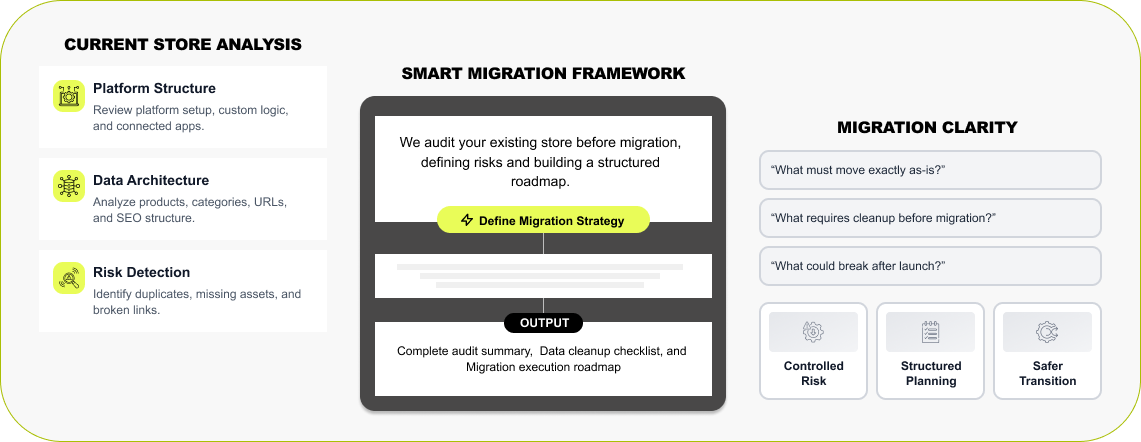

Step 1 — Magento Store Audit & Migration Planning
Every migration starts with a proper look at what you already have. Magento setups get layered over time — extensions, integrations, custom rules, product structures stacked on top of each other — so before anything moves, we work out how the store actually operates. We go through the catalog, the connected systems, and the pages pulling in search traffic. Tooling surfaces the messy bits like missing images or tangled URLs. Out of that comes a clear, plain plan for moving to Shopify without leaving anything behind..
Read More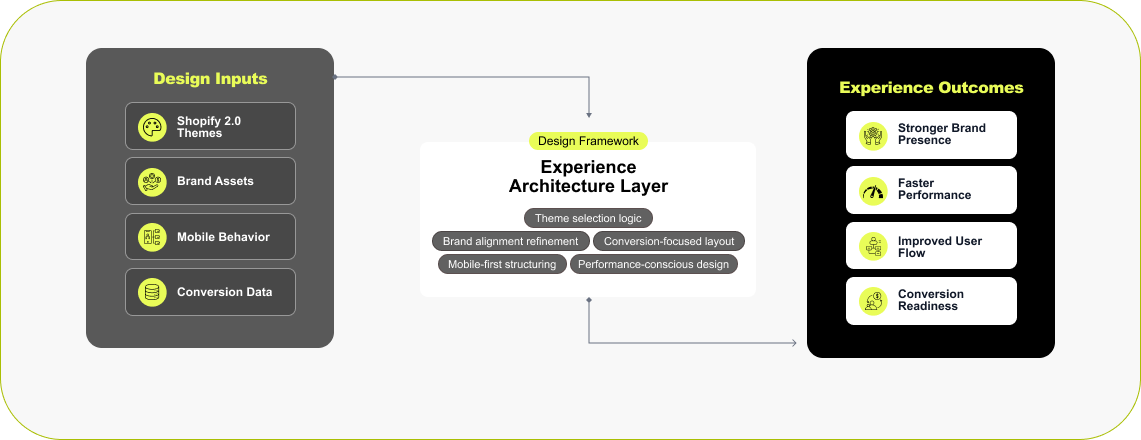

Step 2 — Shopify Store Design & Theme Setup
A move to Shopify is usually a good moment to revisit the storefront. A lot of Magento sites have picked up theme changes and extensions over the years that quietly slowed them down. Some brands take the opportunity to start fresh on a modern Shopify 2.0 theme built for speed and mobile. Others want something bespoke, and we’ll design a custom layout for that. And if you’d rather keep the look your customers already know, we rebuild it in Shopify so it feels the same — just faster and easier to run.
Read More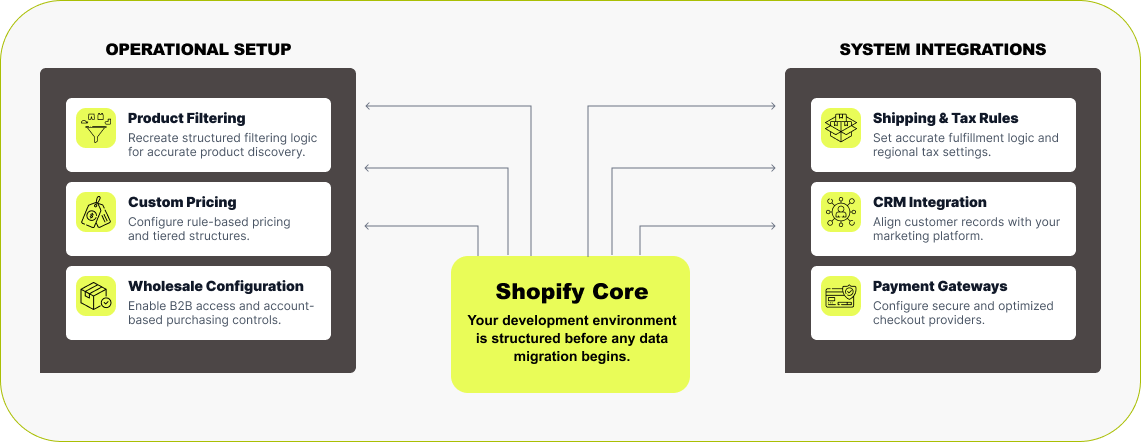

Step 3 — Shopify Build & Feature Setup
Before any data moves, the new Shopify store gets built and configured. We set it up as a development store under our Partner account, so you’re not paying for a plan while the work is underway. The focus at this stage is getting the features your Magento store depends on working inside Shopify — product filters, pricing rules, wholesale access, whatever you use day to day. If your store talks to an ERP, a CRM, or other outside systems, we reconnect those, so the business keeps running the way it should. Shipping, taxes, payments, and the core automations all get configured and tested so the store is ready before the data arrives.
Read More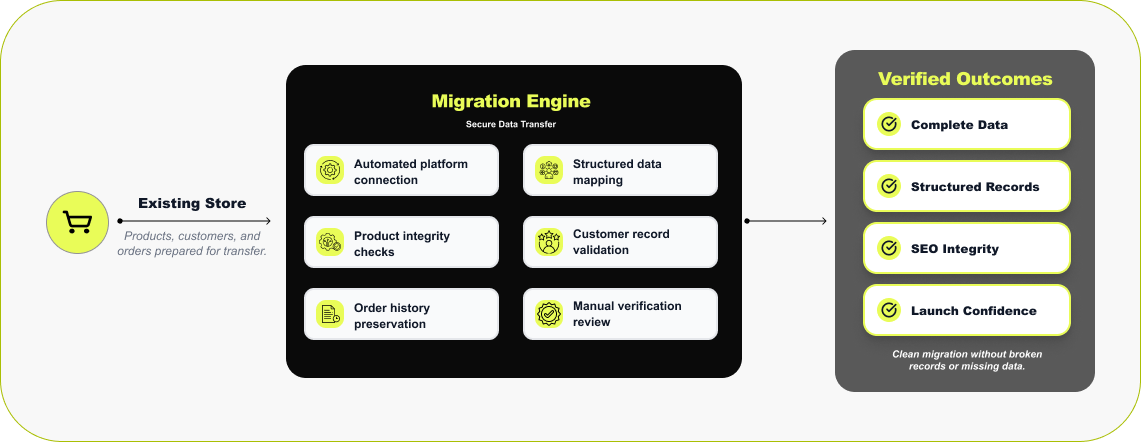

Step 4 — Magento Data Migration
With the store built, the data comes across. We use trusted migration tools that connect straight to your Magento database and move products, variants, customers, order history, and SEO data into Shopify . Then we verify. Once the transfer finishes, our team goes through the new store — product listings, collections, a few test orders — to confirm everything landed where it should. One thing to know up front: customer passwords can’t be carried over, because the two platforms encrypt them differently. Everything else moves across and gets checked before launch.
Read More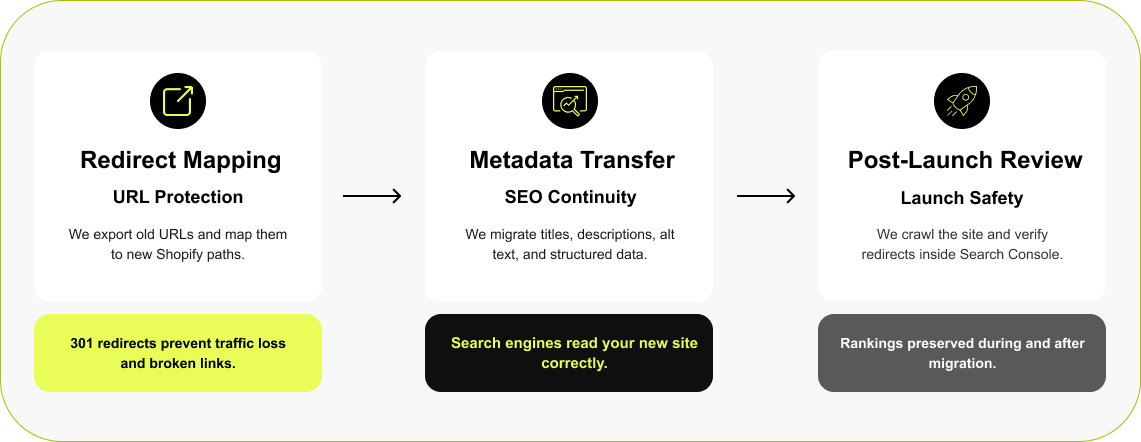

Step 5 — Protecting Search Visibility During Migration
This is one of the steps that decides whether a migration succeeds. Magento and Shopify build URLs differently, and if that change isn’t handled, search traffic lands on 404s and rankings take the hit. To prevent that, we export every Magento URL first, then set a 301 redirect from each one to its matching collection or product page in Shopify. The SEO basics — page titles, meta descriptions — come across at the same time, so the new store keeps the search visibility that the old one spent years building.
Read More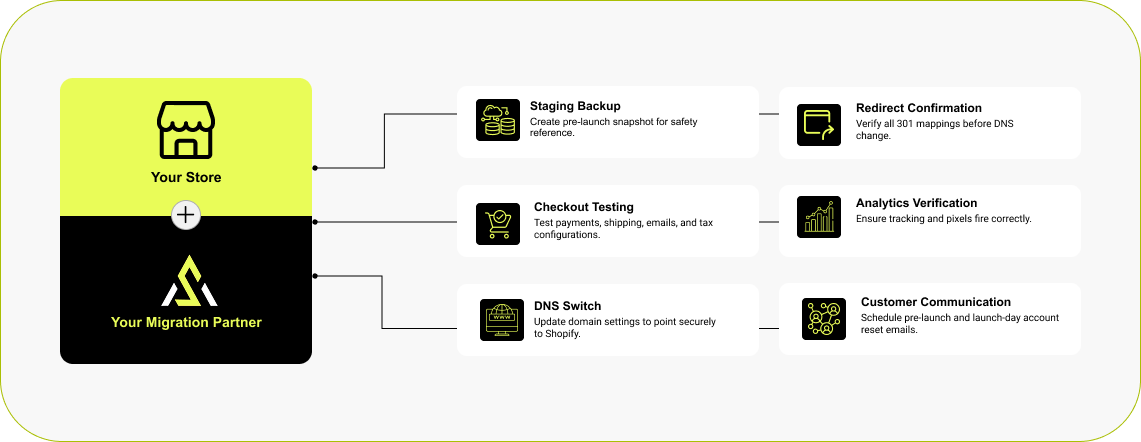

Step 6 — Store Launch & Customer Communication
The last step is going live. Before the switch, we set up a reference copy of the Magento store in case we need to check something later, then run a final round of QA — checkout, forms, redirects, analytics, shipping, and payments. When it all checks out, we update the DNS, so the domain starts serving the Shopify store. Because passwords don’t transfer, customers reset theirs on first login, and we’ll usually have you notify them ahead of time, so the change feels expected rather than confusing.
Read MoreShopify Stores Designed to Perform in Real-World Ecommerce
The stores below were built to fix real problems — sluggish performance, cluttered layouts, weak conversion, and platforms that had simply run out of room. We design around structure, speed, and usability, so each Shopify store holds up day to day and keeps working as the catalog and traffic grow.



Luxury Fashion
A luxury fashion brand redesigned with a refined, editorial feel—built to support a growing roster of designers while staying fast, structured, and scalable.



Women’s Activewear
A performance-focused Shopify design tailored for a women-led fitness brand, balancing strong visuals with frictionless shopping.



Fencing Products
A full Shopify redesign paired with SEO, marketing, and ongoing maintenance for a product-heavy, search-driven business.



Luxury Bedding Manufacturing
We supported this Shopify Plus brand with focused social media marketing, aligning campaigns with seasonal demand and high-intent audiences to drive efficient, scalable growth.
How Much Does Magento to Shopify Migration Cost?
No two Magento stores cost the same to migrate, because no two are built the same way. What drives the number is how much has to be rebuilt: a clean catalog with a handful of extensions is straightforward, while a store with custom pricing logic, complex attributes, wholesale rules, and a stack of integrations takes more work to recreate properly in Shopify. As a rough guide, projects tend to fall into three bands:

Small store
(under 500 SKUs, standard platform)
A standard catalog, few extensions, minimal custom logic. Fastest to move.

Mid-size store
(500–5,000 SKUs, some custom features)
A larger catalog with some custom features, integrations, or wholesale setup

Large / complex store
(5,000+ SKUs, ERP/CRM, custom build)
Heavy customization, ERP/CRM connections, complex attributes, or B2B requirements
Rather than guessing from a generic price list, the cleanest way to know is a scoped estimate against your actual store. You can ballpark it yourself with our Shopify cost calculator, read how migration pricing breaks down in our cost guide, or request a free estimate, and we’ll size it properly.
Scoped with 48 hours
What Our Migration Clients Say

Outstanding Shopify Migration
“We hired Ecommerce Development Pros for our Shopify migration, and they did an outstanding job. Smooth transition, clear communication, and everything worked perfectly after launch.”

Trusted Shopify Technical Partner for Shopify Migration
“We partnered with eCommerce Development Pros for our Shopify migration, and I'm so glad we did. They handled the entire process carefully and professionally. They made sure nothing important slipped through the cracks. Our new Shopify store is faster, easier to manage, and overall, much more stable. It honestly feels like we finally have the right foundation to grow.”
Professional Shopify Development with Real Results
“We worked with eCommerce Development Pros to redesign our Shopify store, and the impact has been real. They took time to understand our brand and customers and restructured the site so everything flows better. Since launch, we've seen improved conversions and stronger engagement.”
Brands Who Build, Grow, and Win With Us
Magento to Shopify Migration FAQ
A few questions come up on nearly every Magento migration project — how long it takes, what it costs, whether SEO holds, and what happens to the design. Straight answers below, based on the migrations we’ve actually run.
Why are businesses moving from Magento to Shopify?
+Mostly, it comes down to how much work the store takes to keep running. Magento is powerful and flexible, but that power brings hosting headaches, security patches, extension upkeep, and a steady development bill — and a lot of owners reach a point where the maintenance outweighs the control. Shopify handles hosting, updates, and platform maintenance itself. Magento still makes sense for stores that need deep customization and own their infrastructure, but for most businesses, the switch is about running the store with less overhead while keeping the features they need to grow.
Is there a Magento to Shopify migration app, or do I need an agency?
+There are migration apps and tools — LitExtension, Cart2Cart, Matrixify, and Shopify's native importer — and they do move the raw data well. What they don't do is rebuild your extensions, map custom attributes correctly, set up 301 redirects, or check that everything actually landed where it should. On a simple catalog, an app alone can be enough. On a typical Magento store with custom logic and integrations, the app is one step in a larger migration — and the parts it can't handle are exactly where stores lose data or SEO. We use those same tools, then do the rebuild and verification around them.
How long does a Magento to Shopify migration take?
+Most projects run 6 to 12 weeks, though it depends entirely on the store. A small, fairly standard catalog moves quickly. A larger store — thousands of SKUs, multiple extensions, integrations, complex product attributes — needs more planning and testing time. The work breaks into stages: auditing the current Magento setup, rebuilding the key features in Shopify, transferring and verifying the data, setting up redirects, and testing checkout and payments before launch.
How much does a Magento to Shopify migration cost?
+There’s no flat rate, because the cost tracks how your Magento store is built. Extensions, custom pricing logic, integrations, and complex catalog attributes all have to be adapted to Shopify’s framework, and the more there is to recreate, the larger the scope. The honest answer is that a scoped estimate against your real store beats any generic figure. Reach out, and we’ll size it for you.
When migrating from Magento to Shopify, do customer passwords transfer?
+No — passwords are the one thing that can’t come across, because Shopify won’t import encrypted data from another platform. Everything else does: customer accounts, order history, and profile details all transfer. After launch, customers set a new password the first time they log in. We prepare the customer messaging for that ahead of time, so people know what to expect and it doesn’t become a support problem.
Can you migrate Magento to Shopify without losing data?
+Yes — handled properly, the core data comes across intact. A standard migration covers products, variants, customers, and past orders, so your catalog and customer history stay whole. Where data problems creep in is when exports are done by hand or the Magento catalog structure isn’t reviewed first — those product attributes and category relationships need mapping before the transfer. Afterward, we review the new store in detail to confirm products, collections, SEO, and orders all landed correctly.
Do I need Shopify Plus when migrating from Magento?
+Not usually. Plenty of stores coming off Magento run perfectly well on Shopify’s standard plans. Shopify Plus comes into play for very high order volumes, a customized checkout, or advanced automation and B2B needs. For most mid-sized stores, the regular plans cover everything. Which one fits becomes clear during planning, once we’ve looked at your catalog size, integrations, and how the business operates.
Will my Magento store design look the same on Shopify?
+It can look very close, though it won’t be a pixel copy — Magento and Shopify use different theme systems, so the design is rebuilt rather than transferred. The layout, colors, and branding can all be matched closely, and a lot of owners keep the same look so the store stays familiar. Others treat the move as a chance to refresh the design, speed the site up, and make it work better on mobile.
Trusted Migration & Technology Partners