



 647-812-5125








Shopify Migrations Done Right — The First Time
Years In ecommerce - working across every major platform before Shopify became the standard
Data loss because we check, double-check, and then run AI-verified mapping to be sure.
We ensure 100% uptime - your store stays live — no “maintenance mode,” no downtime panic
For most stores, we take 8 weeks to migrate over and launch with Shopify
The Fear Behind Every Shopify Migration

Will I Lose My SEO Rankings When I Migrate to Shopify?
A ranking decline is not inevitable when the migration is carefully planned. We map existing URLs to relevant Shopify pages, set up 301 redirects, and preserve important content, meta titles, descriptions and structured data. We also submit the new sitemap to help Google discover the new URLs. Rankings may fluctuate while Google processes the changes, so we monitor indexing and search performance after launch.

Will All My Products, Customers, and Orders Migrate to Shopify?
Yes — products, variants, customers, order history, and content all come across. We migrate the agreed store data, then check it record by record against your old store so nothing is silently dropped or mismatched. Anything that doesn’t map one-to-one between platforms, we flag and handle by hand before launch.

What Happens to Customer Accounts and Passwords After Shopify Migration?
Customer accounts move over; passwords don’t — and that’s by design, for security. Shopify can’t import encrypted passwords from another platform, so customers set a new one the first time they log in. We set up a clean account-activation flow, so it feels routine, not like a problem, and your customers keep their order history and saved details.

Can You Migrate Custom Features, Apps, and Integrations to Shopify?
Almost always — though the how depends on the feature. We audit everything you rely on — subscriptions, ERP or CRM links, custom checkout logic — and match each one to a proven Shopify app or build it where no app fits. You usually end up with a cleaner setup than you had, because we rebuild instead of patching old workarounds.

What Usually Breaks During a Shopify Migration?
The usual casualties are redirects, image links, and custom fields — the details rushed migrations skip. Old URLs get missed, product images lose their connections, and metafields don’t map across, which is what quietly dents traffic after a sloppy launch. We test all three before going live, so what breaks for others doesn’t break for you.

Do I Need a Shopify Migration Agency, or Can I Do It Myself?
You can DIY a small, simple store — but the risk climbs fast with size and complexity. A miss on redirects or data mapping can cost you rankings and sales that take months to win back, and most owners don’t spot the gaps until traffic dips. If you’re moving real revenue, real catalogue size, or custom features off WooCommerce, Magento, or BigCommerce, an agency pays for itself in what it stops you from losing.
How We Handle Your Shopify Migration — Step by Step


Step 1: Store Audit & Mapping
The first step for every Shopify migration project is to audit your existing system. Our Shopify migration agency runs a complete audit of your current store - understand how you are operating — platform setup, product data, SEO structure, custom logic and functionality, and connected apps. Our AI tools scan your store in the background, flagging things that could cause issues later — missing images, duplicate URLs, broken categories. Then we build a simple roadmap that shows what’s moving, what needs cleanup, and how everything connects to Shopify.
Read More

Step 2: Shopify Store Design & Setup
When you plan to move to Shopify, it’s often the right time to refresh your store design. About 80% of our clients choose to start fresh — a modern theme, faster site speed, and layouts built to convert better on mobile. We help you pick the right Shopify 2.0 theme and personalize it to fit your brand. If you want something completely unique, our design team can create an on-brand custom layout or build a new theme from scratch. If you prefer to keep your current look, we can rebuild it inside Shopify so it feels familiar but performs better. Same brand. Better experience. Faster store.
Read More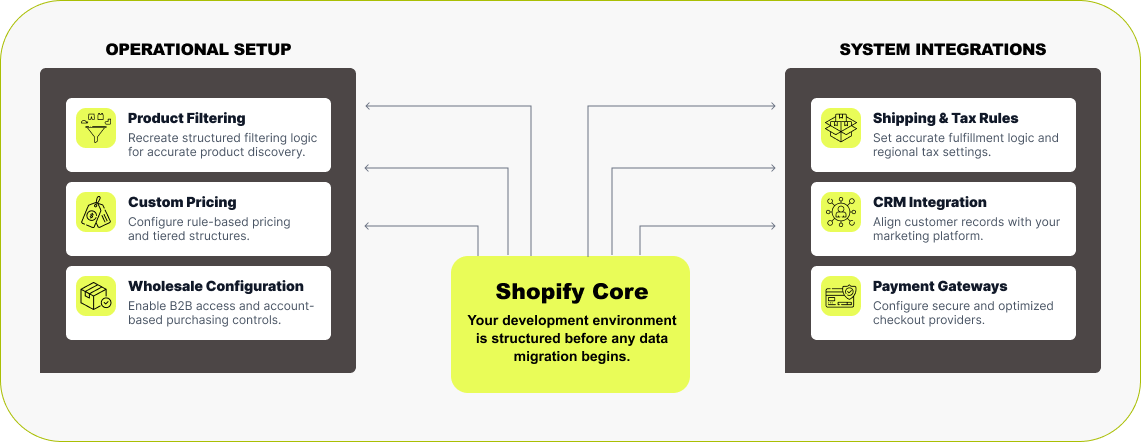

Step 3: Build Before Migrating
Before we move any data, we first build your Shopify store. Our team sets up a development store under our Shopify Partner account — that means you don’t pay for a Shopify plan while we’re building. We match all the key functionality from your current platform — product filters, custom pricing, memberships, or wholesale features — using the right Shopify apps or custom code. If you have integrations with ERP, CRM, or third-party systems, we handle those too. Shipping, taxes, payments, and automations are all configured and tested before migration begins. By the time we move your data, your Shopify store already feels complete — stable, fast, and ready for content.
Read More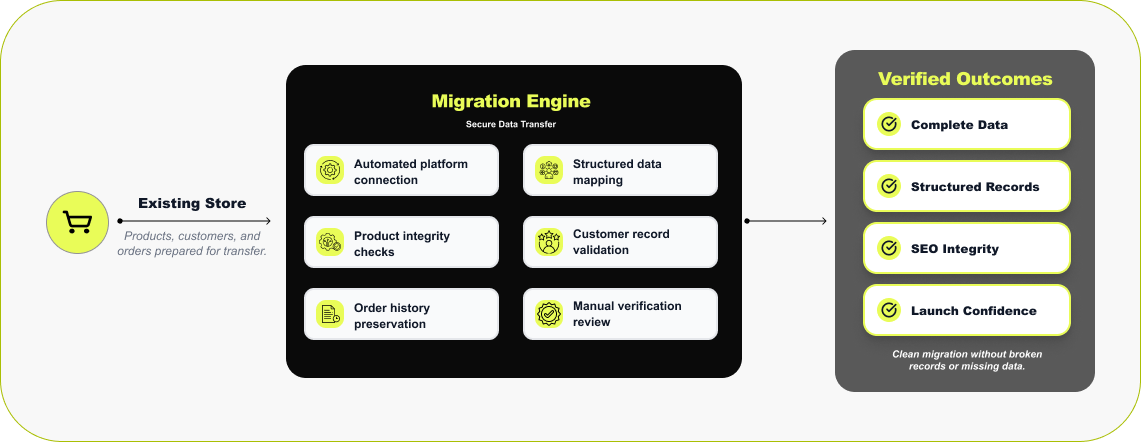

Step 4: Verified Data Migration
Once your Shopify store is built, we start moving your data. We don’t rush this part — it’s where things can easily go wrong if you do. We don’t rely on manual exports or messy spreadsheets. For migration, we use solid tools we’ve trusted for years — LitExtension or Cart2Cart. These tools connect to your current store and move your products, customers, and orders directly into Shopify. After import, our team goes through your data manually — checking products, collections, and checkout to be sure everything landed where it should. Due to different encryption systems used by different platforms, passwords can’t move over. The agreed store data is transferred, checked and verified by our team before launch.
Read More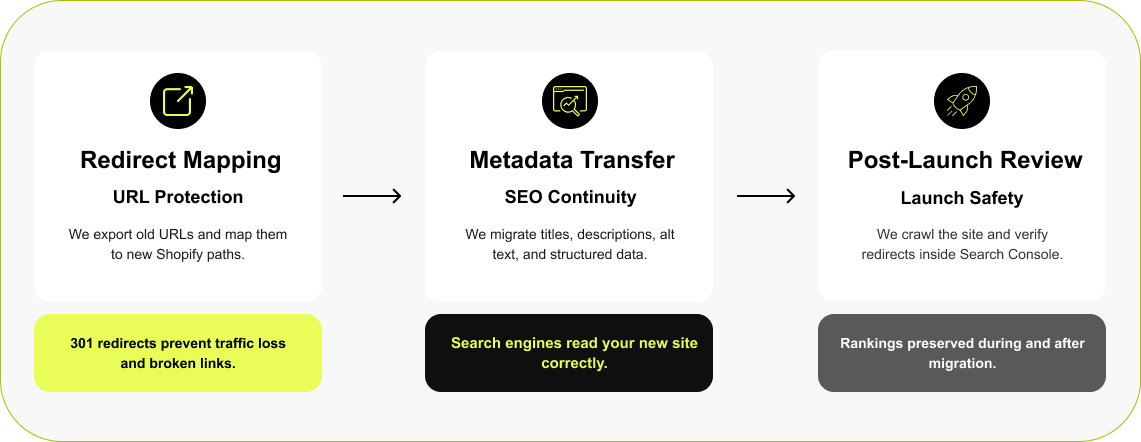

Step 5: SEO & Redirect Validation
When you move from another platform to Shopify, your URLs are going to change. If you don’t set up redirects, those old links will break, and that’s usually when traffic and rankings drop. We deal with that early. We take a full export of your old URLs, match each one to the new Shopify link, and set up proper 301 redirects. We also move your SEO data, including page titles, meta descriptions, image alt text, and structured data (schema)— so Google can read the new site the same way it did the old one. After launch, we crawl the site and check everything again in the Search Console.
Read More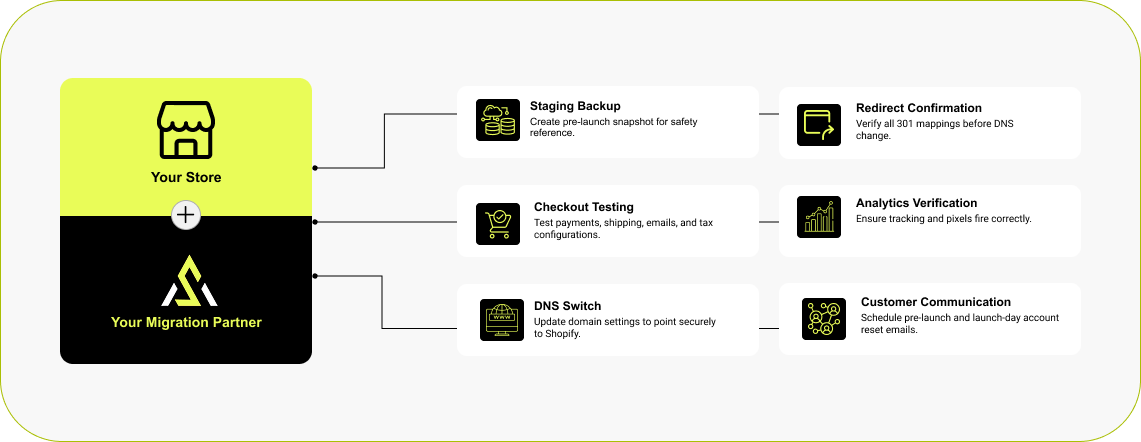

Step 6: Planned, Tested, and Launched
We follow our Shopify migration checklist to prepare for launch. We retain a reference copy of your current store, then test checkout, contact forms, redirects, analytics, shipping and payments. Before switching the domain, we reconcile new orders, customer records and inventory changes made since the initial transfer, agreeing a brief checkout pause where necessary. We then switch the domain to Shopify and check the live store. We also prepare customer communication explaining the new sign-in process and how to access migrated order history.
Read More



Squarespace to Shopify Migration

Wix to Shopify Migration

Volusion to Shopify Migration

Etsy to Shopify Migration

Clover to Shopify Migration
How Much Does It Cost to Migrate to Shopify?
What a Shopify migration costs comes down to three things: how big your store is, how complex your current setup is, and how much needs to be rebuilt rather than just moved. Here’s a rough guide to scope and timeline so you know roughly where you’d land before we ever talk numbers.

Small store
(under 500 SKUs, standard platform)
Data migration, redirect mapping, basic theme setup, SEO transfer, launch

Mid-size store
(500–5,000 SKUs, some custom features)
Everything above, plus custom app matching, integration setup, full QA

Large / complex store
(5,000+ SKUs, ERP/CRM, custom build)
Full rebuild, custom development, complex integrations, phased launch
You get a fixed-scope quote before any work starts — no creeping costs. For a full cost breakdown by platform and store size, request a free estimate and we’ll scope your project within 48 hours.
Scoped within 48 hours
What Our Shopify Migration Clients Say

Outstanding WooCommerce to Shopify Migration
“We hired Ecommerce Development Pros for our WooCommerce to Shopify migration and they did an outstanding job. Smooth transition, clear communication, and everything worked perfectly after launch.”
Exceptional Service & Expertise
“Working with eCommerce Development Pros was a fantastic experience. Their communication was clear and prompt, their technical knowledge of Shopify is top-tier, and the entire process was smooth from start to finish. They delivered exactly what we needed on time and with real professionalism. Highly recommended!”

Trusted Shopify Technical Partner — WooCommerce to Shopify Migration
“We partnered with eCommerce Development Pros for our WooCommerce to Shopify migration, and I'm so glad we did. They handled the entire process carefully and professionally. They made sure nothing important slipped through the cracks. Our new Shopify store is faster, easier to manage, and overall much more stable. It honestly feels like we finally have the right foundation to grow.”
Brands Who Build, Grow, and Win With Us
Migration to Shopify
We get it — switching platforms is a big decision. Below are answers to the questions we hear most from brands moving to Shopify for the first time. Straight answers, no jargon — just what you need to know before you start your migration.
What Does a Shopify Migration Include?
+A migration moves your products, customers, order history, and content over to Shopify. It also covers the SEO work that stops your traffic from dropping — redirecting old URLs, moving your metadata, and rebuilding structured data. If you rely on custom features or third-party integrations, we rebuild those too, and we test everything against your current store before going live. Our Shopify migration checklist covers each step.
How Long Does a Shopify Migration Take?
+Most migrations take four to eight weeks, depending on store size and complexity. A small catalogue on a standard platform moves in four to five; large stores with custom builds or ERP links run twelve to sixteen weeks. We break down what affects the schedule in our Shopify migration timeline.
How Much Does a Shopify Migration Cost?
+There's no flat rate — a small catalogue on a standard platform cost far less than a 10,000-product store with custom integrations to rebuild. We scope your store first and give you a fixed quote, so the number doesn't move once we start. For a fuller breakdown, read our guide on how much a Shopify migration costs, or try the Shopify cost calculator.
What’s the Best Tool for Migrating to Shopify?
+There isn't one best tool — it comes down to your source platform and how clean your data is. For straightforward transfers we usually reach for LitExtension or Cart2Cart. When the catalogue is large or the data's messy, Matrixify gives us tighter control over how each field maps. Whichever we use, we still review and test by hand, because no tool catches everything on its own.
Why Should I Migrate to Shopify?
+Most owners come to us tired of patching a platform that fights them — slow load times, clunky updates, hosting headaches. Shopify takes that maintenance off your plate, scales from a small shop up to high-volume Shopify Plus, and tends to load faster, which helps both conversions and rankings. If you're weighing it against your current setup, our Shopify migration guide walks through the decision.
Trusted Migration & Technology Partners