



 647-812-5125


Shopify data migration is the process of shifting your store’s core data—products, customers, orders, and SEO—from your existing platform to Shopify, making sure nothing breaks, goes missing, or loses its structure along the way.

TL;DR: Shopify Data Migration in 8 Steps
If you’re planning a Shopify migration, here’s what the process actually looks like:
- Identify the data you’re migrating
Products, customers, orders, and SEO data—each needs to be handled on its own. - Clean & prepare your data before moving it
Get your data in order before you start. Clean duplicates, fix incomplete entries, and align formats. Issues at this stage usually carry over if left unchecked. - Map data fields to Shopify Structure
Shopify’s structure is different. Products, variants, and customer records need proper mapping to avoid errors. - Choose the right migration method
Manual import, CSV upload, or automated tools/apps—pick based on your store size and complexity. - Migrate product data first
Move your product data first and check that variants, images, and collections are accurate. - Move customer and order data next
Ensure customer records are linked correctly with past orders. - Preserve SEO data and URLs
Set up redirects, carry over metadata, and maintain URL structure wherever possible to avoid ranking drops. - Validate & test everything after migration
Check storefront, checkout, accounts, and data accuracy before going live.
Below, we break down each type of data and what to watch out for.
Download the complete Shopify Migration Checklist (PDF) to plan each step before going live.
What is Shopify Data Migration?
Shopify data migration is simply moving your store’s core data—products, customers, orders, reviews, and SEO—from your current platform into Shopify, without breaking how everything works.
The difficulty comes from how differently platforms organize data.
Product variants, customer records, order details, and URLs are all structured differently across platforms. Because of this, the data has to be adjusted to fit Shopify’s system.
If this step is not handled correctly, issues can show up after the move:
- Products may not display as expected
- Customer records can be missing or duplicated
- Order history may be incomplete
- SEO performance can drop
Migration is not limited to transferring data.
You also need to verify that everything works properly inside Shopify:
- Products display correctly with all variants and images
- Customer accounts are complete and linked to their orders
- URLs, metadata, and redirects are in place
The objective is to keep the store running as expected, without affecting users, customer data, search visibility, or other important parts of Shopify migration.
The 4 Core Types of Data in Shopify Data Migration
Shopify data migration isn’t one single transfer.
You’re dealing with different types of data, and each behaves differently during the move. Some are straightforward. Others can break things if not handled carefully.
These are the four areas that matter most:
1. Product Data
This is everything related to what you sell and how it appears in your store.
It includes:
- Product titles and descriptions
- Variants (size, color, etc.)
- Pricing and SKUs
- Images and media
- Collections and tags
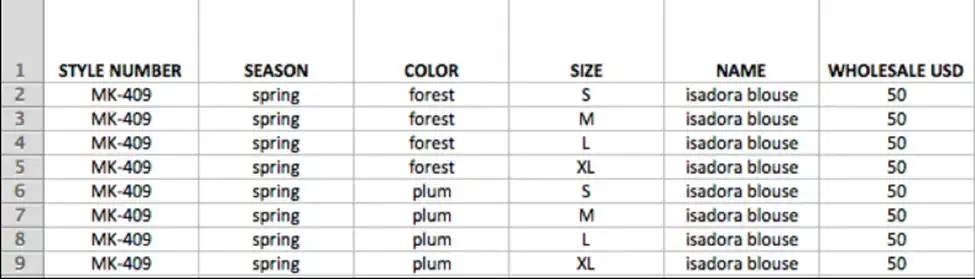
Example of Product Data
This is what customers interact with first.
If variants are off, options won’t match. If images are missing or not linked properly, product pages feel incomplete. Small gaps here are immediately visible.
Product data also affects:
- Navigation and collections
- Search and filtering
- The overall product page experience
2. Customer Data
This is your existing customer base and how it carries over.
It usually includes:
- Names and email addresses
- Shipping and billing details
- Customer tags or groups
- Linked order history
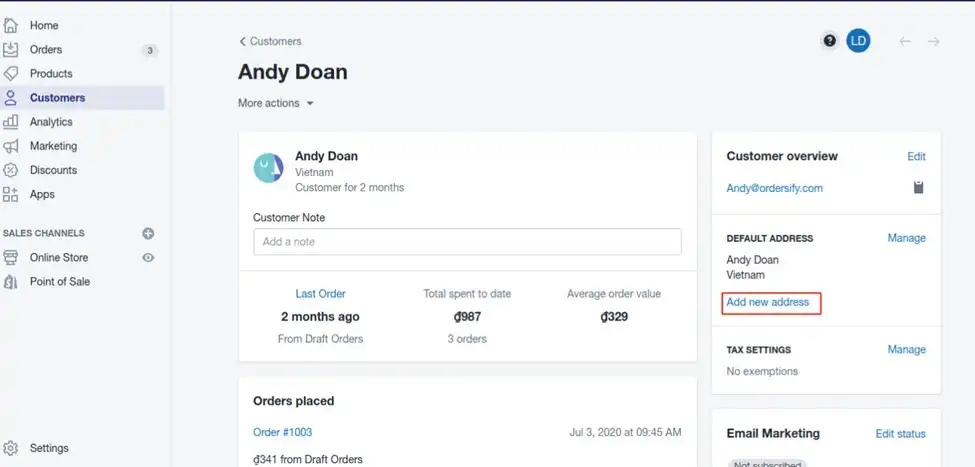
Example of Customer Data
This is what keeps returning customers connected to your store.
One thing to be aware of:
Customer passwords don’t transfer. Customers will need to reset them after migration.
Unclean customer data often results in duplicate profiles, missing details, or incomplete order history.
3. Order Data
This is your store’s past transactions.
It includes:
- Previous orders
- Order status
- Payment and fulfillment details
- Customer-order relationships
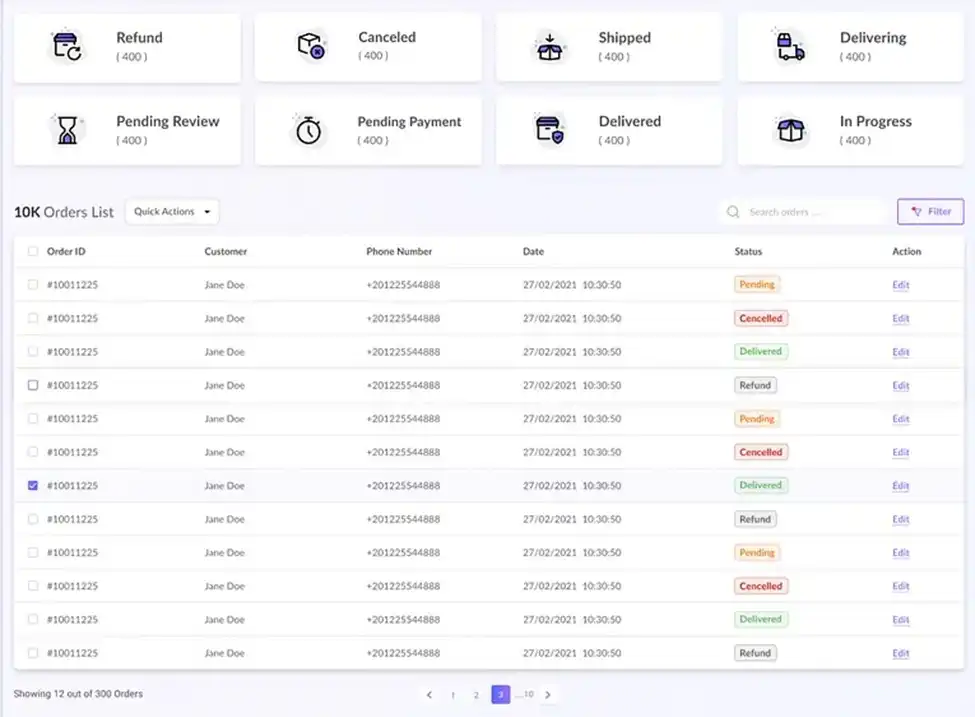
Example of Order Data
Most of this data is used behind the scenes—for reporting, support, and records.
Migrated orders may not function like new Shopify orders, but the data still needs to be correct. Missing or incorrect data can cause confusion when looking at reports or handling customer queries.
4. SEO Data
This is what affects how your store shows up in search.
It includes:
- URLs
- Redirects
- Meta titles
- Meta descriptions
- Image alt text
- Structured data
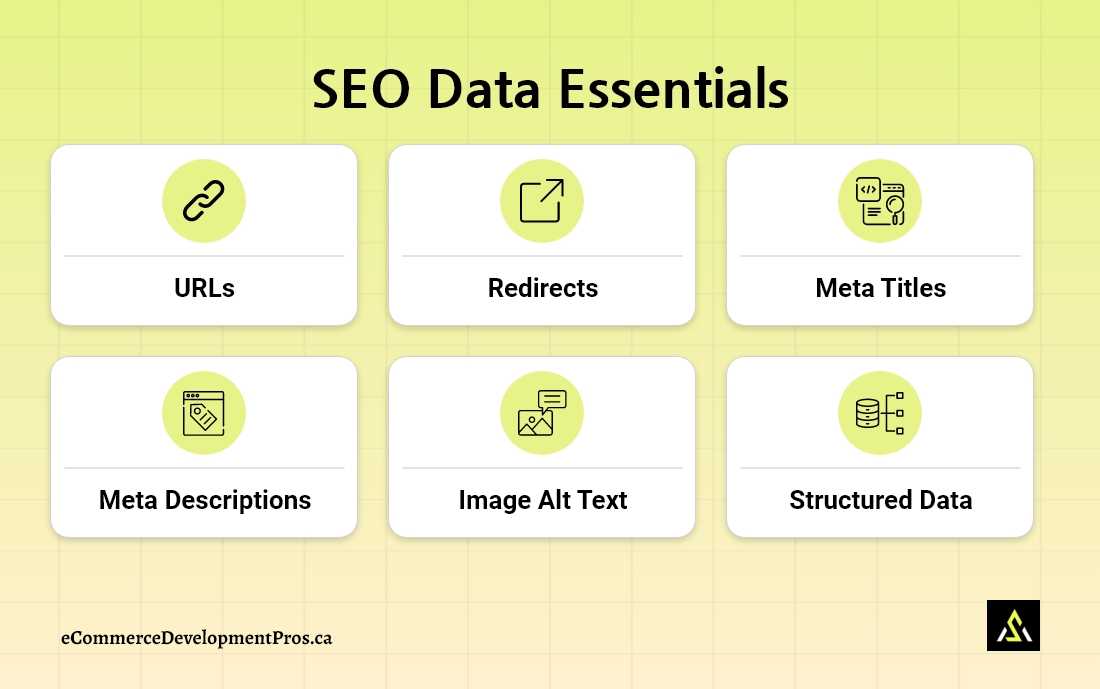
Example of SEO Data
This is where mistakes are the most noticeable in traffic.
When URLs change and redirects aren’t set up correctly, or metadata is missing, rankings can decline. This is a common reason for SEO loss during migration.
Note:
Each of these data types should be handled and checked separately. Trying to move everything in one go usually leads to missed details and post-launch issues.
Shopify Data Migration Overview
Not all types of data carry the same level of complexity or risk during a Shopify migration. Some are straightforward to move, while others can directly impact store functionality and search visibility if handled incorrectly.
Shopify Data Migration Overview |
||||
|---|---|---|---|---|
| Type of Data | What It Includes | Migration Complexity | Risk Level | Impact if Errors Occur |
| Product Data | Titles, descriptions, variants, SKUs, images, collections | Medium | High | Broken product pages, incorrect variants, poor user experience |
| Customer Data | Names, emails, addresses, tags, order linkage | Low–Medium | Medium | Login issues, duplicate accounts, and missing order history |
| Order Data | Order history, status, transactions, fulfillment details | High | High | Inaccurate reporting, support issues, and incomplete records |
| SEO Data | URLs, redirects, metadata, alt text, structured data | High | Very High | Ranking loss, traffic drop, broken links |
What this means in practice
Each type of data behaves differently during migration:
- Product and SEO data directly affect what users see and how they find your store
- Customer and order data affect operations, reporting, and user continuity
Because of this, the migration process is followed in stages, with each type of data validated separately rather than imported as a single batch.
What Data Does NOT Get Migrated to Shopify Automatically?
Not everything comes over during a Shopify migration.
Some parts simply don’t transfer. They have to be set up again inside Shopify.
Key Elements That Do Not Transfer to Shopify Automatically |
||
|---|---|---|
| Area | What Doesn’t Transfer | What It Means |
| Customer Accounts | Passwords (encrypted) | Customers will need to reset their passwords after the migration |
| Apps & Integrations | Reviews, subscriptions, loyalty data | This data doesn’t transfer automatically and needs to be set up again using Shopify apps |
| Custom Features | Custom checkout logic, pricing rules | These need to be rebuilt using Shopify apps or custom development |
| Design & Layout | Theme structure, templates, styling | The design won’t carry over and must be recreated in Shopify |
| URL Structure | Old platform URLs (different format) | You’ll need to map URLs and set up 301 redirects |
| Store Settings | Shipping, taxes, payment setup | These need to be configured again before launch |
Where Most Migration Issues Start
This is where things usually go wrong.
These items are often expected to transfer—but they don’t.
What typically happens:
- Data is moved correctly
- But these pieces are missed
That’s when problems show up after launch.
In most cases, it’s not the data that causes issues. It’s everything around it.
Use the Shopify Migration Checklist to make sure nothing is missed.
Common Shopify Data Migration Mistakes and Their Impact
Shopify isn’t what causes issues during a migration. Problems usually come from how the data is handled.
These are the mistakes that tend to show up after launch—when things don’t work as expected, reports don’t add up, or traffic drops.
Common Shopify Data Migration Mistakes |
|
|---|---|
| Mistake | What Happens |
| Missing redirects | Old URLs aren’t mapped to new ones. This results in broken links and a drop in search visibility and traffic. |
| No data cleanup | Duplicate products, messy formats, missing fields. This starts affecting filters, search, and backend use |
| Incorrect field mapping | Data doesn’t line up properly—variants, customers, or orders don’t connect the way they should |
| Ignoring product variants | Options show wrong, pricing doesn’t match, and inventory tracking gets messy |
| No post-migration validation | Missing products or incorrect data go unnoticed until customers start reporting issues |
| Overlooking SEO data | Metadata is lost, URLs change, and rankings drop over time |
| Skipping end-to-end testing | Checkout, login, or key flows break after the store is already live |
Missing these steps is where most migrations start to fall apart. This is exactly what a proper Shopify migration checklist is meant to catch.
When these mistakes usually happen
These issues don’t just happen randomly.
They usually come up when:
- Data is pushed in without being checked
- Differences between platforms are ignored
- SEO is left for later instead of being handled during the move
What to focus on during Shopify data migration
Avoiding these issues isn’t complicated—but it does require attention.
Focus on:
- Treat each data type individually
- Go through product, customer, and order data after import
- Walk through the main user flows before going live
- Include SEO as part of the migration process
Tools Used for Shopify Data Migration
There isn’t one fixed setup for migrations.
It depends on the store—how much data there is, how clean it is, and how much custom work exists. These same factors also determine migration cost.
In most cases, it’s not just one tool. You end up using a combination—CSV files, APIs, and a few tools depending on the situation.
Common Shopify Migration Tools |
||
|---|---|---|
| Tool | Best For | Key Use Case |
| Matrixify | Larger or more complex datasets | Handles bulk data like products, customers, orders, and redirects, with control over how everything is structured |
| LitExtension | Straightforward automated migrations | Used to move structured data from platforms like WooCommerce or Magento |
| Cart2Cart | Quick, standard migrations | Works for simpler setups where you need to move data without much customization |
| MigrationPro: Store Migration | Cases where support is needed | Used when you want help managing the process instead of handling everything yourself |
How Automation Works in Migration
Tools like LitExtension or Cart2Cart can move structured data.
Products, customers, orders—these usually go through without much issue.
But that’s only part of the work.
Areas that still require manual handling include:
- SEO validation (redirect accuracy, metadata checks)
- Data cleanup and normalization
- Custom features and app-specific data
- Store configuration and testing
This is where most gaps happen.
Matrixify usually comes in when you need to adjust things—fix data, remap fields, or re-import in a controlled way.
What to Keep in Mind
- Automation helps move data faster, but it doesn’t guarantee accuracy
- Products, customers, and orders should all be reviewed after import
- Redirects need to be verified manually
- Custom setups and integrations won’t carry over on their own
Tools help with execution, but the success of a migration comes down to how well it’s planned and tested.
How Data Migration Impacts Store Performance
Migration doesn’t end at setup. Most of the impact shows up after the store goes live.
A few small gaps in data can affect how the store performs—traffic, usability, even day-to-day operations.
1. Search Visibility and Traffic
This is usually the first place issues show up.
If redirects are missing or URLs change without being mapped properly, or there is a loss of metadata:
- Rankings drop
- Traffic declines
- Existing backlinks stop contributing value
2. User Experience
This comes down to how the store actually feels to use.
When data isn’t aligned properly, it shows:
- Product images not loading or mismatched
- Variants not reflecting the correct options
- Navigation behaves differently than expected
None of this is complex, but it’s noticeable.
3. Conversion Rates
Traffic alone doesn’t mean much if the store doesn’t convert.
Common issues after migration:
- Incorrect pricing or variant combinations
- Checkout is not completing properly
- Returning customers are unable to access their accounts
These don’t always break the store—but they slow it down.
4. Reporting and Decision-Making
After moving to Shopify, reporting works differently.
Orders fall into two buckets:
- Imported orders (pre-migration)
- Shopify orders (post-migration)
Imported orders don’t drive Shopify reports. They’re mainly there for record-keeping.
As a result:
- Reports show post-migration performance
- Older data is still accessible
- Long-term trends require looking at both
Advanced reporting often involves exports or third-party tools.
5. Customer Accounts and Order History
Customer accounts are usually recreated during migration, not fully moved.
Because of that:
- Previous orders don’t show in the account view
- Order history remains available internally
If order visibility is required, it has to be set up.
This can be done through:
- Proper data mapping
- Customer portal tools
- Custom implementations
6. Operational Efficiency
This is less visible—but it shows up internally.
If setup isn’t complete:
- Shipping rules don’t behave correctly
- Payment setup causes friction
- Inventory tracking becomes inconsistent
Nothing major on its own. But it adds up.
Shopify Data Migration FAQs
What data can be migrated to Shopify?
Products, customers, orders, and basic SEO data (like URLs and metadata) can be moved over.
Not everything comes with it, though. Customer account passwords, app data (reviews, subscriptions), and custom features need to be handled separately.
Is it possible to migrate customer passwords to Shopify?
No. Customer account passwords can’t be transferred to Shopify.
Shopify doesn’t use the same encryption as other platforms. Customers will need to reset their passwords once the store is live.
It’s better to plan this ahead and inform users early—otherwise it turns into support tickets.
Is it necessary to migrate the order history?
Not required for the store to function, but still important. Order history helps with support, reporting, and general context. Most stores bring it over for that reason.
Will I lose SEO when migrating to Shopify?
You can, if things aren’t set up properly.
The usual problems are missed redirects, URL changes without mapping, or metadata not being carried over. That’s where most SEO loss during migration comes from. Here’s how to protect SEO when migrating to Shopify.
How long does Shopify data migration take?
It depends on the store.
Smaller setups can be done in a few days. Larger ones, especially with custom work, can take a few weeks.
Moving the data is the easy part. Checking and fixing things takes longer.
What tools are used for Shopify data migration?
Common tools include Matrixify, LitExtension, and Cart2Cart. They help move data, but checking accuracy still has to be done manually.
What is the biggest risk during Shopify data migration?
The biggest risk isn’t usually the migration itself. It usually comes down to minor misses—redirects not in place, mapping errors, or no validation after import.
That’s what creates broken pages, traffic drops, and data issues over time.
Can I migrate my store to Shopify without losing data?
Yes—if it’s handled properly. Most data problems happen when mapping is incomplete, validation is missed, or too much is assumed to carry over.
What This Means for Your Migration
Migration isn’t just about moving data over.
It’s about making sure the store still works the same way after launch.
Most problems don’t come from Shopify. They come from gaps—things that weren’t mapped, checked, or set up.
A successful migration comes down to:
- Knowing what won’t transfer
- Planning for it upfront
- Checking everything before going live
That’s what prevents cleanup later.
Plan Your Shopify Migration the Right Way: Additional Resources
👉 Shopify Migration Guide — the full step-by-step process
👉 Shopify Migration Checklist — track every step from planning to post-launch
Need Help with Your Shopify Migration?
If you’re moving from WooCommerce, Magento, or another platform, it’s not just the data transfer.
At Ecommerce Development Pros, we handle:
- Complete Shopify data migration (products, customers, orders, SEO)
- Redirect mapping and SEO preservation
- Store setup, testing, and launch support
Book a consultation to plan your Shopify migration properly.