



 647-812-5125


Thinking about moving your eCommerce store to Shopify?
Before starting a migration, most store owners have the same concerns:
- Will my SEO rankings drop after switching platforms?
- Can products, customers, and order history be moved safely?
- How long does the Shopify migration process actually take?
- What does it cost to migrate an online store to Shopify?
These are all genuine concerns, and we hear from brands in our initial discovery calls. Many businesses reach a point where their current eCommerce platform starts slowing them down — plugins become harder to manage, performance becomes inconsistent, or the store becomes more complex to maintain than it should be.
That’s when Shopify often enters the conversation.
Understanding how the Shopify migration process works before starting helps store owners avoid common mistakes and plan the transition more carefully.

Inside This Shopify Migration Guide
Migrating an eCommerce store involves several moving parts. This guide walks through the key stages involved in planning and executing a Shopify migration:
- Why businesses migrate their eCommerce stores to Shopify
- The Shopify migration process explained step by step
- A practical Shopify migration checklist
- Shopify migration cost and timeline expectations
- SEO considerations to avoid a rankings drop when migrating to Shopify
- Testing and launching your store on Shopify
- Common Shopify Migration Mistakes to Avoid
What Is Shopify Migration?
Shopify migration means moving an existing online store from another eCommerce platform to Shopify.
This usually means moving over the store data, rebuilding the storefront, and setting things up in Shopify so everything runs as expected.
Stores are commonly migrated from platforms like WooCommerce, Magento, BigCommerce, Ecwid, OpenCart, X-Cart, and custom-built solutions.
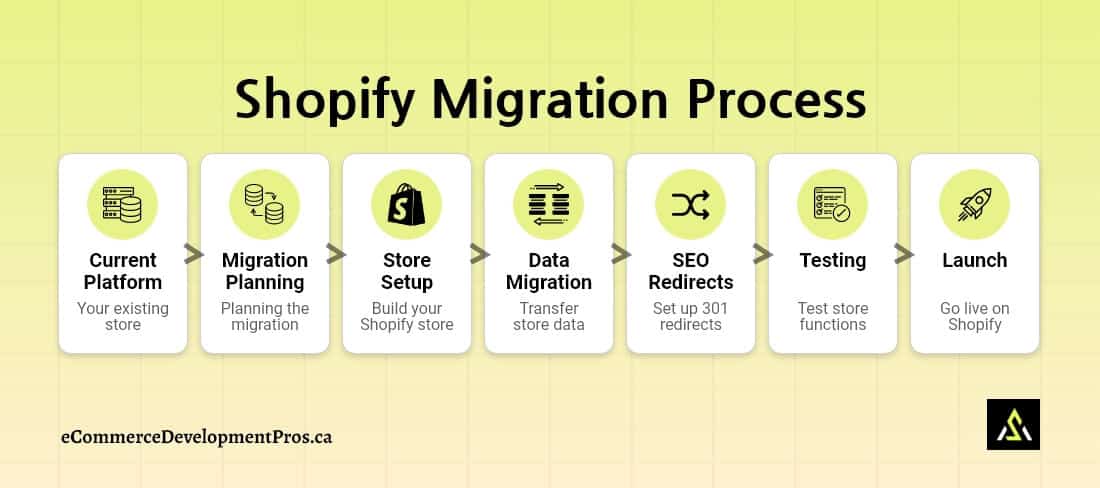
A typical Shopify migration project includes four main elements:
- Store Replatforming: Changing the underlying eCommerce platform and moving the store infrastructure to Shopify.
- Storefront Rebuild: Move the storefront over to Shopify, matching the design and getting all features working.
- Data Migration: Move all store data—products, customers, orders, and the rest—into Shopify.
- SEO Migration: Keep rankings in place by setting up 301 redirects, moving over metadata, and ensuring all URLs work or redirect to the correct page.
Why Merchants Migrate to Shopify?
Most stores don’t plan a platform migration when they first launch. But as the business grows, the limitations of the existing platform often become harder to manage.
Over time, many merchants running stores on WooCommerce, Magento, X-Cart, or other self-hosted platforms find themselves spending more time managing the system than actually growing the business.
Some common issues are:
- Too much platform maintenance
- Plugins start conflicting with each other
- Performance and speed issues
- Security and patch management
- Routine updates begin breaking features
- Scaling challenges as the business grows
- Rising hosting and other IT infrastructure costs
For many businesses, the decision to move to Shopify comes from a simple realization: they want to spend less time managing technology and more time focusing on customers, products, and growth.
Common Ecommerce Platform Challenges — And How Shopify Solves Them
Most stores don’t think about switching platforms until things start getting harder than they should be.
Common Platform Challenges — And How Shopify Solves Them |
||
|---|---|---|
| Challenge | What happens on many ecommerce platforms | How Shopify Handles It |
| Operational complexity | Hosting, updates, plugins, and server settings all need attention. | Centralized management and hosted infrastructure let merchants prioritize their business. |
| Plugin and extension conflicts | Stores often rely on multiple plugins or extensions. They can become incompatible or break after updates. | Shopify apps are built for the platform, so this happens far less. |
| Server maintenance | Speed, uptime, and backups depend on server setup and must be managed manually by the owner. | Hosting is included and managed by Shopify. |
| Performance issues | Clunky plugins and setup issues can make the site lag. | Shopify is built for speed and supported by a CDN. |
| Security updates | Patches, updates, and monitoring need to be handled manually by the owner or IT team. | Shopify handles updates and security automatically. |
| Scaling challenges | More traffic or products lead to slowdowns or crashes. | Shopify is designed to handle increased traffic without any extra configuration. |
Platforms like WooCommerce and Magento often struggle with performance and maintenance. For many companies, WooCommerce platform limitations or Magento migration challenges are the reasons they switch to Shopify.
When is the Right Time to Migrate to Shopify?
Businesses often wait until their existing platform begins to limit growth. A good benchmark: when backend upkeep outweighs the revenue it supports, it’s a sign to think about moving.
Signs you have outgrown your current ecommerce platform:
- Slow site: Your online store gets slow when you have a lot of visitors, which makes people leave without buying.
- Hard to manage: Your product list is so big that adding or changing items takes way too much time.
- Too many apps: You have to use so many extra add-ons to get all the features to work.
- Constant fixes: You spend more time fixing tech issues, security, or hosting than you do on your actual business.
- Can’t handle growth: Your website struggles to stay up during your busiest sales days.
When these bottlenecks stop being minor inconveniences and start eating into your profit margins, it is time to look at a platform like Shopify.
Realizing you’ve hit a ceiling is the first step—but the actual transition is where most people get tripped up. Let’s look at the Shopify migration process with a focus on keeping your data clean and your downtime at zero.
The Shopify Migration Process (Step-by-Step)
Migrating to Shopify isn’t a one-step job. It’s a sequence—and each step has a very specific purpose.
If you understand what each stage is actually trying to achieve, the whole process becomes easier to manage (and a lot less risky).
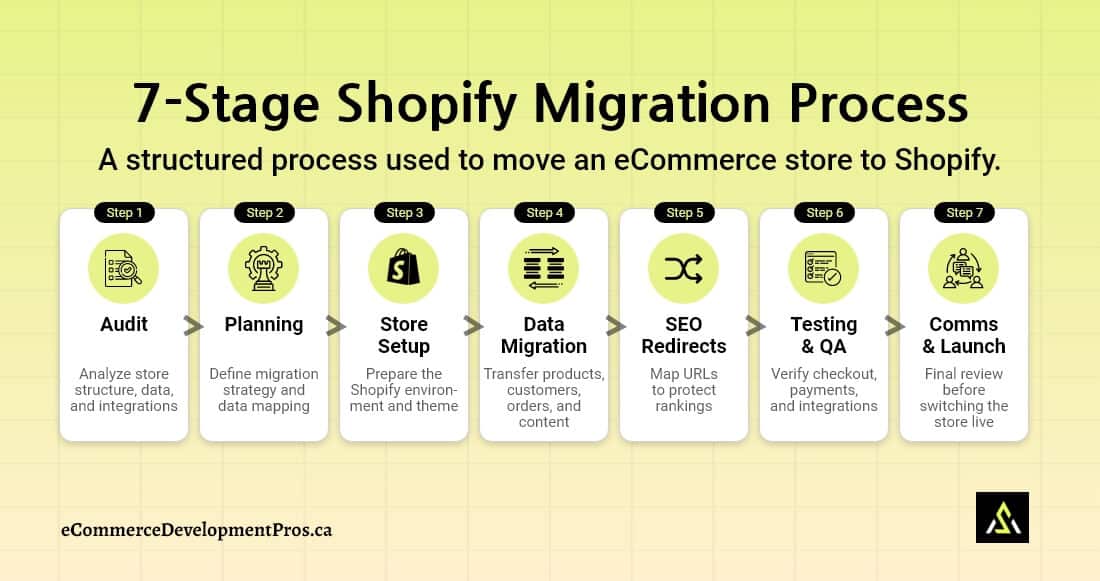
Step 1: Understand What You Already Have
What this stage is really about: clarity
Before doing anything, you need a clear picture of your current store.
Not just what exists—but what’s worth keeping.
Go through:
- Products and variants
- Collections
- Apps/plugins
- URLs and SEO pages
- Customers and orders
- Pages and blog content
You’ll almost always find things that shouldn’t move forward—duplicate listings, outdated pages, unused tools.
This step is less about “migration” and more about cleaning things up before you start.
Step 2: Plan the Migration
What this stage is really about: avoiding problems later
This stage defines what will be migrated, how the store will function in Shopify, and plans for rebuilding the functionality. Proper planning reduces errors during the migration and helps keep the project organized.
You’re figuring out:
- What data is moving over
- What needs to be rebuilt from scratch
- How the store will be structured in Shopify
That usually includes:
- Defining migration scope (products, customers, orders, content)
- Listing features that need to be recreated
- Choosing replacement apps
- Mapping collections and navigation
- Creating a working checklist
If this part is rushed, you’ll feel it later—things get missed, flows break, and fixes become expensive.
Step 3: Set Up the Shopify Store
What this stage is really about: building the base
Before importing anything, Shopify needs to be ready to receive it.
Think of this as setting up the empty structure.
You’ll:
- Create the store
- Install apps
- Set up collections and menus
- Configure payments
- Set shipping and taxes
- Connect with your CRM, ERP, etc.
If the store is being redesigned, this is also where the Shopify theme selection or design build begins.
Step 4: Data Migration
What this stage is really about: moving store data from the existing ecommerce platform into Shopify.
During Shopify data migration, store information must be mapped correctly to Shopify’s structure so that products, customers, and orders appear properly in the new store.
What needs to be transferred:
- Product info (titles, descriptions, images)
- Variants, SKUs, pricing
- Collections
- Customers
- Orders
- Informational pages and blogs
A structured Shopify data migration ensures the new store retains important business information without creating duplicate or missing records.
Step 5: SEO Redirects
What this stage is really about: protecting what you’ve already built using a proper redirect strategy.
This is where most stores take a hit if they’re not careful.
When URLs change, search engines don’t automatically know the corresponding new URLs. So you need to guide them.
That means:
- Mapping old URLs to new ones
- Setting up 301 redirects
- Checking titles and meta descriptions
- Fixing internal links
- Reviewing canonical tags
- Updating the sitemap
Step 6: Test Everything
What this stage is really about: catching mistakes before customers do
Before launch, assume something is broken—and go find it.
Walk through the store like a customer:
- Browse products
- Add to cart
- Complete checkout
- Test payments
- Check shipping/taxes
- Review emails
Also check:
- Mobile experience
- Apps and integrations
- Redirects and SEO
This step is your safety net. Skipping it usually shows up as problems after launch.
Step 7: Final Checks + Go Live
What this stage is really about: a smooth transition
Before flipping the switch, there are a few things that need to be clear.
One big one:
👉 Customer passwords won’t transfer. Customers will need to reset them after launch.
If this isn’t communicated early, you’ll get a flood of support requests.
Other final checks:
- Admin access and permissions
- Apps and payment setup
- Launch timing
Once everything is aligned, you point the domain—and the new Shopify store goes live.
What Data Can Be Migrated to Shopify (And What Cannot)
When migrating to Shopify, most store data—like products, customers, orders, and content—can be transferred. Some things, however, such as customer passwords or platform-specific plugins, cannot be transferred.
Shopify Data Migration: Supported vs Unsupported Data |
||
|---|---|---|
| Store Data | Can It Be Migrated to Shopify? | Notes |
| Products & variants | ✔ Yes | Includes titles, descriptions, SKUs |
| Product images | ✔ Yes | Usually migrated with product data |
| Customers | ✔ Yes | Customer records transfer |
| Orders | ✔ Yes | Historical orders can be imported |
| Blog posts & pages | ✔ Yes | Content can be recreated or imported |
| SEO metadata | ✔ Yes | Titles and meta descriptions can migrate |
| Customer passwords | ❌ No | Customers must reset passwords |
| Platform plugins/extensions | ❌ No | Replaced with Shopify apps |
| Custom platform functionality | ⚠ Depends | May require custom development |
Being clear on what data can move and what cannot allows businesses to prepare properly for the Shopify data migration and avoid problems along the way.
Shopify Migration Checklist
There are a lot of small things involved in a Shopify migration. Most issues don’t come from big mistakes—they come from missing simple steps.
This Shopify migration checklist highlights the key tasks businesses typically complete during a migration.
Pre-Migration Preparation
This part is really just getting your current store ready before you touch Shopify.
✔ Take a full backup (products, customers, orders—everything)
✔ Clean up products and collections (remove duplicates, old items)
✔ Look at the apps/plugins you’re using—what’s actually needed?
✔ Export your URLs and SEO data
✔ Make a list of pages and blog content you want to keep
Shopify Store Setup
Now you’re just setting up the new store so it’s ready—nothing fancy yet.
✔ Create the Shopify account
✔ Set up payments
✔ Add shipping and tax rules
✔ Install the apps you’ll need
✔ Build collections and basic navigation
Pre-Launch Checks
Take a step back before going live and double-check your store.
✔ Redirect old URLs to the new ones
✔ Review all page titles and meta descriptions
✔ Run through the checkout process
✔ Test the store on different mobile devices
✔ Click through all pages, menus, and links to confirm everything works (just browse like a customer would)
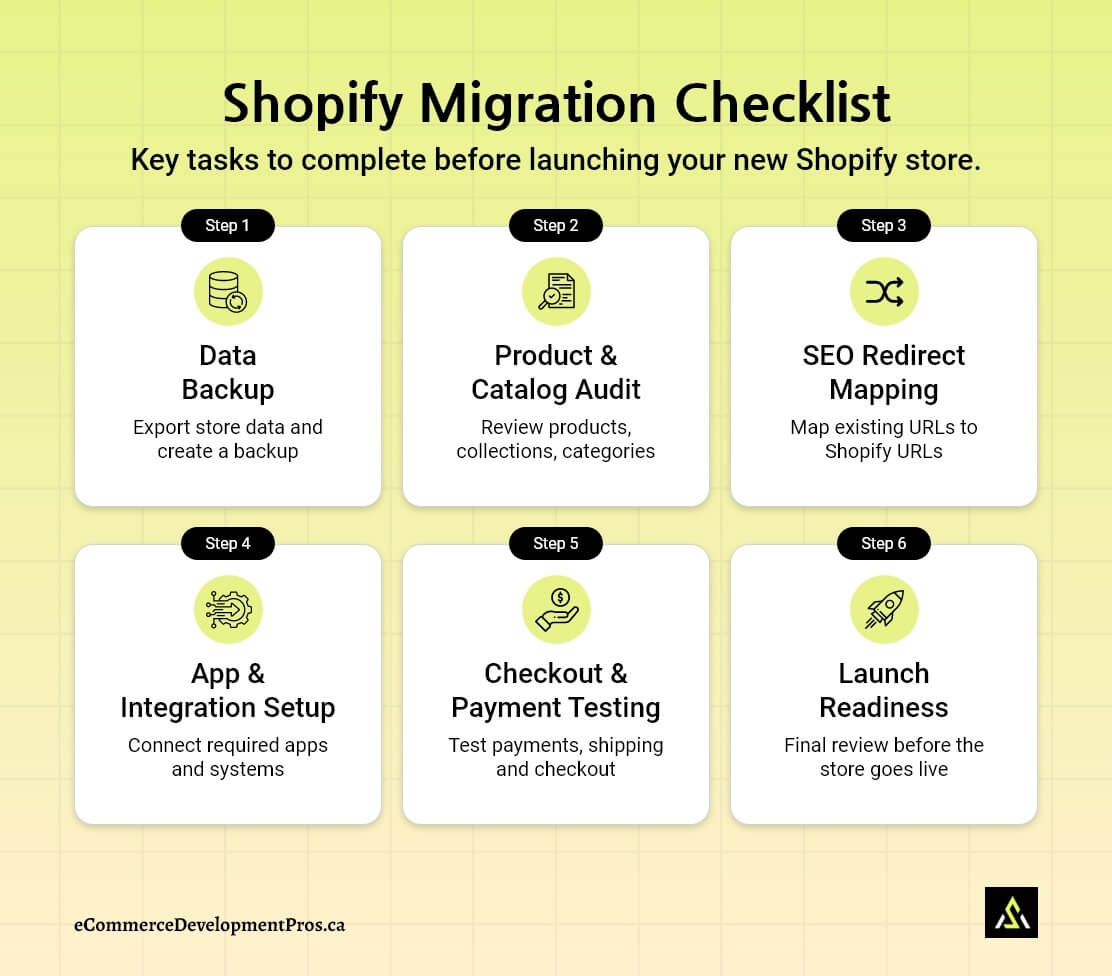
For a more detailed breakdown of these steps, see our complete Shopify migration checklist.
How Much Does a Shopify Migration Cost?
Shopify migration costs mostly depend on how big and complex your store is.
A small store with only a few products and basic features can be moved fairly quickly. Larger stores with custom features, integrations, and complicated product catalogs usually take more time and careful planning.
Several factors influence the overall Shopify migration cost, as mentioned below:
Key Factors That Affect Shopify Migration Cost |
|
|---|---|
| Factor | How It Affects Migration Cost |
| Store Size | The more products and variants you have, the longer it takes to move and check everything properly. |
| Theme & Design | Using ready-made themes can simplify and accelerate migration. Going with a custom design or a full redesign increases both the time required and the expense. |
| Apps & Integrations | Your current plugins/extensions won’t move over. So, those features need to be set up again using Shopify apps or rebuilt. |
| Data Complexity | Straightforward products are easy. Items such as bundles or custom fields generally require extra attention. |
| SEO Migration | Redirects and metadata take time to set up, but skipping this can impact your traffic later. |
| Testing & QA | Stores with more products or features need longer testing, especially for checkout, payment processing, and app integrations. |
Since every store is unique, the total cost of migrating to Shopify can vary widely.
How Long Does a Shopify Migration Take?
No two migrations take the same amount of time. It mostly comes down to how big the store is and how much work is involved behind the scenes.
A small store can be moved fairly quickly. But once you’re dealing with more products, custom features, or third-party integrations, it naturally takes longer.
Typical Shopify Migration Timelines |
|
|---|---|
| Store Complexity | Typical Timeline |
| Small Store (under 100 products) | About 2-4 weeks |
| Medium Store (100–1,000 products) | Usually around 4-8 weeks |
| Large Store (1,000+ products or complex features) | Can go anywhere from 8-16 weeks |
What Affects the Shopify Migration Timeline
Several elements can extend the migration timeline:
- Store size and number of products or variants
- Design work or theme customization
- Rebuilding features previously handled by plugins or extensions
- Data cleanup and validation during migration
- Testing checkout, integrations, and payments
For a full breakdown of every phase, what drives time in each one, and what commonly pushes projects past their deadlines, see our dedicated Shopify migration timeline guide.
SEO Considerations When Migrating to Shopify
SEO is one area you can’t take lightly during a Shopify migration.
If things like redirects, metadata, and site structure are handled properly, your rankings can stay stable — sometimes they even improve. But if these are missed or rushed, the downside shows up quickly: broken pages, lost rankings, and a drop in organic traffic. In most cases, that also means a direct hit to revenue.
For the complete step-by-step process — how to audit your URLs, build the mapping spreadsheet, upload to Shopify, and avoid the mistakes that cause post-launch traffic drops — see our Shopify URL redirects migration guide.
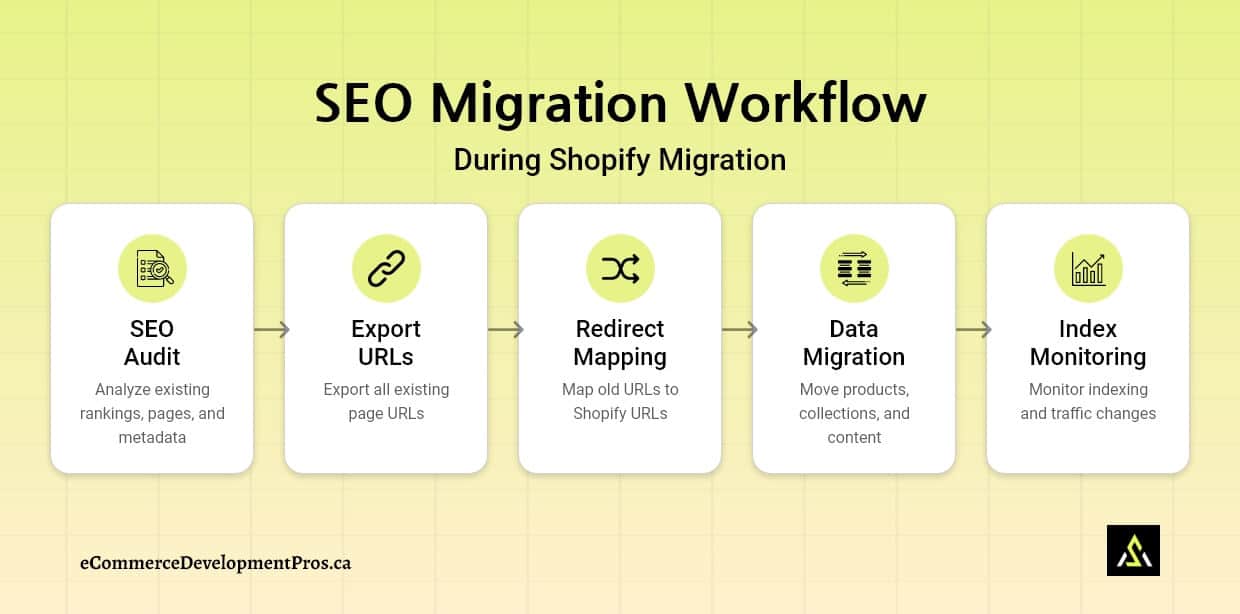
A few important SEO areas need extra attention during a Shopify migration:
1. URL Structure Changes
Every platform structures URLs differently. So when you move to Shopify, your URLs usually don’t stay the same.
Shopify follows its own fixed format:
- Products are under /products/
- Categories are under /collections/
This can’t be altered, which means old URLs won’t match the new structure. They must be mapped correctly to the corresponding URL in your Shopify store.
Example of URL Changes During Migration |
|
|---|---|
| Old Platform URL | New Shopify URL |
| /category/shoes/running-shoes | /products/running-shoes |
| /shop/shoes | /collections/shoes |
Doing this step carelessly can result in broken pages for visitors and lost SEO signals for search engines.
2. 301 Redirects
301 Redirects are critical during a migration. Without redirects, search engines may see the page as missing, leading to broken links and lost rankings.
During migration, stores should create a redirect map that connects every important old URL to its new location in Shopify.
Redirect Mapping Example |
||
|---|---|---|
| Old Platform URL | New Shopify URL | Redirect Type |
| /shop/red-shoes | /products/red-shoes | 301 |
| /category/boots | /collections/boots | 301 |
| /sale/summer | /collections/summer-sale | 301 |
A careful redirect setup makes sure visitors reach the right pages and protects SEO performance.
3. Metadata Transfer
Metadata provides details that help search engines interpret a page. While not always visible to visitors, it’s essential for SEO.
During a Shopify migration, this metadata should be preserved.
Important elements that need to be preserved are:
- Page titles
- Meta descriptions
- Image alt text
- Structured product information (page markup schema)
Transferring these elements ensures that important SEO signals remain intact after the migration.
Key SEO Metadata to Preserve |
|
|---|---|
| SEO Element | Why It Matters |
| Page Titles | Helps search engines understand the page’s topic |
| Meta Descriptions | Improves click-through rate in search results |
| Image Alt Text | Supports accessibility and image SEO |
| Product Structured Data | Helps search engines understand product details |
4. Sitemap Updates
Once the new Shopify store is live, the XML sitemap should be reviewed and submitted to search engines.
Typical steps include:
- Checking the new Shopify sitemap – located atwww.domain-name.com/sitemap.xml
- Submitting the sitemap to Google Search Console and other search engines
- Monitoring crawl errors or indexing issues
Post-Migration SEO Checks |
|
|---|---|
| Task | Purpose |
| Submit the sitemap in Google Search Console | Helps search engines discover new URLs |
| Monitor crawl errors | Detects broken links or missing pages |
| Verify indexing | Ensures pages appear in search results |
Updating the sitemap helps search engines quickly discover the new store layout. Doing this correctly helps preserve rankings and maintain traffic during the Shopify migration process..
WooCommerce vs Shopify: What Changes as Your Store Grows
A lot of stores begin with WooCommerce. It’s flexible and works well in the beginning.
But things start to change as the store grows.
The need for more plugins arises, and hosting requires far more attention.
And sometimes an update — plugin, theme, or WordPress — breaks something unexpectedly.
It doesn’t happen all at once. But over time, managing the setup starts taking more effort than it should.
That’s usually when businesses start looking at Shopify. Not because WooCommerce can’t work, but because they want something more stable and easier to run day to day.
What Changes When Moving from WordPress/WooCommerce to Shopify
Here’s a simple comparison to show where the differences start to matter.
Key Differences Between WooCommerce and Shopify |
||
|---|---|---|
| Store Management Area | WooCommerce | Shopify |
| Hosting | Needs separate hosting (you manage it) | Included with Shopify |
| Platform Maintenance | Regular updates needed across WordPress + plugins | No manual updates needed |
| Performance | Varies depending on setup and hosting server | Generally consistent out of the box |
| Plugins/Apps | Wide range with varying quality | More curated set of apps |
| Security | Store owner handles website security | Managed by Shopify |
| Store Management | Becomes more technical over time | Simpler admin to work with |
Why Businesses Move from WooCommerce to Shopify
At the start, WooCommerce works fine. But as store grow, the effort behind the scenes increases. More plugins, more updates, more things to watch.
Over time, that starts affecting how the business runs.
That’s usually when merchants start exploring their move to Shopify.
Top reasons stores leave WooCommerce for Shopify:
- Too many plugins are causing unexpected issues
- Performance problems or hosting headaches that won’t go away
- Time-consuming maintenance and security tasks
- Scaling challenges that sometimes require rebuilding parts of the store
- Simply wanting a platform that’s easier to manage
For many store owners, Shopify isn’t about extra features—it’s about reducing stress and having a stable platform that can grow with their business.
For a deeper look at how the two platforms compare, see our WooCommerce vs Shopify comparison guide.
If you’re planning a move, follow our step-by-step WooCommerce to Shopify migration checklist.
Magento to Shopify Migration: What Changes as Your Store Grows
Magento is powerful and flexible, no doubt. But running it smoothly usually needs strong technical support.
As the business grows, the workload behind the scenes grows too.
You’re dealing with server management, upgrades, developer dependency, and ongoing performance tuning. None of this is one-time — it’s continuous.
That’s when many teams look towards Magento to Shopify migration— mainly to move away from infrastructure-heavy setups and onto something more managed, where hosting, security, and updates are handled for you.
What Changes When Moving from Magento to Shopify
Here’s a simple breakdown of where the differences start to show.
Key Differences Between Magento and Shopify |
||
|---|---|---|
| Area | Magento | Shopify |
| Hosting | You need to arrange your own hosting and manage the server (often a VPS or dedicated server as you grow) | Shopify takes care of hosting for you |
| Maintenance | Regular updates, patches, and ongoing technical work are required | Updates happen in the background — no manual work needed |
| Development | Most changes need a developer, even for smaller updates | A lot can be handled from the admin; only complex changes usually need a developer |
| Extensions | Large extension ecosystem | Curated Shopify app ecosystem with AI-powered apps |
| Performance | Depends on server setup and optimization; it often needs a VPS or a dedicated server to maintain performance | Optimized cloud infrastructure that is easily scalable |
Why Businesses Migrate from Magento to Shopify
Many businesses start considering a move away from Magento when the day-to-day effort starts getting in the way of growth.
Most businesses start noticing a few common patterns:
- Development and maintenance costs keep creeping up
- Hosting costs increase as the store grows (VPS or dedicated servers become necessary)
- The team is responsible for servers, platform updates, and security
- Performance needs constant attention due to a complex setup
- Scaling takes more effort than expected
- There’s a need for something easier to run day to day
For many teams, Shopify offers a simpler setup. The technical side — hosting, security, platform updates — is handled in the background, so the focus can shift back to running and growing the business.
How to Test Your Shopify Store Before Launch
Before going live, it’s a good idea to run through the store once as your customer would.
Even if everything looks fine from the backend, small issues usually show up during checkout — payments failing, shipping not applying properly, emails not sent, or something just not working as expected.
Nothing complicated here. Just go step by step and see how it behaves.
Here are a few things worth checking:
- Try placing an order yourself, from the product page all the way to checkout
- Make sure the payment actually goes through without errors
- Check shipping — both the rates and whether the correct zones are being applied
- Test any discount codes or offers you’ve set up
- After placing the order, look at the confirmation email — does it send, does it look right
- Go back into the admin and confirm the order is showing up properly
This usually takes a few minutes, but it helps catch the kind of issues that only show up once someone actually tries to buy.
Once these are working, you’re in a much safer place to launch without surprises.
Common Shopify Migration Mistakes
Even if most of the migration is done right, a few things can still get missed.
Usually, it’s the smaller details — and those only show up once the store is live.
Below are some of the most common migration issues to watch for.
Common Shopify Migration Mistakes to Avoid |
|
|---|---|
| Mistake | What can go wrong |
| Missing 301 redirects | Old links don’t work anymore, some pages show 404, and rankings can drop |
| Incomplete data migration | A few products, images, or customer/order records might be missing |
| Broken navigation links | Menus still link to old URLs without realizing |
| Not testing checkout | Payments/shipping/discounts/emails look fine, but break on real orders |
Nothing here is complicated. It’s just easy to overlook when you’re focused on the bigger setup.
Better to check these before launch than deal with them after people start using the site.
When to Work With a Shopify Migration Agency
Migrating some stores is relatively easy. But others get complicated — especially when there’s a lot of data, SEO involved, or integrations that need to be rebuilt.
That’s usually where bringing in a Shopify migration agency starts to make sense.
Most businesses at this stage also look at both options — Shopify agencies and freelancers — depending on how complex the project is.
Situations Where Expert Help is Useful:
- Large product catalogs
When you’re dealing with hundreds (or thousands) of products, it’s not just about moving data — it needs to be checked properly after migration as well. - SEO-sensitive stores
If a good portion of your traffic comes from search, things like redirects and metadata need to be handled carefully. Small mistakes here can impact rankings.
- Complex integrations
Stores connected to ERPs, CRMs, subscription tools, or wholesale systems usually need those integrations rebuilt or reconfigured during migration.
In these cases, an experienced Shopify migration team can save time — and avoid issues that are harder to fix later.
If you’re evaluating potential partners, check out our guide on how to choose a Shopify web design company, which outlines what to look for before starting a Shopify migration project.
Migration to Shopify FAQ
Will I lose SEO rankings when migrating to Shopify?
Not really — unless something important is missed.
The main thing is redirects. Old URLs need to point to the new ones, and all page metadata transferred. If that’s done right, along with metadata and structure, rankings usually stay stable. And for some stores, the rankings even improve after the move.
How long does a Shopify migration take?
The migration timeline depends on the store. Smaller ones can be done pretty quickly. A few weeks in some cases. Larger stores — especially with more products or integrations — take longer. Usually 4-12 weeks.
How much does Shopify migration cost?
There’s no fixed price. It comes down to how complex the store is.
Simple setup → lower cost
Custom features, more data, integrations → higher cost
Contact us to get a custom estimate for your migration project.
Can customer passwords be migrated to Shopify?
No. Shopify doesn’t allow password transfer for security reasons. Customers will need to reset their password when they log in for the first time after migration.
Will my store experience downtime during a Shopify migration?
Usually no. The new Shopify store is built separately and tested before launch, while your current store keeps running.
Once everything is ready, the domain is switched. That part is quick.
Can I keep my existing domain when migrating to Shopify?
Yes. You just update the DNS settings once the new store is ready, and it points to Shopify instead.
Start Planning Your Shopify Migration
Most migration issues are preventable — they usually come from things being rushed or missed early on.
A Shopify migration doesn’t have to be complicated, but it does need a bit of structure. The stores that go live without issues are the ones that take the time to plan the basics properly before making the switch.
The stores that get it right focus on a few key things:
- Use a Shopify migration checklist
- Set up redirects properly to protect SEO
- Verify product, customer, and order data
- Test checkout, payments, and shipping before launch
That’s it. Do this properly, and you avoid most problems.
If you’re planning to move your store and want guidance through the process, our team helps businesses migrate to Shopify while protecting store data, functionality, and SEO performance.