



 647-812-5125
 Back to Ecommerce Glossary
What Is a One-Click Upsell?
A one-click upsell appears after an order is placed. The customer can add the item instantly without going through checkout again.
How One-Click Upsells Work?
A one-click upsell happens after the main purchase is complete.
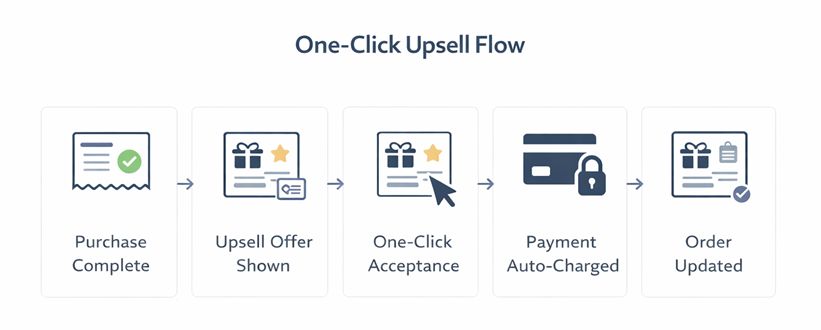
Where One-Click Upsells Typically Appear?
One-click upsells usually appear after checkout, not before.
- On the thank-you page after purchase.
- On the order confirmation screen.
- Inside post-purchase flows on the site.
- In follow-up emails linked to the original order.
Why One-Click Upsells Matter in Ecommerce?
One-click upsells work because they appear when buying intent is at its highest—immediately after checkout. The hard decision is already made, so accepting an additional offer feels easier.
They matter since they:
- Grow the order size without restarting checkout
- Remove extra steps by relying on saved payment info
- Work strongest in post-purchase moments
- Bring in additional revenue without risking the original sale
Small post-purchase offers can make a big difference in overall revenue. Our Shopify CRO service helps Shopify stores optimize those opportunities more effectively.
How One-Click Upsell Differs From Cart Upsell and In-Checkout Upsell?
One-click upsells, cart upsells, and in-checkout upsells all aim to raise order value, but they differ in timing, friction, and buyer intent.
One-Click Upsell vs Cart Upsell vs In-Checkout Upsell |
|||
|---|---|---|---|
|
Aspect |
One-Click Upsell |
Cart Upsell |
In-Checkout Upsell |
|
Timing |
After the original purchase is completed |
While reviewing items in the cart |
During checkout steps |
|
Friction level |
Very low — no checkout restart |
Low to moderate — cart totals update |
Higher — adds decision points to checkout |
|
Shopper intent |
High — purchase already confirmed |
Medium — intent is forming |
High but time-sensitive |
|
Impact on checkout |
No impact — checkout is already complete |
Can delay progression |
Can interrupt completion |
|
Typical role |
Capture additional value post-purchase |
Encourage add-ons before checkout |
Increase order value before payment |
What Are the Common Reasons One-Click Upsells Fail?
One-click upsells fail when they interrupt the experience instead of extending it.
- The offer doesn’t make senseIf someone just bought a high-end product and you show them something unrelated, it gets ignored. The upsell has to feel obvious. Almost like, “yeah, that makes sense.”
- The price feels too bigAn upsell works best when it feels like a small addition. When the extra item is close to (or higher than) the original order, people pause. And once they pause, you’ve lost the moment.
- It shows up awkwardlyIf the page hesitates, reloads weirdly, or feels like a separate sales pitch, the buying momentum disappears. Post-purchase is about flow, not pressure.
- Mobile makes it harderIf someone has to pinch, scroll too much, or wait for it to load, they won’t bother. Especially on mobile. One-click should literally feel effortless.
- Too many back-to-back offersOne good upsell can work. Three in a row feels desperate. People get fatigued quickly.
- It feels like a popup trickWhen it looks like a hacky overlay or interruption, trust drops instantly. A proper one-click upsell should feel built into the experience — not bolted on after the fact.
When these are handled well, upsells quietly lift revenue. When they’re not, they just become noise.
How AI Changes One-Click Upsells?
AI changes one-click upsells by replacing static offers with dynamic ones. It reacts to real shopper actions and decides:
- Who sees the upsell
- What is offered
- When it appears
Where One-Click Upsells Fit in the eCommerce Journey?
One-click upsells appear after checkout, once the main purchase is complete. They do not interrupt browsing, cart review, or checkout.
Because the shopper has already paid, one-click upsells work at a moment of high intent, when adding an extra item feels easy and low-risk.