



 647-812-5125


An outdated ecommerce platform can cost you holiday sales by slowing down under heavy traffic, creating checkout failures, or crashing during peak shopping periods. The store that runs fine in July is often the one that buckles on Black Friday, Cyber Monday, or the week before Christmas.
The financial impact is significant. For mid-size and large businesses, an hour of downtime can cost more than $300,000, according to 2024 ITIC research.
Eight warning signs predict a Black Friday website crash before it happens. Score two or more against your own store, and the risk is real through the whole holiday season, not just one day. This guide covers why crashes happen, the eight signs to check, and what to fix now versus what needs a longer-term platform decision.
What Causes a Black Friday Website Crash?
Black Friday website crashes happen for different reasons depending on your platform. On Shopify, the platform itself rarely fails, so the risk sits in the apps, themes, and integrations layered on top. On WooCommerce, Magento, or custom hosting, the infrastructure is usually the weak point. Find your platform below and check which failures apply to you.
Black Friday Crash Causes on Shopify |
||
|---|---|---|
|
Cause |
What happens |
What to check |
|
App and script overload |
Every app and tracking script adds weight. Pages that felt fine in July take seconds to render under peak traffic. |
Your installed app list. Remove anything unused, and check what each one injects into your theme. |
|
Theme code that doesn’t scale |
Custom Liquid loops and unoptimised collection pages slow sharply as catalogue size and traffic climb. |
Run PageSpeed Insights on your largest collection page, not just the homepage. |
|
Third-party API limits |
Inventory, ERP, or fulfilment integrations hit rate limits during order surges and stop syncing silently. |
Whether your integrations alert you on failure, or fail quietly. |
|
Checkout extensions failing |
Discount apps, upsell widgets, or payment extensions break under load while the storefront still looks fine. |
Place ten rapid test orders and confirm each one completes end to end. |
Black Friday Crash Causes on Self-Hosted Platforms |
||
|---|---|---|
|
Cause |
What happens |
What to check |
|
Traffic spikes |
Thousands of shoppers hit your store within minutes of a promotion going live. |
Your peak traffic from last Black Friday, then plan for several times that. |
|
Server overload |
The server runs out of memory or processing power and stops responding. |
Whether you’re on shared hosting, and what your plan’s memory and CPU limits actually are. |
|
Checkout and payments failures |
Shoppers fill their carts, reach payment, and the transaction fails while the rest of the site still loads. |
Test the full checkout path under load, not just page speed. Confirm your payment gateway’s capacity limits. |
|
No auto-scaling |
Capacity can’t grow with demand, so the site slows, times out, or crashes outright. |
Ask your host directly whether auto-scaling is enabled on your plan. |
|
Database strain |
Product and order queries pile up faster than the database can clear them. |
Your slow query log, and whether object caching is switched on. |
8 Signs Your Platform Won’t Survive the Holiday Rush
EDP’s 8-Point Platform Diagnostic is a scoring framework we use with clients before Q4: eight independent failure points, each scored yes or no. Score two or more “yes” answers, and the platform is a genuine holiday risk, not a maybe.
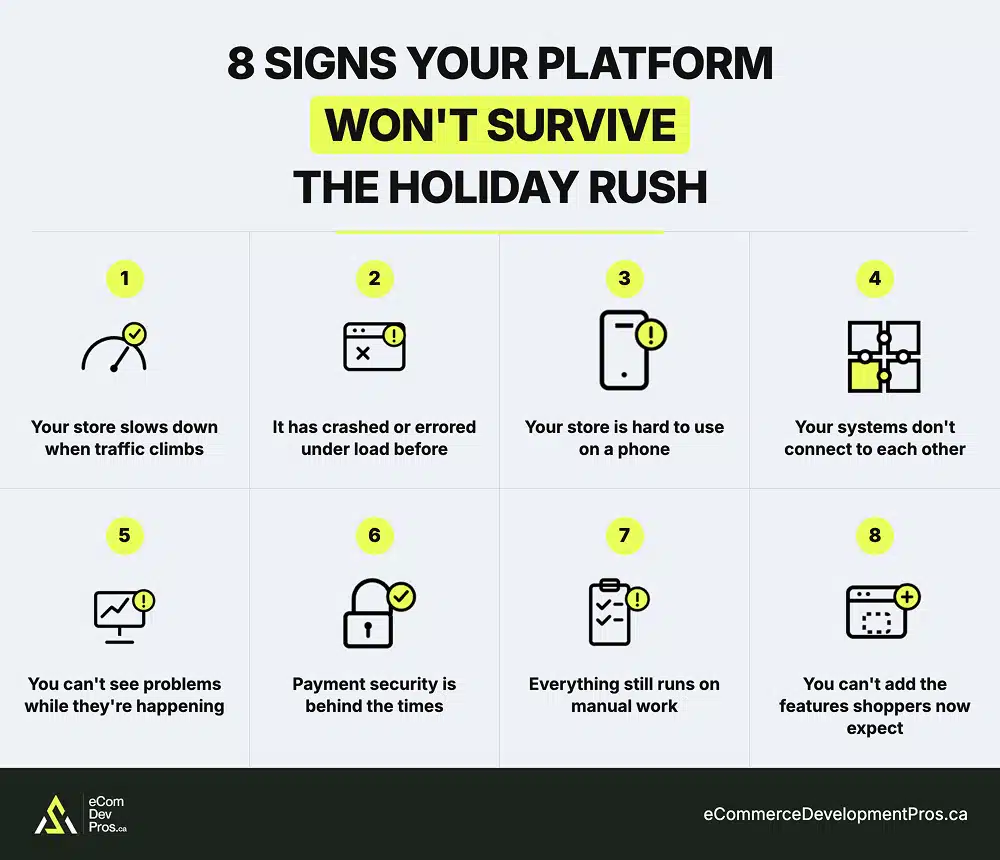
- Your store slows down when traffic climbs. Speed is the first thing to break under load. A store that loads in two seconds on a quiet day can crawl to eight or ten when hundreds of shoppers arrive at once. Deloitte research found that even a 0.1-second delay drops retail conversions by 8.4%, so on your busiest day, a slow store quietly bleeds sales with every passing second.
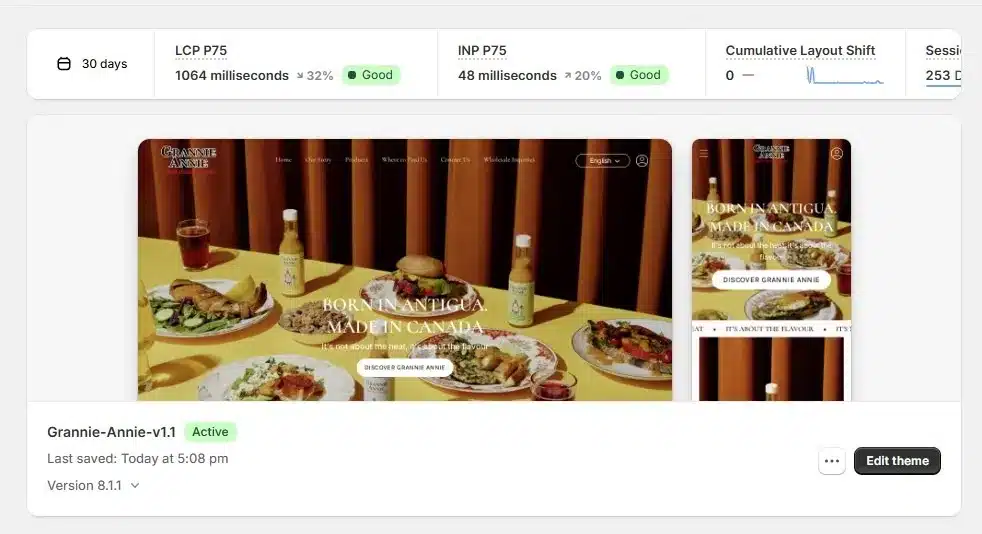
A real EDP client hitting Google’s Core Web Vitals target for Q4.
- Your site has crashed or errored under load before. If your store has ever gone down, frozen, or thrown checkout errors during a sale or traffic spike, that’s not a one-off to forget. A store that breaks under moderate traffic will almost certainly go down when Black Friday traffic hits several times higher, and a full outage during peak hours costs far more than a slow page.
- Your store is hard to use on a phone. Most holiday shopping happens on phones, so a rough mobile store costs you the majority of your shoppers. Product pages that need pinching to read, buttons too small to tap, and a checkout that fights the thumb all push buyers away before they reach the cart. On an outdated platform, mobile is usually bolted on afterward, and it shows.
- Your systems don’t connect to each other. When your store, inventory, point-of-sale, and shipping tools can’t sync automatically, someone has to move the data by hand. During peak season, those gaps turn into overselling stock you don’t have, shipping delays, and a flood of “where’s my order” tickets, right when your team has the least time to deal with them.
- You can’t see problems while they’re happening. During a big sale, you need to spot trouble in real time: sales suddenly dropping, a product page that stops converting, cart abandonment climbing. Outdated platforms often show this data hours late, or bury it in basic reports. By the time you notice something is broken, the Black Friday traffic and the revenue are already gone.
- Payment security is behind the times. Shoppers are cautious at checkout, and it doesn’t take much to lose them. Baymard Institute’s checkout research found that 19% of shoppers have abandoned an order because they didn’t trust the site with their credit card information. A platform that can’t keep current with PCI requirements and modern fraud protection loses more of those sales as holiday transaction volume climbs.
- Everything still runs on manual work. If routine jobs like order routing, inventory updates, and customer notifications still need a person to do them by hand, your team becomes the bottleneck the moment orders spike. During your busiest week, that manual work is what keeps orders from going out and questions from getting answered.
- You can’t add the features shoppers now expect. Today’s buyers look for personalized recommendations, flexible payment options, and fast, modern checkout. If your platform simply can’t support them, you’re stuck on aging technology, and the gap between your store and newer ones grows every season.
EDP Insight
One of the clearest signs that a store has outgrown its platform isn’t in Analytics. It’s when the development team becomes afraid to change it. If routine updates are postponed before Black Friday because nobody is confident the code will survive the change, the platform itself has become a business risk.
Quick Self-Check: The EDP Platform Health Score
Go back through the eight signs above and give yourself one point for each one that describes your store today. A sign counts if it’s true right now, even occasionally. Add up your points, then find your range below.
The EDP Platform Health Score |
||
|---|---|---|
|
Score |
Assessment |
What to do |
|
0-2 |
Lower Risk/likely ready |
Confirm with load testing, monitoring, and the prevention steps below. |
|
3-5 |
Real Risk |
You’ve got weak spots. Investigate before Q4. Fix what can be addressed quickly and identify any structural platform limitations. |
|
6-8 |
Platform is likely becoming a bottleneck |
Protect this year’s sales with the quick fixes below, then plan a deeper platform decision outside the peak window. |
Knowing which range you’re in before the traffic arrives lets you spend your limited pre-Q4 time where it matters.
Know Where You Stand Before Traffic Hits
Download the free EDP Platform Health Scorecard, a one-page checklist that turns all eight signs into quick yes/no questions, tallies your score, and tells you what to do next.
How to Prevent a Crash This Holiday Season
Three moves prevent most holiday crashes. None of them require replatforming, and all of them can happen before Q4.
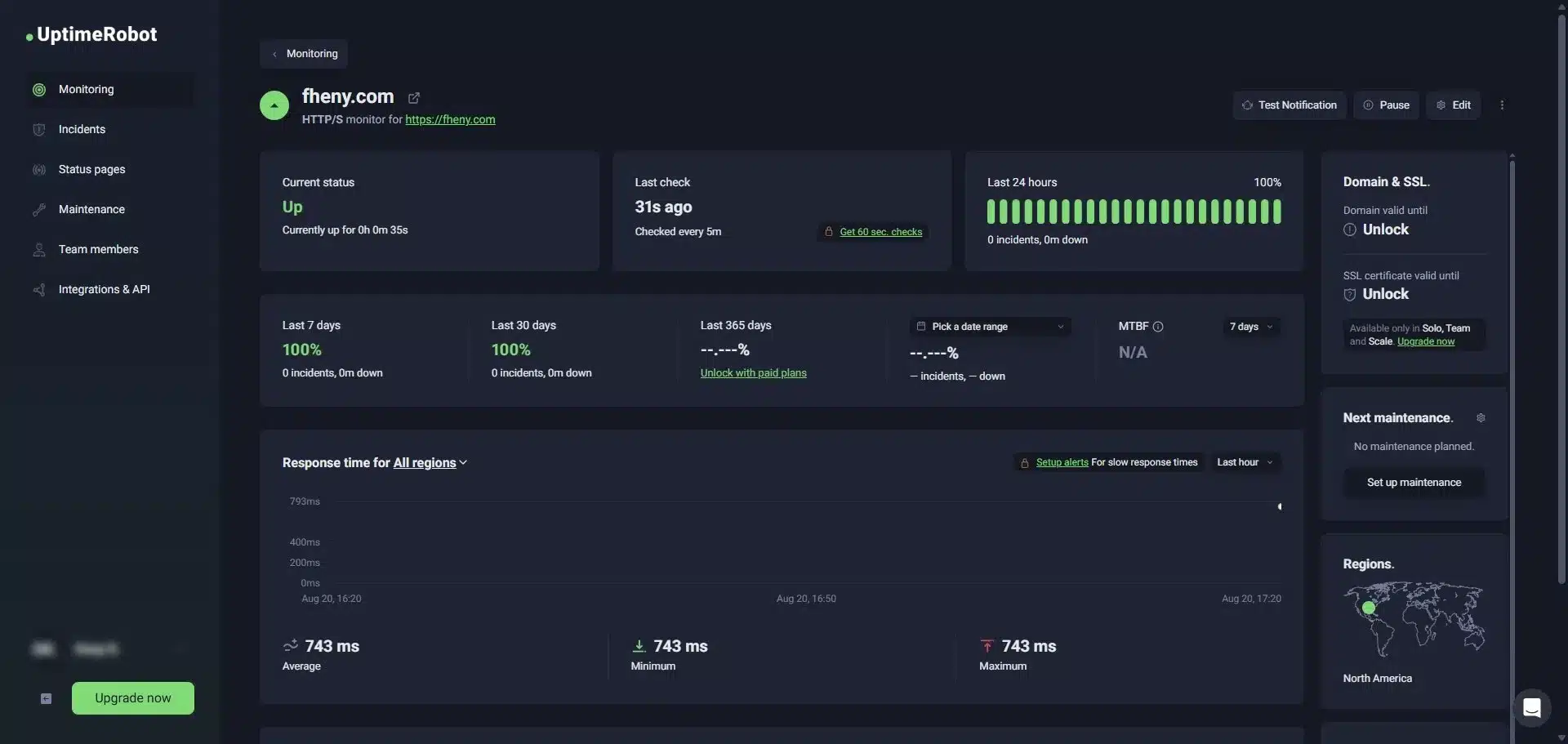
A real EDP client’s uptime on UptimeRobot: 100% up, sub-second response.
1. Load Test Before the Traffic Arrives
What is load testing for ecommerce websites?
Load testing simulates a flood of visitors hitting your store at once so you can find the breaking points while there’s still time to fix them. A common engineering rule of thumb is to test at five times your normal peak traffic — if your store hasn’t been tested at that level, assume it will struggle.
How do I load test my online store?
On self-hosted platforms (WooCommerce, Magento, custom), use k6 or BlazeMeter to simulate concentrated traffic and see what fails first — usually checkout or search. Test now, while there’s still time to fix it. If you don’t have a developer, this is the one step worth outsourcing: the results show exactly where to spend your remaining budget.
On Shopify, you can’t load test the platform and simulated traffic floods can breach its terms of service. Test what you control: run PageSpeed Insights on your homepage, top product page, and cart during your busiest hour, then place ten rapid test orders and confirm each reaches your inventory and fulfilment systems.
2. Move to Infrastructure That Scales on Its Own
What is auto-scaling hosting?
Auto-scaling cloud hosting adds server capacity automatically when demand climbs and releases it once the surge passes, so you’re not paying for peak power year-round or guessing your ceiling in advance.
How do I check if my store has auto-scaling?
On Shopify, this is largely handled for you. On WooCommerce, Magento, or custom hosting, ask your host directly whether auto-scaling is enabled — many entry-level plans don’t include it by default.
3. Monitor in Real Time, and Plan for Outages You Don’t Cause
What is real-time uptime monitoring?
Uptime monitoring alerts you the moment your store slows or goes down, instead of you finding out from customers on social media. It also covers outages you can’t control — your payment processor, CDN, or security provider going down.
How do I set up uptime monitoring for my store?
Use a free tool like UptimeRobot or Pingdom to get a text or email alert within minutes of a problem. Then decide in advance what shoppers see if a dependency fails: a branded “back in a moment” page or a fallback checkout. You can’t prevent every third-party outage, but you can control how your store handles one.
What You Can Fix Right Now vs. What Needs a Longer-Term Plan
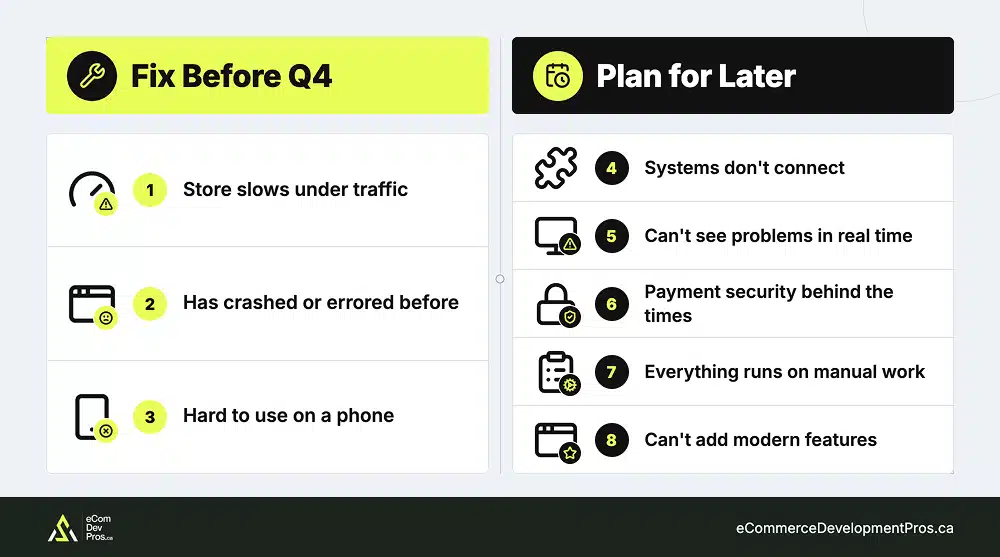
Split your Platform Health Score into two buckets: what a quick fix can solve before Q4, and what only a platform change will truly resolve.
- Fixable now. Speed issues, mobile polish, monitoring, load testing, and many checkout frictions can be addressed in weeks, not months. If your score came mostly from signs 1, 2, and 3, you’re in patch-and-prepare territory, and our Shopify CRO strategies guide covers most of what you’ll want to tackle.
- Structural. If your score came from signs 4, 5, 6, 7, and 8 (systems that won’t connect, no real-time visibility, compliance you can’t maintain, heavy manual work, no path to modern features), you’re looking at platform architecture, not a quick fix. That’s a migration decision, and it deserves a real plan rather than a panic in October. Our Shopify migration guide walks through what a considered move actually involves.
One thing to be clear about: don’t attempt a migration in Q4.
The timing question of whether to move before or after the holidays has its own answer, and it’s almost never “during your highest-traffic month.” Our Shopify migration timeline guide explains when to migrate before the holidays, when to wait until after, and how much time to allow for a safe move.
EDP Insight
If you discover a major platform problem in October or November, rushing into a migration can create more risk than the outdated platform itself. Stabilize your current store for Black Friday and Cyber Monday, then plan the migration for January or early Q1, when you have time to replatform properly.
Frequently Asked Questions
What does it mean when a website crashes?
A crash means the server can no longer handle the requests coming in. During sales, the usual trigger is a traffic spike that exceeds the server’s capacity, though bad code updates, app conflicts, and third-party service failures cause crashes too. The crash itself is a symptom; the real cause is almost always capacity or a broken dependency.
Why is my website suddenly not working?
Sudden failures usually trace back to traffic your server can’t absorb or a recent change that introduced a bug. Third-party outages are the other common culprit, since your payment processor or CDN going down takes your store with it. If nothing on your end changed, check your providers’ status pages first.
How do I stop a website from crashing?
Load test at several times your expected peak traffic before the event, move to auto-scaling hosting so capacity grows with demand, and set up real-time monitoring so you catch degradation early. You can’t prevent every third-party outage, but you can decide in advance how your store behaves when one happens.
What causes ecommerce sites to crash during sales?
Four causes dominate: sudden traffic spikes, server overload, checkout or payment-processor failures, and infrastructure that can’t scale automatically. Most real-world crashes are some combination — traffic climbs, the server strains, and a dependency gives way under the load.
How do I know if my ecommerce platform is outdated?
Watch for slow load times under traffic, poor mobile experience, integrations that won’t connect, thin analytics, security you can’t keep current, heavy manual work, and an inability to add modern features. If several of these describe your store, the platform — not your team — is the constraint.
How much revenue can a website crash cost during Black Friday?
For most mid-size and large retailers, an hour of downtime averages more than $300,000; per 2024 ITIC research, Black Friday multiplies that with traffic well above normal. Even a short outage during peak hours can erase a meaningful share of your holiday revenue, which is why prevention matters more than recovery.
Should I fix my platform now or wait until after the holidays?
Fix what you can quickly — speed, mobile, monitoring — before Q4. But don’t attempt a full migration during the holiday season; the risk to your peak-traffic window is too high. If you find a structural problem late, harden your current setup for this season and plan the platform move for Q1.
Can my website handle Black Friday traffic?
The only reliable way to know is to load test at several times your normal peak before the event. If you haven’t tested at roughly five times typical traffic, assume it will struggle. Historical performance on a normal day tells you very little about behaviour under a concentrated holiday surge.
How do I stress-test my site before Black Friday?
Use a load-testing tool to simulate concentrated traffic at several multiples of your expected peak, focusing on the full path a real shopper takes — browse, add to cart, and checkout — not just the homepage. Run it early enough to fix what breaks, and re-test after each fix to confirm it held.

Not Sure Where Your Score Leaves You?
Scored 3 or higher? Quick fixes won’t carry you through peak season. Book a free strategy call and get an expert read on your store. We’ll separate what’s urgent from what’s structural, flag the risks you missed, and tell you straight whether a migration makes sense.