



 647-812-5125



What is Shopify Conversion Rate Optimisation?
Shopify conversion rate optimisation (CRO) is the process of identifying why visitors leave your store without buying – and systematically removing those barriers. Unlike driving more traffic, CRO improves revenue from the visitors you already have. For most Shopify stores, fixing friction across the homepage, product pages, and checkout can meaningfully improve conversion rates without increasing ad spend.
TL;DR: What You’ll Learn in This Guide
- What counts as a good Shopify conversion rate – and how to measure yours
- The most common reasons Shopify stores get traffic but no sales
- 42 Shopify CRO strategies organized by where they apply in your store
- The 4-Layer CRO Audit Framework we use with clients
- The Shopify Conversion Cascade – our named framework for diagnosing drop-off
- AI-powered CRO tools and how to use them across your store
- When CRO is the right investment – and when it isn’t
- How long CRO takes and what it realistically costs
- A prioritized action list for quick wins
Why Most Shopify Stores Leave Revenue on the Table
Your store is getting traffic. People are finding you. But most of them leave without buying.
Here’s what the data shows:
- 70.22% of shoppers who add something to their cart never complete the purchase. Baymard Institute
- 48% leave because of unexpected shipping costs, 24% want guest checkout, and 17% find the process too complicated. Baymard Institute
- A 0.1-second improvement in mobile site speed increased retail conversions by 8.4% and average order value by 9.2%. Deloitte
- Live chat visitors convert at 7.5x the rate of non-chatters. ICMI
- 10.7% of abandoned carts recovered with one email. Nearly 20.3% with three. Barilliance
None of this is a product problem. It’s a friction problem. And friction is fixable.
The goal of CRO is to find those friction points and remove them – systematically, not by guessing. If your store does $50,000 a month at a 1.5% conversion rate, moving to 2.5% adds roughly $33,000 a month in revenue with the exact same traffic.
What Is a Good Shopify Conversion Rate?
For most Shopify stores, a conversion rate between 1% and 3% is typical. Stores in the top quartile consistently convert at 3%-5% or higher.
But averages are misleading. Conversion rates vary significantly by:
- Traffic source – Paid traffic typically converts lower than email or returning visitors
- Price point – A $20 product converts at a much higher rate than a $500 product
- Product category – Fashion and consumables convert differently from furniture or B2B products
- Traffic quality – If your traffic isn’t qualified, even a well-optimised store won’t convert well
Here’s a reference breakdown by industry:
|
Industry |
Average Conversion Rate |
|---|---|
|
Fashion & Apparel |
1.91% |
|
Beauty & Cosmetics |
2.45% |
|
Electronics |
1.27% |
|
Food & Beverages |
3.03% |
|
Home & Furniture |
2.33% |
|
Health & Wellness |
3.12% |
The right benchmark isn’t an industry average – it’s your own store’s trend over time. Month-over-month improvement while average order value holds steady is the real target.
How to Find and Calculate Your Shopify Conversion Rate
Your conversion rate lives in Shopify Analytics – go to Analytics → Reports → Conversion rate. That’s where you’ll find your overall rate plus the three-funnel metrics that tell you where shoppers are dropping off.
Conversion Rate Formula
(Total Orders ÷ Total Sessions) × 100 = Conversion Rate %
Example: 150 orders ÷ 10,000 sessions × 100 = 1.5% conversion rate
The overall conversion rate is a starting point. These three metrics are where the real diagnosis happens:
- Add-to-cart rate – Should be 5-10%+ for a healthy store. If it’s low, the problem is on your product pages
- Checkout initiation rate – How many people who add to cart actually start checkout. A big drop here usually means cart friction or trust issues
- Purchase completion rate – How many people who start checkout actually finish. Drops here point to checkout problems – unexpected costs, payment options, or too many form fields
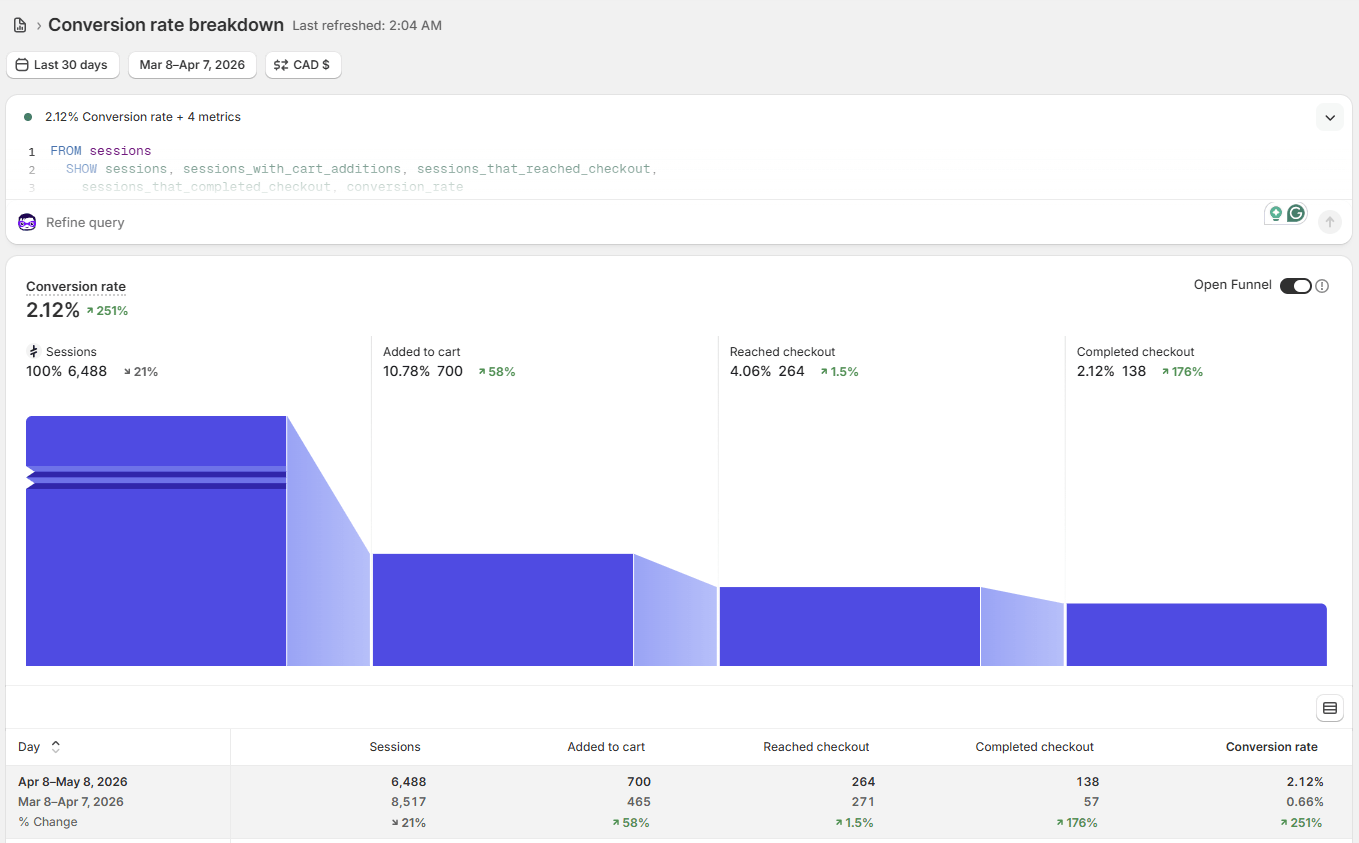
Shopify Analytics — Analytics → Reports → Conversion rate. The three funnel metrics below the overall rate tell you exactly where shoppers are dropping off.
What Is Conversion Rate Optimization?
Here’s the simplest way to think about it:
SEO gets people to your store. CRO gets them to buy once they’re there.
More specifically, conversion rate optimisation is the process of using data and testing to increase the percentage of visitors who complete a purchase. You’re not changing what you sell or who you’re selling to – you’re removing the friction that stops willing buyers from following through.
The two disciplines work together in a compounding way. Higher-quality SEO traffic is easier to convert because the people arriving already want what you sell. And a store that converts well makes every SEO gain worth more – the same traffic produces more revenue.
The 4-Layer CRO Audit Framework
Before making any changes to your store, you need a way to diagnose where the real problems are. Random changes without data don’t improve conversion rates – they just create noise. We use a four-layer framework with every CRO engagement.
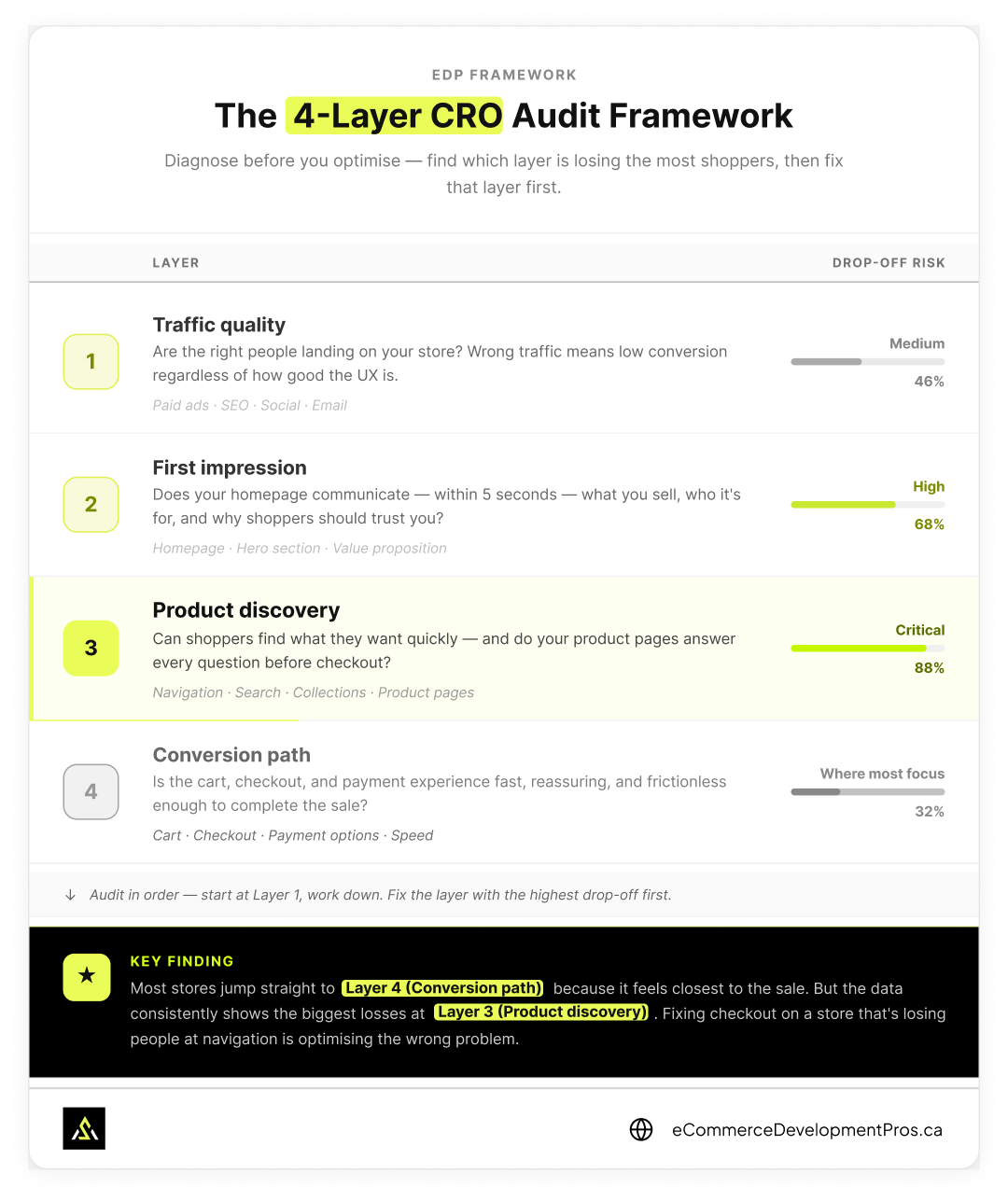
The 4-Layer CRO Audit Framework — audit in order from traffic quality down to checkout. Most stores focus on Layer 4, but the highest drop-off risk is at Layers 2 and 3.
🔍 Layer 1 – Traffic Quality | Are the right people landing on your store?
Wrong traffic equals low conversion regardless of how good the UX is. If you’re running ads to a cold audience with no product-market fit, no amount of store optimisation will fix it.
👁 Layer 2 – First Impression | Does your homepage communicate clearly – within 5 seconds – who this is for, what you sell, and why to trust you?
Most Shopify stores fail this test because the hero section leads with a lifestyle image and a vague tagline rather than a clear, specific statement.
🔎 Layer 3 – Product Discovery | Can shoppers find what they want quickly?
Do your product pages answer every question a buyer needs answered before committing? This is where most stores have their biggest losses.
✅ Layer 4 – Conversion Path | Is the cart, checkout, and payment experience fast, reassuring, and frictionless?
Most brands focus too much here when their biggest losses are actually at Layers 2 and 3.
Address layers in order – start with traffic quality, then first impression, then discovery, then the conversion path. This produces the fastest results.
Key finding: Most stores jump straight to Layer 4 – tweaking checkout, adding payment options, reducing form fields. It’s the last step before the sale, so it feels like the logical place to start. But the data consistently shows the biggest drop-off happens at Layers 2 and 3, long before a shopper reaches the cart. Fixing checkout on a store that’s losing people at navigation or product pages is optimising the wrong end of the funnel. Start at Layer 1 and work down – the layer where your numbers break is where your effort belongs.
When CRO Is Not the Right Investment
This is something most CRO articles won’t tell you, but it matters.
CRO won’t help you if:
- Your monthly traffic is under 500 sessions – You don’t have enough data to make meaningful decisions or run valid A/B tests
- Your core product doesn’t resonate – CRO improves a working funnel; it doesn’t fix a product-market fit problem
- Your traffic is mostly bot, spam, or irrelevant – Fixing the store experience doesn’t help if the visitors aren’t buyers
- Your pricing is significantly higher than comparable products with no clear justification – That’s a positioning problem, not a UX problem
If any of these apply, fix those fundamentals first. CRO is a multiplier – it needs something to multiply.
Section 1: Homepage & First Impression
The homepage has one job: convince the right visitor that they’re in the right place and that they should keep exploring. Most Shopify store homepages fail this test not because they’re ugly, but because they’re vague.
Strategy 1: Clarify Your Value Proposition Above the Fold
Most Shopify store homepages fail the five-second test – not because they look bad, but because they don’t answer the basic questions a new visitor needs answered before they’ll do anything else: what do you sell, who is it for, and why should I buy it here rather than somewhere else.
The most common version of this problem: a full-width lifestyle photo, a vague tagline like “Elevate Your Style,” and a Shop Now button. No product name. No category. No reason to stay.
- What broken looks like: “Elevate Your Style” above a full-width photo, with no product name or category visible.
- What good looks like: “Premium Skincare Made for Sensitive Skin – Free from Parabens, Tested by Dermatologists. Shop Now.”
The difference isn’t the design budget – it’s specificity. The second version tells a first-time visitor in under five seconds exactly what this store is and whether it’s for them.
Three things to fix:
- Test your homepage with someone who has never seen your store. Ask them what you sell and who it’s for after five seconds. If they can’t answer clearly, the hero section needs work.
- Rewrite the hero headline to lead with a specific outcome or audience – not a brand mood or aspiration.
- Make the primary CTA button specific. “Shop Men’s Jackets” outperforms “Shop Now” because it confirms to the right visitor that they’re in the right place.
If these issues run deeper than the homepage, it may be time for a full Shopify redesign.
Strategy 2: Build Trust Before the Scroll
Shoppers make trust decisions within seconds. If your homepage doesn’t surface social proof, recognizable trust signals, or credibility markers early, visitors leave before they explore.
Trust signals that work above or near the fold:
- Number of customers served (“10,000+ orders shipped”)
- Star rating with review count
- Media mentions or certifications
- Secure checkout badge
- Free shipping threshold, if applicable
Strategy 3: Match Landing Pages to Traffic Source
If you’re running paid ads to your homepage, your conversion rate will likely be low – not because your homepage is bad, but because it wasn’t designed to receive that specific audience with that specific search intent.
Paid traffic converts better on dedicated landing pages that:
- Mirror the ad message exactly
- Remove navigation distractions
- Have a single, specific CTA
- Include the offer from the ad
We regularly see 30-60% improvement in paid conversion rates simply by moving ad traffic from the homepage to a purpose-built landing page.
Strategy 4: Personalize for Returning Visitors
A first-time visitor and a returning customer have different needs. Shopify apps like Rebuy and LimeSpot allow you to show different homepage content to returning visitors – for example, continuing from where they left off, or surfacing recently viewed products.
Strategy 5: Use Language and Currency Localization
If you serve multiple markets, showing the wrong currency or language is a conversion killer. Shopify Markets makes it relatively straightforward to detect location and present the right currency, language, and payment methods automatically.
In stores we’ve worked on that ship internationally, implementing currency localization has improved add-to-cart rates by 15-25% for non-primary markets.
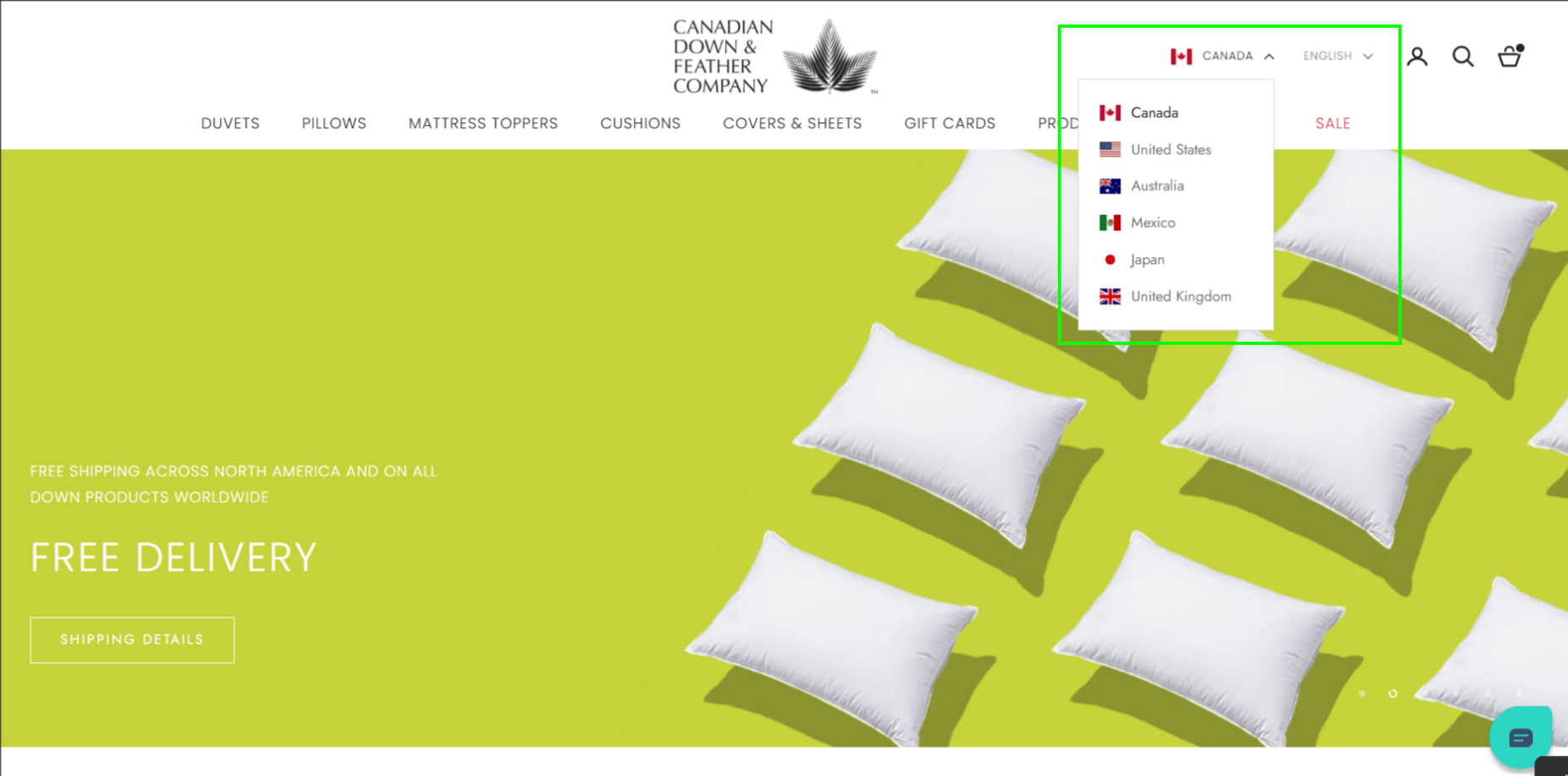
Shopify Language and Currency Selector for International Stores
Section 2: Site Navigation & Search
Poor navigation is the silent conversion killer. Shoppers who can’t find what they want within a few clicks don’t ask for help – they leave.
Strategy 6: Simplify Your Main Navigation
The instinct when building a Shopify store is to surface everything in the navigation. The result is a menu that overwhelms rather than guides.
Every option you add forces the visitor to process one more choice before moving forward. More choices, more time to decide – and in ecommerce, hesitation costs you.
The stores with the cleanest navigation have 4-6 top-level categories maximum, with labels specific enough to be predictive. “Men’s Outerwear” tells a visitor where to go. “Products” tells them nothing.
What to audit:
- Can a new visitor navigate to a specific product in under 3 clicks without using search? If not, the structure is working against you.
- Are your labels descriptive or decorative? Rename anything vague.
- Check mobile separately – mega-menus that work on desktop often become an unusable wall on a small screen and need a different treatment entirely.
Strategy 7: Invest in AI-Powered Site Search
For stores with more than 50 products, site search is a primary discovery tool – and Shopify’s default search is too basic to do that job well. It matches keywords but doesn’t handle typos, synonyms, or any real sense of what the shopper actually means.
Search apps like Searchpie and Boost Commerce fix the basics – typo tolerance, synonym matching, predictive results. The search analytics alone are worth it: every zero-results search is a missed sale, and your search data tells you exactly what visitors want that you’re either not carrying or not surfacing.

AI in Action – Site Search
Klevu uses natural language processing (NLP) to understand search intent – not just keyword matching. A shopper typing “something warm for winter hiking” finds relevant products even if those exact words don’t appear in any product title. This is the same technology behind AI Overviews in Google Search, applied to your store’s search bar.
What AI-powered search adds beyond standard apps:
- Intent recognition – Finds what shoppers mean, not just what they typed
- Personalized results – Shows different results to different visitors based on how they browse
- Zero-results recovery – Catches dead-end searches and suggests alternatives instead of a blank page
- Predictive merchandising – Gets smarter over time – learning which products actually convert for which queries
The search analytics are a goldmine for CRO, regardless of the tool – they tell you exactly what your visitors want that you’re either not selling or not surfacing.
Strategy 8: Add Intelligent Filtering to Collections
On collections pages with more than 20 products, filtering is essential. Shoppers need to narrow by size, colour, price, material, use case, or whatever attributes matter for your product.
Poor filtering = longer time to find the right product = higher abandonment rate.
Shopify’s native filtering works for basic stores. For complex catalogs, Boost Commerce or similar apps give you full control over filter attributes, display, and behaviour.
Section 3: Collections Pages
The collections page is where browsers decide whether to go deeper. It’s often overlooked in CRO audits, but it’s a critical conversion point.
Strategy 9: Show More Information on Product Cards
Default Shopify product cards show image, name, and price. Adding the following to collection cards reduces the need to click through and back:
- Star rating and review count
- Key variants available (colours, sizes)
- “Low stock” or “New” labels
- Hover-to-see-second-image functionality
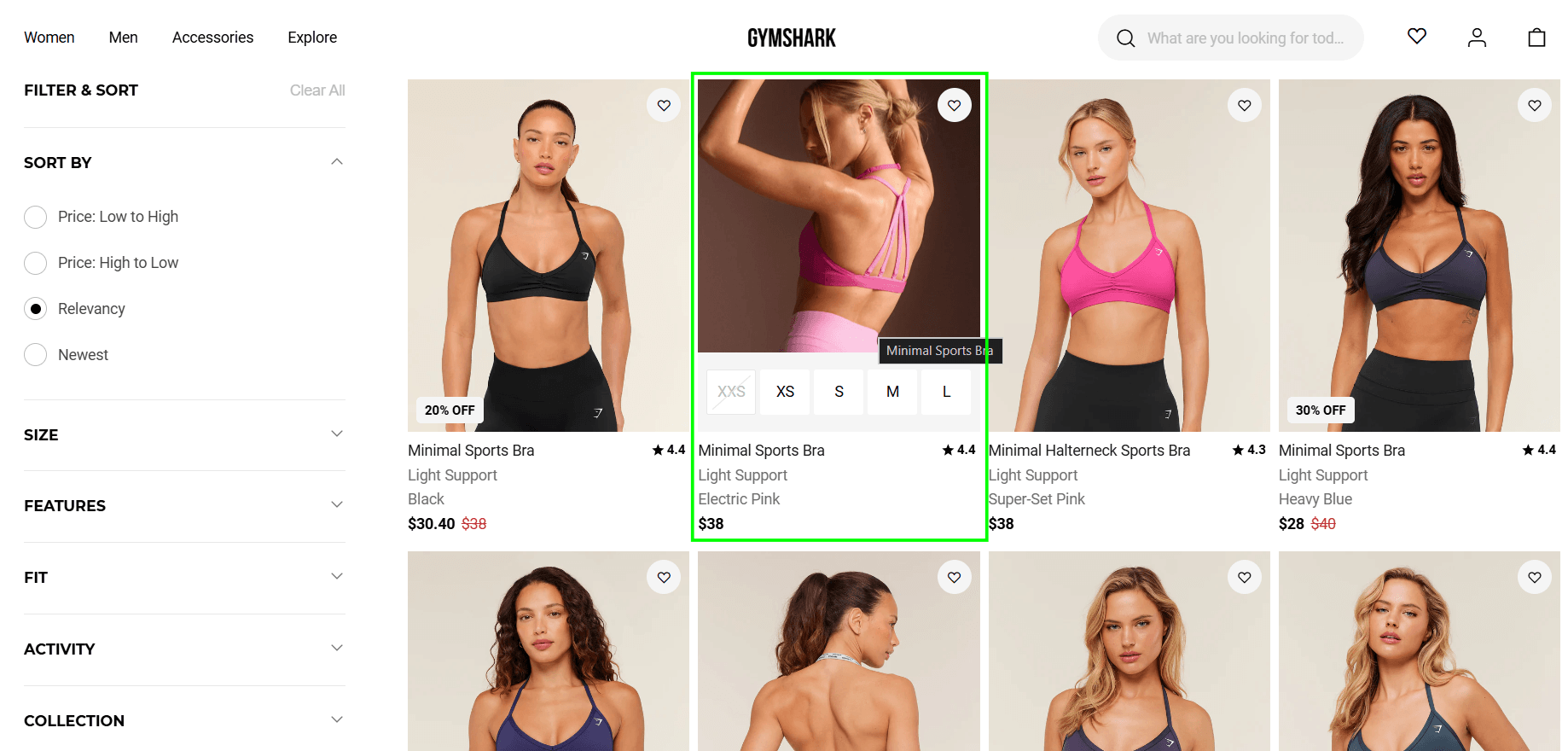
Shopify Collection Page Optimized for Product Discovery and Conversions
Strategy 10: Use Quick-Add or Quick-View
For products with few variants, a Quick Add button on the collection card removes an entire page load from the conversion path. For products needing more detail, a Quick View modal lets shoppers preview without leaving the collection.
This is especially impactful on mobile, where page transitions feel heavier.
Strategy 11: Personalize Collection Order Based on Behaviour
Static collection sorting shows every visitor the same products in the same order – bestsellers first, newest first, or whatever you set it to when you built the store. That made sense when personalization required enterprise-level infrastructure. It doesn’t anymore.
Tools like Rebuy and LimeSpot reorder collection results based on what each individual shopper has browsed and purchased, making the collection feel like it was curated for them rather than for everyone.
The practical effect is fewer clicks to the right product – which means fewer opportunities to lose the shopper before they get there.
Strategy 12: Make Collections Mobile-First
Across the Shopify stores we work on, 60-75% of traffic is mobile. But most collection pages are designed desktop-first.
Key mobile collection fixes:
- 2-column grid – 1 column wastes screen space; 3 columns makes product images too small to evaluate. Two hits the sweet spot.
- Sticky filter bar – shoppers shouldn’t have to scroll back to the top every time they want to change a filter
- Large, tappable sort/filter buttons – if a finger can’t hit it accurately on the first tap, it’s too small
- Portrait-ratio product images – landscape images on mobile waste vertical space and make products harder to browse quickly
Section 4: Product Pages
The product page (PDP) is where the buying decision actually happens. It needs to answer every question in the buyer’s mind before they’re ready to commit. The questions are predictable:
- What exactly is this?
- Is it the right size/fit/version for me?
- Will it look right?
- Can I trust this store to deliver?
- What if I don’t like it?
Strategy 13: Use High-Quality Multi-Angle Photography – and AI to Scale It
Photography is the biggest ROI lever on product pages for most stores. Shoppers can’t touch, try on, or inspect the product in person – your photos are doing that job. Baymard Institute’s product page usability research consistently shows that inadequate product imagery is one of the top reasons for abandonment.
What high-converting product photography includes:
- Multiple angles – front, back, side, detail close-ups
- Scale reference – product on a person, or next to a known object
- Lifestyle context – product in use, in the right setting
- Zoom capability on desktop
- Video – even a 10-15 second rotation or lifestyle clip significantly improves conversion
AI in Action – Product Photography & Video
Professional photography has historically been out of reach for smaller stores – expensive, slow, and impossible to scale across a large catalog. AI tools have changed this fundamentally.
AI product photography tools for Shopify:
- Pebblely – generates professional product backgrounds and lifestyle settings from a single product image. Upload your product photo, describe the background, and generate unlimited variations. Free tier available. Works directly in Shopify.
- Botika – purpose-built for fashion and apparel. Transforms flat-lay product images into on-model shots using AI-generated models, then creates short video reels and TikTok-ready content from the same source image. Botika on Shopify App Store
- CreatorKit – generates and publishes product photos and short videos directly from Shopify admin. Free unlimited image generation, charges on download. Deepest native Shopify integration of any AI photography tool.
- Shopify Magic – Shopify’s own AI tool generates product description drafts and can remove/replace image backgrounds natively in the admin. No additional app required.
- ChatGPT (GPT-4o) – most merchants already have access to it, which makes it the natural first tool to try. Describe your product and the shot you want, and it generates lifestyle images, background variations, and ad creative in seconds. Results are good enough to use – not just for mockups. Where it falls short is consistency across a large catalog; getting the same product to look identical across dozens of generated images takes careful prompting. For that, dedicated tools like Pebblely are a better fit.
AI shoppable video for product pages:
- Tolstoy – embeds interactive shoppable video widgets on PDPs and collection pages. AI Player personalizes which video each visitor sees based on browsing behaviour. Brands using Tolstoy report conversion rates up to 7x higher on video-enabled product pages.
- Videowise – video commerce platform with deep Shopify, Klaviyo, and Yotpo integration. Built for stores that need performance analytics alongside shoppable video.
The combined effect: a mid-sized store that previously couldn’t afford proper lifestyle photography can now generate unlimited product variants – different backgrounds, settings, model shots – in minutes rather than weeks, at a fraction of the cost.
Strategy 14: Write Product Descriptions That Answer Real Objections – and Rank in AI Search
Generic descriptions list features. High-converting descriptions answer objections. Before writing a product description, identify the top 3-5 questions or hesitations a shopper would have and use them to write descriptions and answer them directly.
Weak: “This jacket is made from premium materials and is available in three colours.”
Strong: “This jacket runs true to size with a slightly relaxed fit – if you’re between sizes and prefer a more tailored look, size down. The shell is 100% waterproof – tested to 10,000mm hydrostatic head rating. Worn comfortably over a thin mid-layer in temperatures down to -5°C.”
Product Descriptions for SEO, AIO, and GEO
A well-structured product description isn’t just a conversion tool – it’s also how your products get cited by AI tools, surfaced in Google’s AI Overviews, and discovered through Generative Engine Optimization (GEO).
When someone asks an AI assistant “what’s the best waterproof jacket for -5°C hiking?” the systems that answer that question pull from product pages that contain specific, factual, structured answers. Vague feature lists don’t get cited. Specific attribute descriptions do.
What makes a product description AI-citation-ready:
- Specific measurements and ratings – “10,000mm hydrostatic head” not “waterproof”
- Use-case language – “suitable for temperatures down to -5°C” not “suitable for cold weather”
- Comparison context – “runs true to size; if between sizes, size down” answers the question Google and AI tools get asked most
- FAQ-style structure – Q&A format on product pages is the single highest-probability format for AI Overview extraction
- Natural question language – mirror how customers phrase questions in reviews and support tickets, not how you write marketing copy
Shopify Magic for description drafting: Shopify’s built-in AI tool generates product description drafts from attributes you define. Use it as a starting point, then layer in the specific measurements, use-case language, and objection-answering content above. The AI draft handles structure; the specifics are what make it convert and rank.
Strategy 15: Display Shipping Costs and Timelines Prominently
Surprise shipping costs at checkout are the #1 cause of cart abandonment globally, according to Baymard Institute checkout usability research. Show estimated delivery date and shipping cost on the product page, not just at checkout. If you offer free shipping above a threshold, display that threshold prominently on the product page.
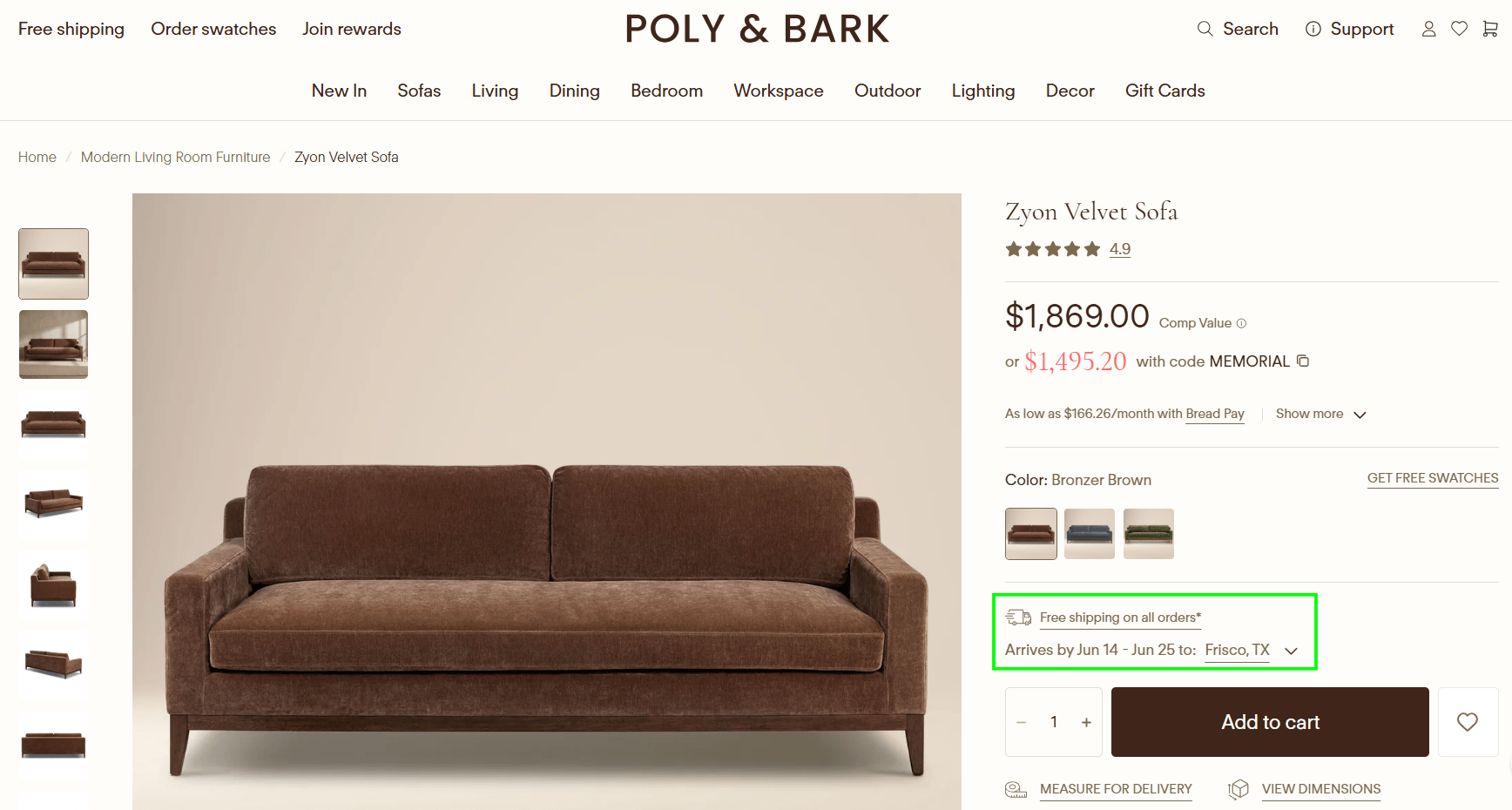
Product Page Shipping Timeline and Delivery Estimate Example
Strategy 16: Add a Structured Review Section With AI-Surfaced Insights
Reviews convert. How they’re displayed is what most stores get wrong. A high-converting review section shows average star rating near the product title, displays photo reviews, allows filtering by rating or keyword, and includes review count prominently. Apps like Okendo, Yotpo, and Judge.me all support these features. We typically see 10-20% improvement in product page conversion rates when photo reviews are added to stores that previously had text-only reviews.
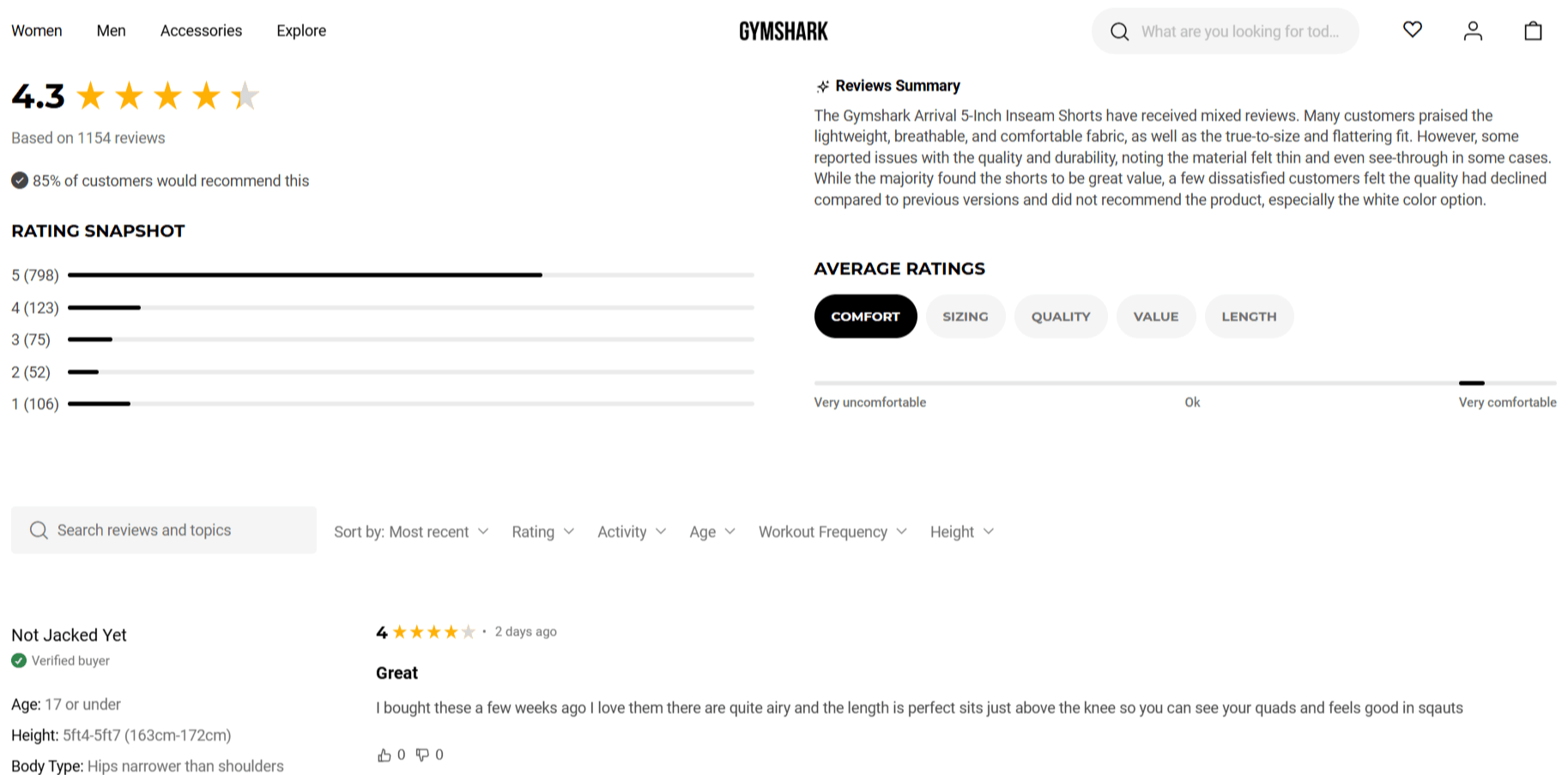
Structured Review Section with AI Summary Designed to Increase Product Page Conversions
AI in Action – Reviews
Okendo and Yotpo now use AI to surface the most relevant reviews for each individual visitor based on browsing behaviour. A shopper who has been looking at size 10 products sees size-specific reviews first. A visitor who arrived from a “sensitive skin” search query sees reviews mentioning skin sensitivity at the top.
This behavioural relevance lift meaningfully increases the trust signal value of a review section that already exists – no additional reviews needed.
Strategy 17: Make Variant Selection Intuitive
Variant selection is where a lot of quiet abandonment happens. The shopper knows what they want – they just can’t figure out how to select it, or they hit a dead end and leave.
Fix these first:
- Use swatches for colour, not dropdowns – swatches show the actual colour; dropdowns make shoppers guess
- Update product images when a variant is selected – if a shopper picks red and the image stays on blue, trust drops
- Grey out out-of-stock variants, don’t hide them – hiding frustrates returning customers who know what they want. Grey out with a “Notify me” option turns a lost sale into a lead
- Add a size guide link next to the size selector – sizing uncertainty is one of the top reasons shoppers don’t commit, especially in fashion and footwear
- Label colour swatches on hover – always show the colour name, not just a visual block
- Update price in real time when variants are priced differently – a price change discovered at checkout is a trust-breaker
For stores that need richer variant UX beyond what their theme provides, apps like Swatchify or Variant Image Automator handle custom swatches, dynamic variant images, and out-of-stock logic without custom development.
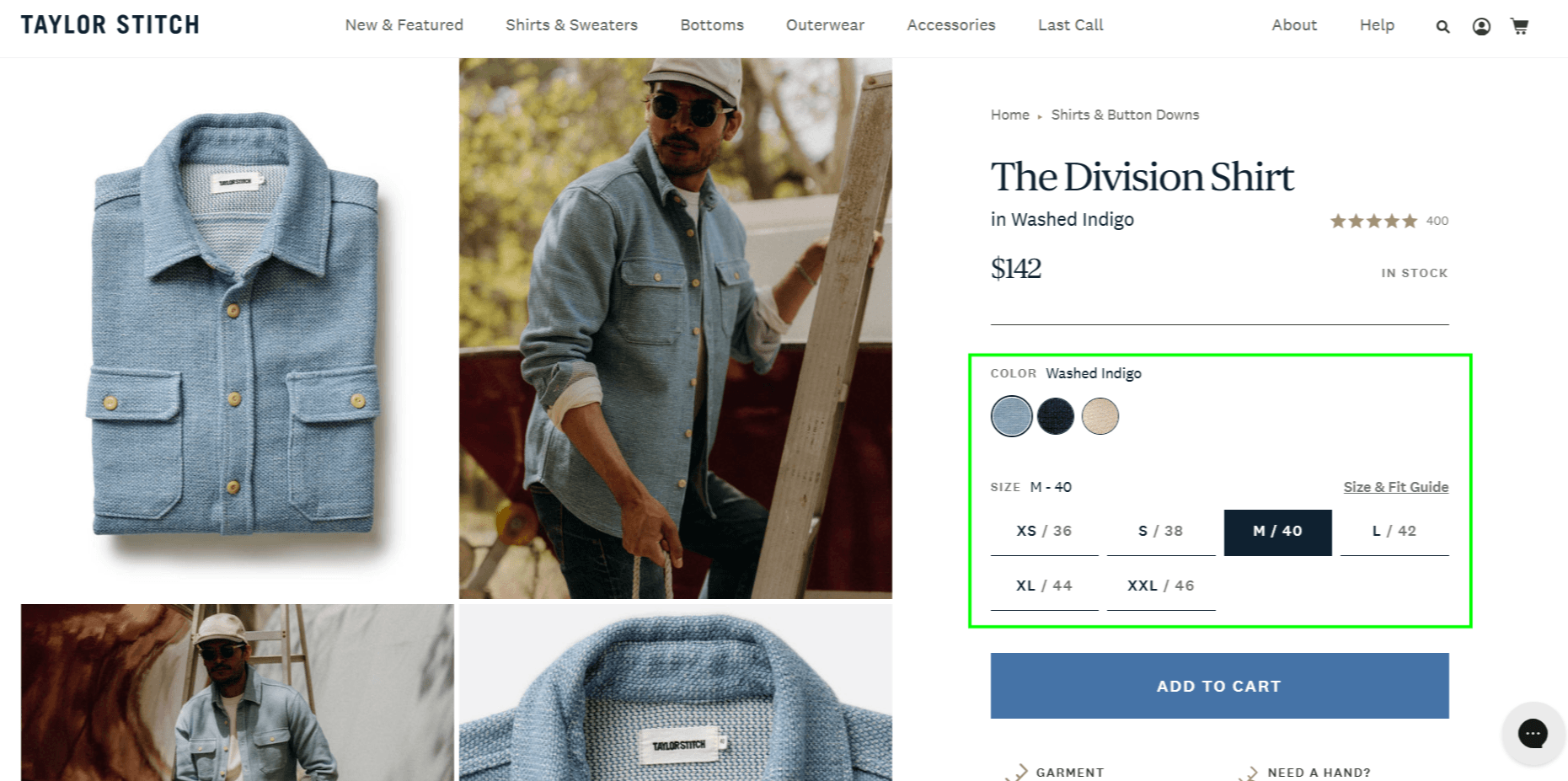
Intuitive Variant Selection with Color Swatches and Size Options
Strategy 18: Use Urgency and Scarcity – Honestly
Fake countdown timers and manufactured “Only 2 left!” warnings do work – until the shopper notices they reset every time they visit. At that point you’ve lost both the sale and the trust.
Real urgency doesn’t need manufacturing.
- Pull stock levels directly from Shopify inventory so low-stock warnings reflect actual availability – “3 left in stock“
- Show order-by deadlines tied to real shipping cutoffs – “Order by 2pm for next-day delivery”
- Run sales with end dates you actually honour.
Shoppers respond to genuine scarcity because it’s true – not because it’s designed to pressure them.
Strategy 19: Position Your CTA for Maximum Visibility
The Add to Cart button should be above the fold on mobile (no scrolling required), high contrast against the page background, sticky on mobile as the user scrolls, and larger than any other button on the page.
On mobile, a sticky Add to Cart / Buy Now bar at the bottom of the screen is one of the highest-ROI Shopify CRO changes for most stores.
Strategy 20: Add an AI-Powered Recommendation Block
“Customers also bought” and “Pairs well with” recommendation blocks on product pages serve two purposes: they increase average order value, and they give shoppers an alternative if the current product isn’t quite right. Apps like Rebuy and LimeSpot generate these from purchase data.
AI in Action – Product Recommendations
Rebuy’s AI recommendation engine uses machine learning to predict what each individual visitor is most likely to buy next – not static rules like “customers who bought X also bought Y.” Rebuy’s AI analyses a shopper’s browsing behaviour, purchase history, and real-time session data to show the right product to the right person at the right moment.
The difference in practice: a rule-based system shows the same upsell to every visitor. An ML system shows a different upsell based on what you’ve clicked, how long you’ve spent on each page, and what similar shoppers converted on. Most stores using Rebuy see 10-15% lifts in average order value from this alone.
Strategy 21: Add FAQ Sections to High-Converting Product Pages
A well-placed product FAQ eliminates the last objections before checkout without requiring the shopper to contact support or leave the page. For most stores, the questions are predictable: sizing, shipping timeline, materials, compatibility, and warranty.
Keep the FAQ short – 3 to 5 questions maximum per product. Use a collapsible accordion format. Use the actual language your customers use in their questions – pull from support tickets and reviews.
Why Product FAQs Get Cited by AI Search:
FAQ sections on product pages are one of the highest-probability formats for extraction by Google’s AI Overviews and other AI assistants. A structured Q&A directly on a product page with specific, factual answers is cited far more often than general product descriptions. This one change serves both conversion and AI visibility simultaneously.
Strategy 22: Display a Clear Return Policy on the Product Page
Return policy anxiety is a real conversion barrier – especially for first-time buyers and higher-priced items. Putting your return policy in the footer and nowhere else is a mistake most stores don’t realise they’re making. Research from Narvar shows that 96% of shoppers say they’ll shop again with a retailer that made the return process easy. Shopify’s own merchant resources recommend surfacing return policies near purchase decisions.
The fix is straightforward: add a short, plain-English return policy note near the Add to Cart button on every product page.
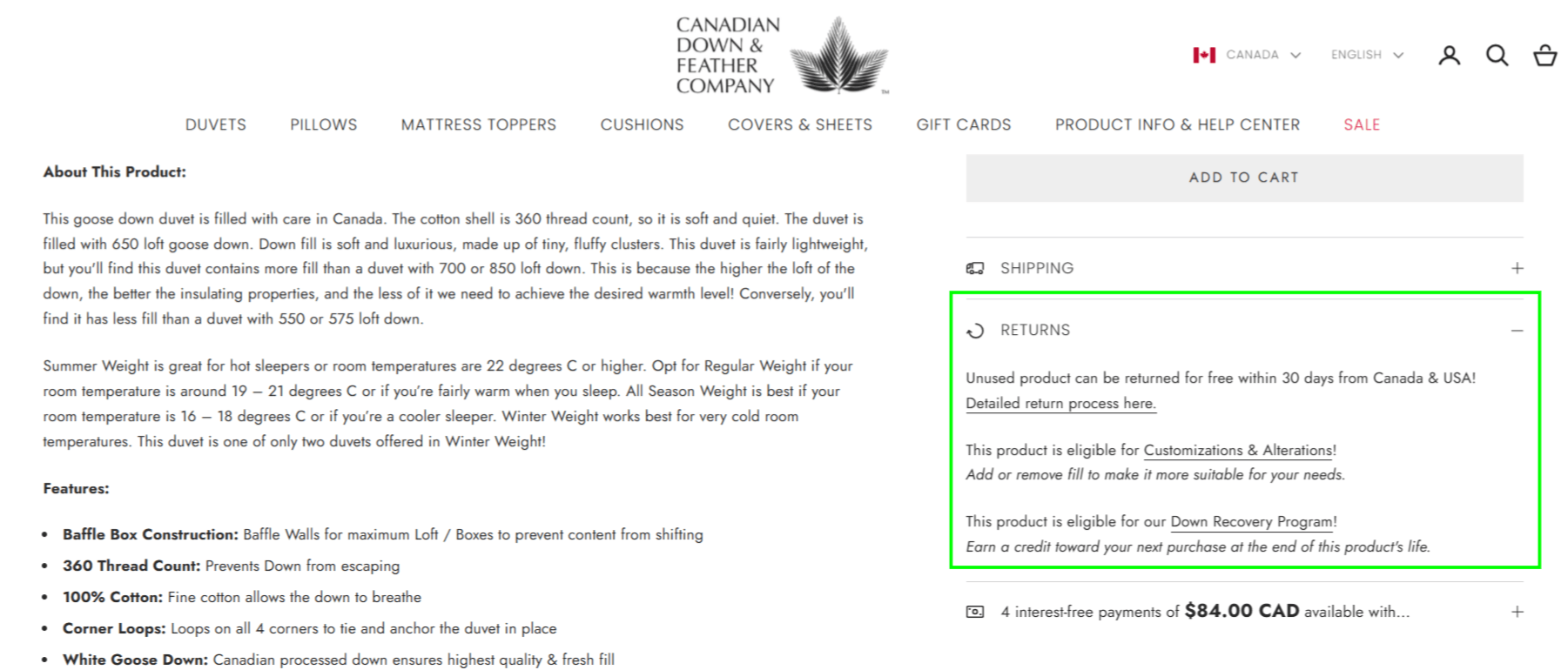
Clear Returns Policy as a Product Page Trust Signal

Not Converting Enough of Your Product Page Visitors?
Product pages are where most stores have their biggest conversion losses. We identify exactly which friction points are costing you sales and fix them with a data-driven CRO audit.
Section 5: Cart
The cart is where intent is confirmed – but also where doubt creeps back in. Cart optimisation is about reassuring the buyer that they’ve made the right decision and removing last-second hesitations.
Strategy 23: Show Trust Signals in the Cart
Most stores put trust badges on the homepage and product pages and stop there. Repeating them in the cart – secure checkout icons, return policy reminder, satisfaction guarantee – addresses doubt at exactly the moment it’s most likely to surface. It costs nothing to add and consistently reduces cart abandonment on stores that have tested it.
Strategy 24: Offer Relevant Upsells and Cross-Sells
The cart is the ideal place for one focused upsell or cross-sell – not a wall of recommended products. The best cart upsells are relevant to what’s already in the cart, lower-priced than the main item, and easy to add in one tap. Apps like Rebuy’s Smart Cart allow dynamic upsell logic based on what’s in the cart.
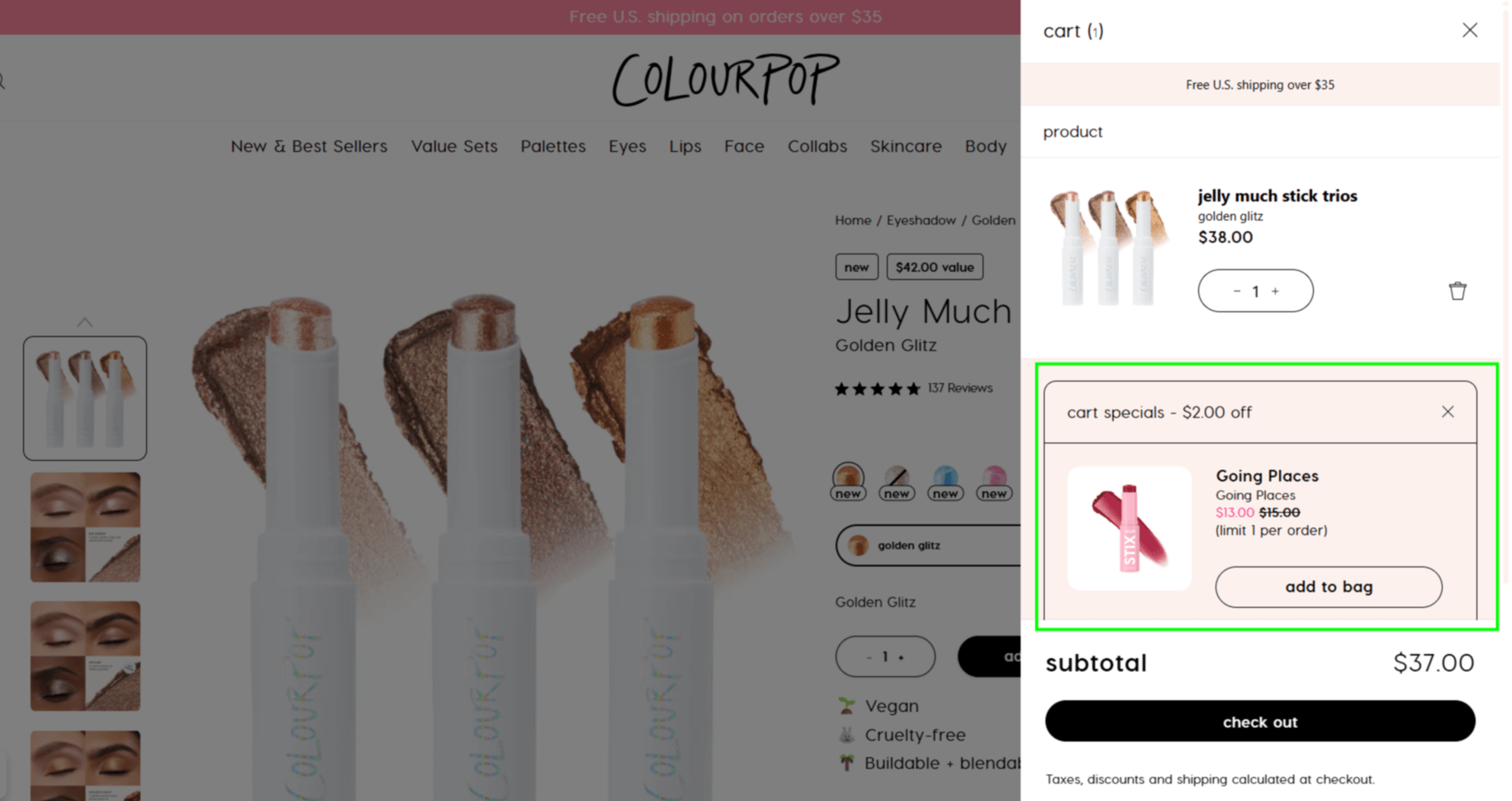
Smart Cart Upsell Offer Before Checkout
Strategy 25: Display the Free Shipping Threshold Dynamically
If you offer free shipping above a threshold, show a progress bar in the cart that says “You’re $X away from free shipping.” This is one of the simplest cart changes and consistently produces meaningful lifts in average order value.
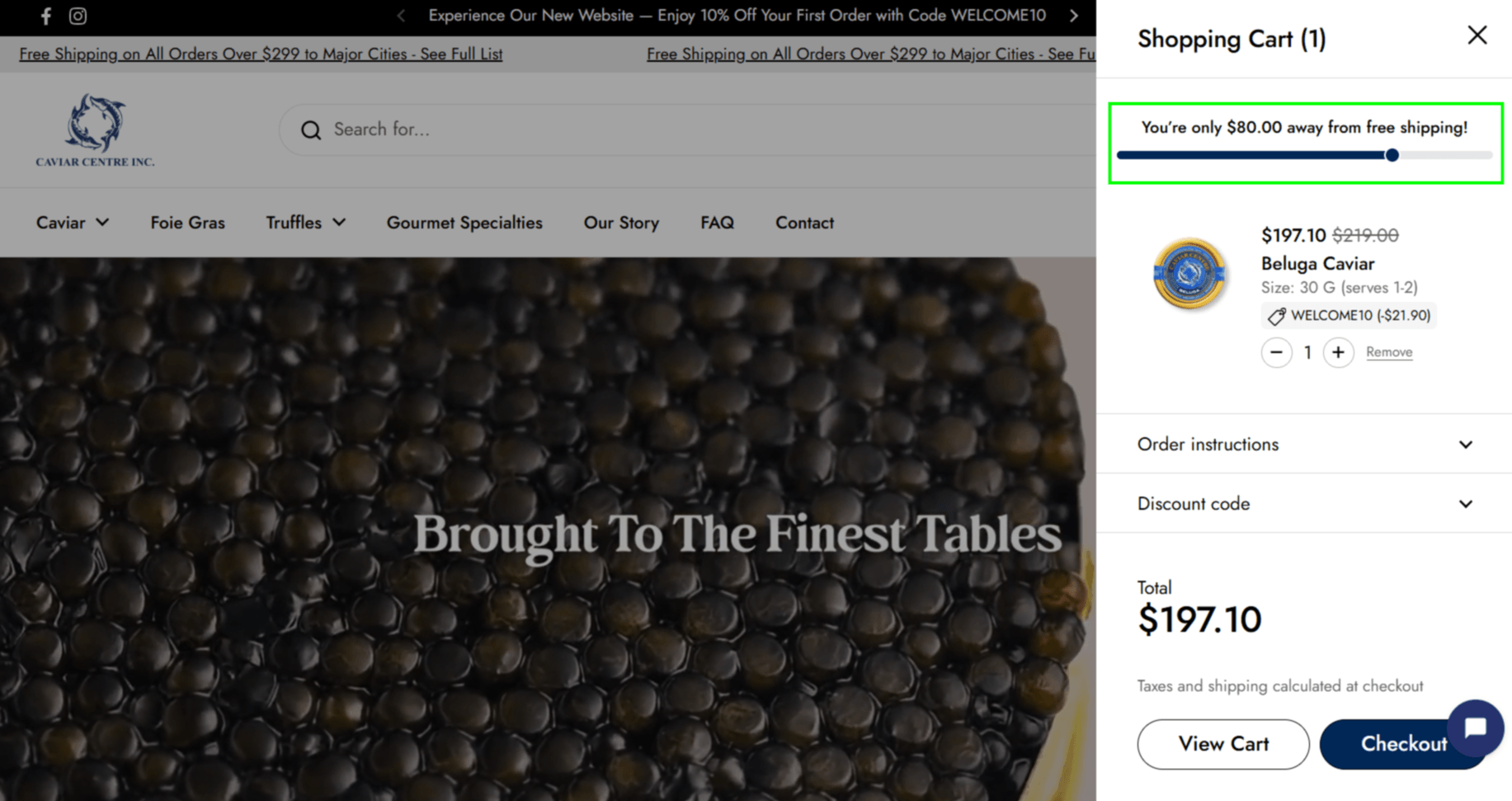
Free Shipping Progress Indicator Encouraging Higher Order Values
Strategy 26: Reduce Unnecessary Steps to Checkout
Every additional step or page load between add to cart and beginning checkout is a drop-off point. Consider a side cart (drawer cart) instead of a separate cart page, and direct-to-checkout for single-product purchases.
Section 6: Checkout
Checkout optimisation on standard Shopify plans is limited by what Shopify allows you to change. On Shopify Plus, you have full control over checkout customization. Here’s what matters most on either plan.
Strategy 27: Minimize the Number of Form Fields
Every unnecessary field in checkout reduces conversion. The minimum required fields are: email, shipping address, payment info. If your checkout asks for anything beyond that without a clear reason, consider removing it.
Strategy 28: Make Payment Options Visible and Complete
A significant percentage of checkout abandonment happens because the shopper’s preferred payment method isn’t available. The most important payment methods to support:
- Shopify Payments (credit/debit)
- Shop Pay
- PayPal
- Apple Pay / Google Pay – especially critical for mobile
- Buy Now Pay Later (Affirm, Afterpay, Klarna – increasingly expected for purchases over $100)
Consider offering more than one BNPL option. Each provider requires shoppers to have an existing account, so a shopper who uses Afterpay won’t switch to Klarna just because it’s there. Showing the option they already have an account with is what removes the friction – if you only offer one, you’re only reaching part of that audience.
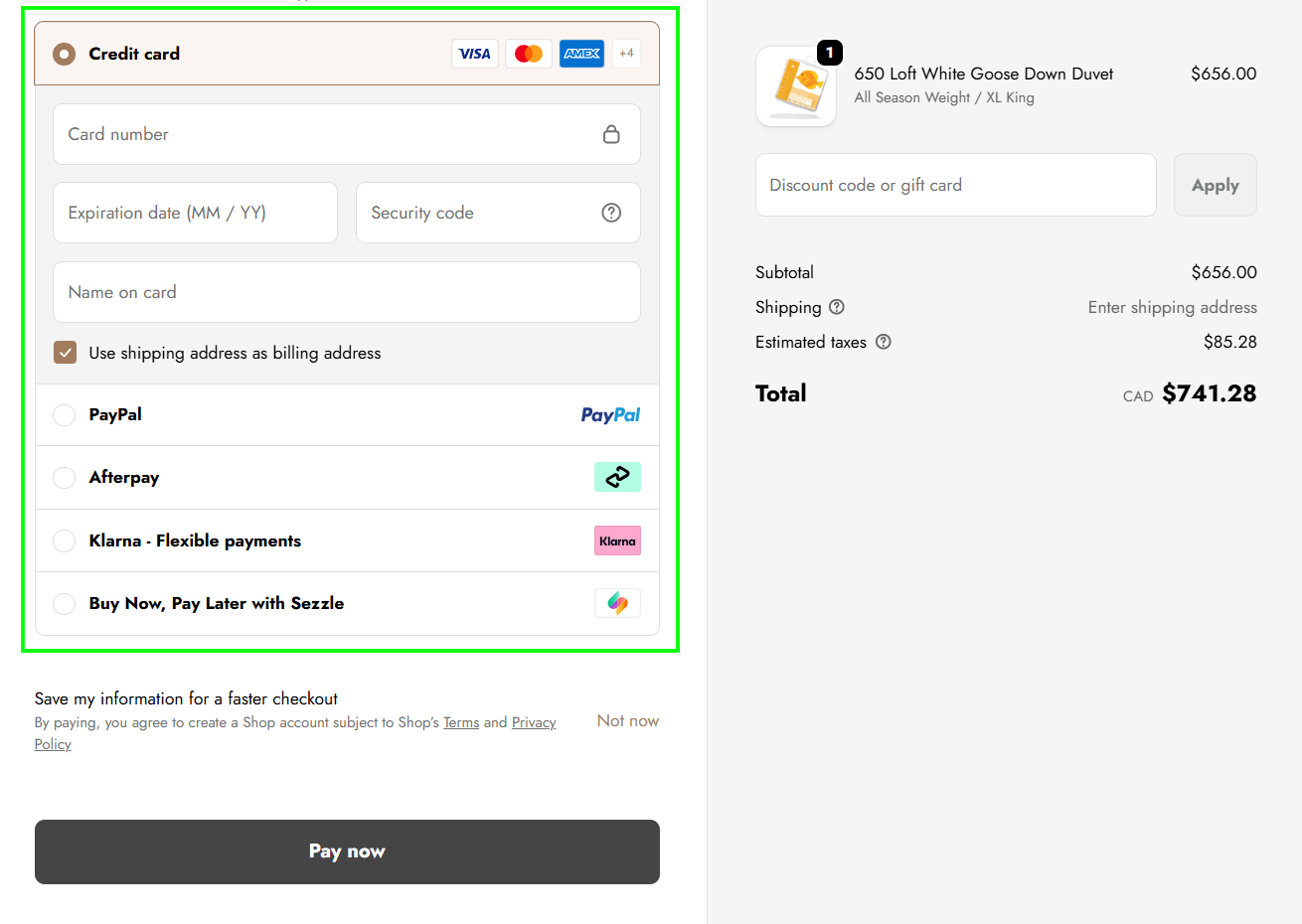
Offering Multiple Payment Methods at Checkout
Strategy 29: Offer Express Checkout Options
Shop Pay, Apple Pay, and Google Pay allow shoppers to complete checkout with a single tap using stored payment and address information. For mobile shoppers, especially, this removes the friction of typing a full billing and shipping address on a small screen. Shop Pay consistently shows the highest completion rates of any express checkout option on Shopify.
Strategy 30: Send Abandoned Checkout Recovery Emails and SMS
Shopify has built-in abandoned checkout recovery, but the default settings leave money on the table. According to Barilliance, recovery rates nearly double from 10.7% to 20.3% when a three-email sequence is used.
Here’s an optimised abandoned checkout sequence we recommend:
- First email: 1 hour after abandonment – simple reminder, no discount
- Second email: in 24 hours – address common objections, include reviews
- Third email: in 72 hours – offer incentive if appropriate (small discount or free shipping)
You can also pair this with SMS recovery via Klaviyo or Postscript for stronger results.
Section 7: Mobile Optimization
Mobile isn’t a separate consideration – it’s your primary channel. 60-75% of Shopify traffic is mobile, but many stores still have desktop-designed experiences that happen to display on a phone.
Strategy 31: Test Your Store on a Real Phone Monthly
Responsive design doesn’t mean mobile-optimised. Walk through your entire purchase flow on an actual mobile device at least once a month. Common mobile issues that show up on real device testing but not in browser emulation:
- Touch targets are too small to tap accurately
- Pop-ups that can’t be closed on small screens
- Checkout form fields that trigger the wrong keyboard type – a number field that opens a text keyboard is a common one
Strategy 32: Optimize for Mobile Page Speed
Google’s Core Web Vitals are both ranking signals and conversion signals. Key Shopify speed optimisations:
- Use a lightweight theme, or optimize your current theme
- Compress all images and use the WebP format
- Remove unused Shopify apps – every installed app adds JavaScript, even if not actively used
- Lazy-load images below the fold
- Use Shopify’s built-in CDN
Target: Largest Contentful Paint (LCP) under 2.5 seconds on mobile. A 1-second delay in page load time reduces conversions by up to 7%, according to Deloitte’s research on mobile page speed and revenue.
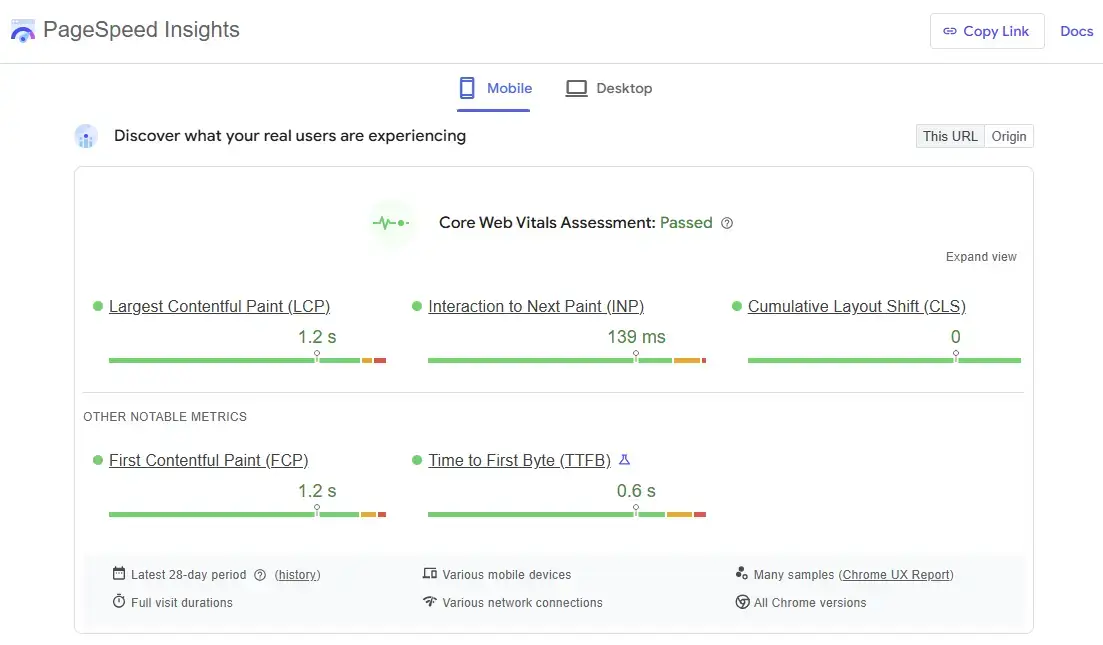
Core Web Vitals and Mobile Performance Optimization
Strategy 33: Use a Sticky Mobile CTA Bar
On mobile, a sticky “Add to Cart” or “Buy Now” bar fixed to the bottom of the screen – visible as the user scrolls through the product description, reviews, and FAQs – is one of the highest single-change ROI improvements for most Shopify stores.
Section 8: Email & On-Site Retention
CRO isn’t only about the first visit. Recovering and re-engaging visitors who didn’t buy is often more efficient than optimizing the first-visit flow.
Strategy 34: Capture Emails Before the Bounce
Exit-intent popups (triggered when the cursor moves toward the browser close button on desktop, or after scroll depth thresholds on mobile) are effective for capturing emails from visitors who would otherwise leave without converting.
The offer matters: a discount isn’t always necessary. “Get 10% off your first order” works, but so does “Join 10,000 customers and get early access to new arrivals” for brand-focused stores.
Strategy 35: Build a Post-Purchase Upsell Flow – Including the Thank You Page
After checkout is one of the highest-conversion moments for additional offers. The customer is in a buying mindset. Shopify Plus allows native post-purchase upsell pages. Apps like Rebuy or AfterSell enable this on standard Shopify plans.
The Thank You Page – Your Most Underused CRO Asset
Most Shopify stores treat the Thank You page as a receipt. It’s actually one of the highest-attention pages in your entire store – the customer has just committed, their guard is down, and they’re reading every word. Almost nobody is competing with you for this moment.
What you can do on the Thank You page:
- Post-purchase upsell – a single complementary product offer at a discount, one-click add. AfterSell and Rebuy handle this natively
- Zero-party data quiz – “Tell us more about yourself” quiz collects zero-party data (preferences, use case, occasion) that feeds into Klaviyo segmentation. Apps like Octane AI handle this seamlessly
- Referral program prompt – the moment right after purchase is the highest-intent moment for referral asks. Apps like Referral Candy or Friendbuy embed here
- Loyalty program enrollment – invite to join Smile.io or LoyaltyLion points programme. One-click enroll while excitement is still high
- Social follow prompt – before the order confirmation email lands, ask for an Instagram or TikTok follow with a branded image
You can run one or two of these without overwhelming the page. The key is sequencing: show the upsell first (highest revenue intent), then data collection, then community/loyalty below the fold.
Strategy 36: Use Klaviyo for Behaviour-Based Email
Generic email blasts underperform. The highest-converting Shopify email programs are triggered by behaviour:
- Browse abandonment – viewed a product but didn’t add to cart
- Cart abandonment – added to cart but didn’t check out
- Win-back – no purchase in 90+ days
- Post-purchase review request – timed to delivery plus a few days
- Replenishment reminders – for consumable products
Klaviyo is the industry standard for Shopify email integration. Properly configured behaviour-based flows typically generate 20-30% of total store revenue from email alone.
Strategy 37: Add Live Chat for High-Intent Support
For stores with higher-priced products ($100+), live chat at key moments – product pages, cart, checkout – converts undecided shoppers.
The key is availability: a live chat widget that’s always offline does more harm than no chat at all, because it signals the store is unresponsive.
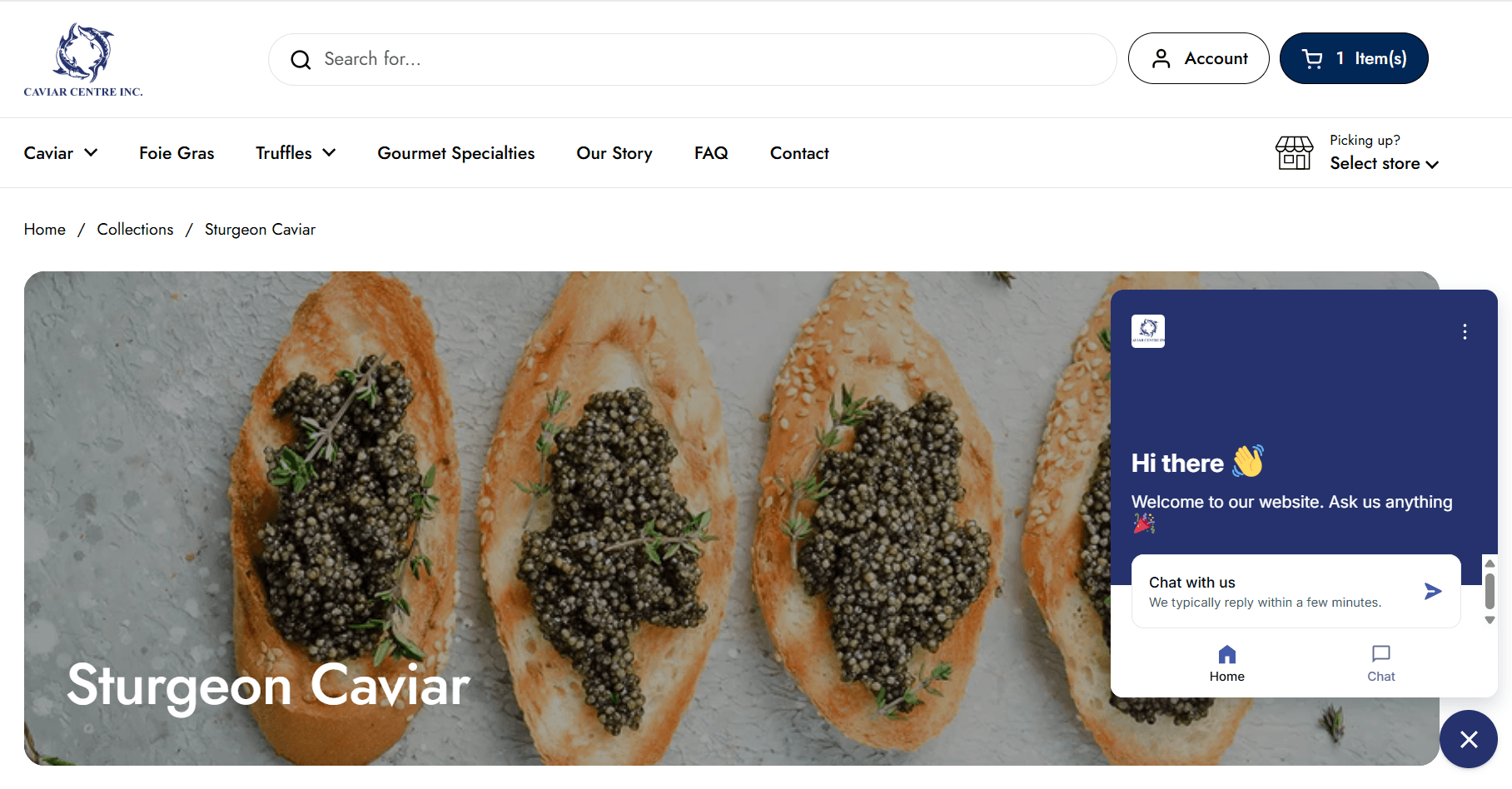
Live chat on product page screenshot
Strategy 38: Build a Loyalty and Retention Program
Repeat customers convert at 3-5x the rate of new visitors and spend significantly more per order. The economics of retention are straightforward – it costs far less to bring someone back than to acquire someone new.
Apps like Smile.io and LoyaltyLion integrate directly with Shopify and let you reward purchases, reviews, referrals, and social shares. You don’t need a complex program to start. A simple points-for-purchases system with a clear redemption threshold gives customers a concrete reason to come back before they’ve had time to forget about you – which is enough to start.
Not Sure Which of These to Tackle First?
With 42 strategies across every part of your store, the hardest part is knowing where your biggest leaks actually are. That’s exactly what a CRO audit tells you.
Section 9: Measurement, Heatmaps & A/B Testing
Every strategy in this guide works better when you know what’s actually happening in your store. These strategies give you the data foundation that makes everything else more effective.
Strategy 39: Install Heatmaps and Session Recording
Knowing your conversion rate tells you that there’s a problem. Heatmaps and session recordings tell you where and why.
What heatmaps reveal that analytics can’t:
- Exactly which elements visitors click – including things that aren’t buttons
- How far down the page visitors scroll before leaving
- “Rage clicks” – repeated clicks on an element that isn’t responding, almost always signalling a broken feature or confusing UX
- Where visitors hesitate before leaving (scroll depth combined with session time)
Microsoft Clarity is free, installs on Shopify in minutes, and now includes AI-powered session summaries that identify behaviour patterns without manually watching recordings. clarity.microsoft.com
For stores that want more advanced funnel analytics and A/B testing integration alongside heatmaps, Hotjar remains the industry standard.
Strategy 40: Run Structured A/B Tests
Most CRO work is educated guessing until you test it. A/B testing is how you confirm that a change actually improved conversion before rolling it out to everyone – and how you avoid confidently implementing something that quietly made things worse.
The rules for valid Shopify A/B tests:
- Test one variable at a time – change three things simultaneously and a lift tells you nothing about what caused it
- Wait for statistical significance – 95% confidence minimum before calling a winner. Most Shopify stores need 4-8 weeks per test depending on traffic volume
- Set your success metric before you start – conversion rate, AOV, or revenue per visitor. Deciding after you see the results is how you talk yourself into bad conclusions
A/B testing tools for Shopify:
- Intelligems – purpose-built for Shopify. Tests prices, shipping rates, discount strategies, and content. Unique in that it shows profit impact, not just conversion rate – critical because a higher-converting test can still hurt margins.
- VWO – full-featured testing platform. Good for complex multi-page tests and funnel experiments
- Convert – agency-grade testing with strong Shopify integration and privacy compliance
AI in Action – A/B Testing
Traditional A/B testing requires sufficient traffic to reach statistical significance – a barrier for smaller stores. AI-assisted testing tools like Intelligems use smarter statistical models (Bayesian rather than frequentist) that can surface reliable results faster with less traffic.
Intelligems also tests variables most CRO tools ignore: whether a $75 or $100 free shipping threshold converts better, or whether your best-selling product converts more profitably at $49 or $54.
Over 95% of brands find more profitable prices after three price tests using Intelligems – and they’ve tested over $500M in GMV.
Strategy 41: Set Up Proper Conversion Tracking Before Making Any Changes
Making CRO changes without a clear before/after measurement system means you don’t know if anything worked. Set up Google Analytics 4 e-commerce tracking before making changes.
The tracking stack every Shopify store needs:
- Google Analytics 4 – purchase events, funnel steps, revenue attribution
- Shopify Analytics – add-to-cart rate, checkout initiation rate, session data
- Microsoft Clarity or Hotjar – heatmaps and session recordings
- UTM parameters on all paid traffic – so you know which campaigns drive conversions, not just clicks
Strategy 42: Use On-Site Quizzes for Personalisation and Lead Capture
Product recommendation quizzes guide shoppers to the right product while collecting first-party data – a dual conversion and data acquisition win. For stores selling products with a fit, type, or compatibility dimension (supplements, skincare, software, fitness equipment), a quiz dramatically improves the likelihood a shopper finds and buys the right product.
What quizzes do for CRO:
- Reduce returns by helping shoppers self-select the right variant or product
- Increase average order value by recommending bundles based on quiz answers
- Capture email and preference data for Klaviyo segmentation
- Create a personalised experience that builds brand affinity
Apps like Octane AI and Tolstoy (interactive video quiz format) integrate directly with Shopify and Klaviyo. Tolstoy’s video quiz format converts at 2-3x the rate of static text-based quizzes because the experience feels guided rather than transactional.
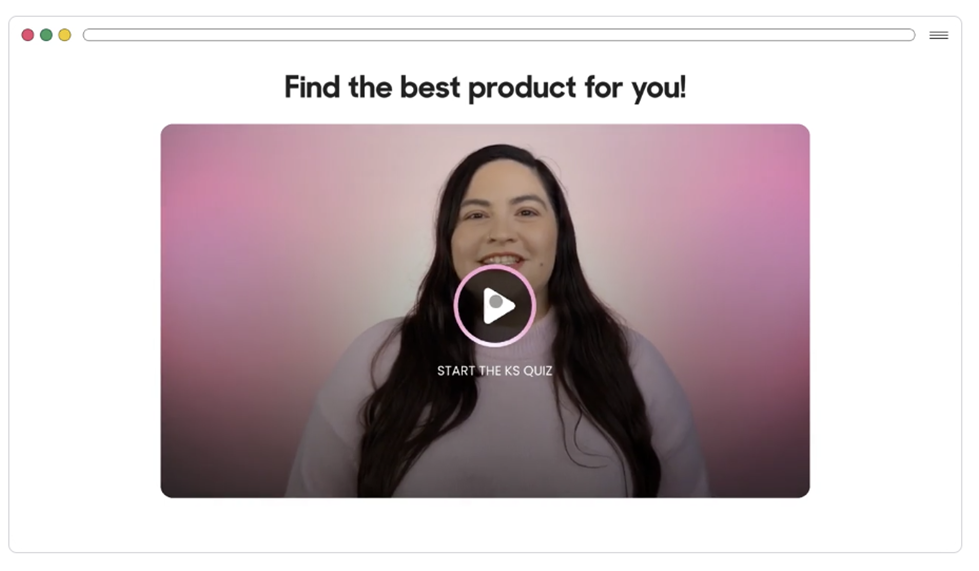
Source: Gotolstoy.com
AI-Powered CRO: The Tools That Are Changing What’s Possible
AI has moved from a buzzword to a practical advantage in Shopify CRO. Across the strategies in this guide, AI tools appear at every stage of the conversion funnel. Here’s a consolidated view of where they deliver the most impact.
|
Store Area |
AI Tool |
What It Does for CRO |
|---|---|---|
|
Product photography |
Pebblely, CreatorKit, Botika |
Generates lifestyle images, on-model shots, and short video clips – eliminating the photography budget barrier for small stores |
|
Shoppable video |
Tolstoy AI Player, Videowise |
Embeds personalized shoppable video on PDPs; AI personalizes which video each visitor sees. Up to 7x conversion lift reported on video-enabled pages |
|
Site search |
Klevu |
NLP-powered search understands intent, not just keywords. Personalized results based on individual browsing behaviour |
|
Product recommendations |
Rebuy AI engine |
ML-based recommendations predict what each individual visitor is most likely to buy, not static ‘customers also bought’ rules |
|
Reviews |
Okendo, Yotpo |
AI surfaces most relevant reviews for each visitor based on their browsing context |
|
Product descriptions |
Shopify Magic |
Generates description drafts from defined attributes; structures content for AIO and GEO extraction |
|
Heatmaps & session analysis |
Microsoft Clarity |
AI-powered session summaries identify behaviour patterns across thousands of sessions without manual review |
|
A/B testing |
Intelligems |
Bayesian statistics surface results faster with less traffic; tests price, shipping, and discount economics, not just UX |
|
Post-purchase data |
Octane AI |
AI-assisted quiz captures zero-party data on the Thank You page and feeds it into Klaviyo segmentation automatically |
|
Live chat |
Tidio AI, Gorgias AI |
AI handles first-response support queries on product pages and cart, escalating to human agents only when needed |
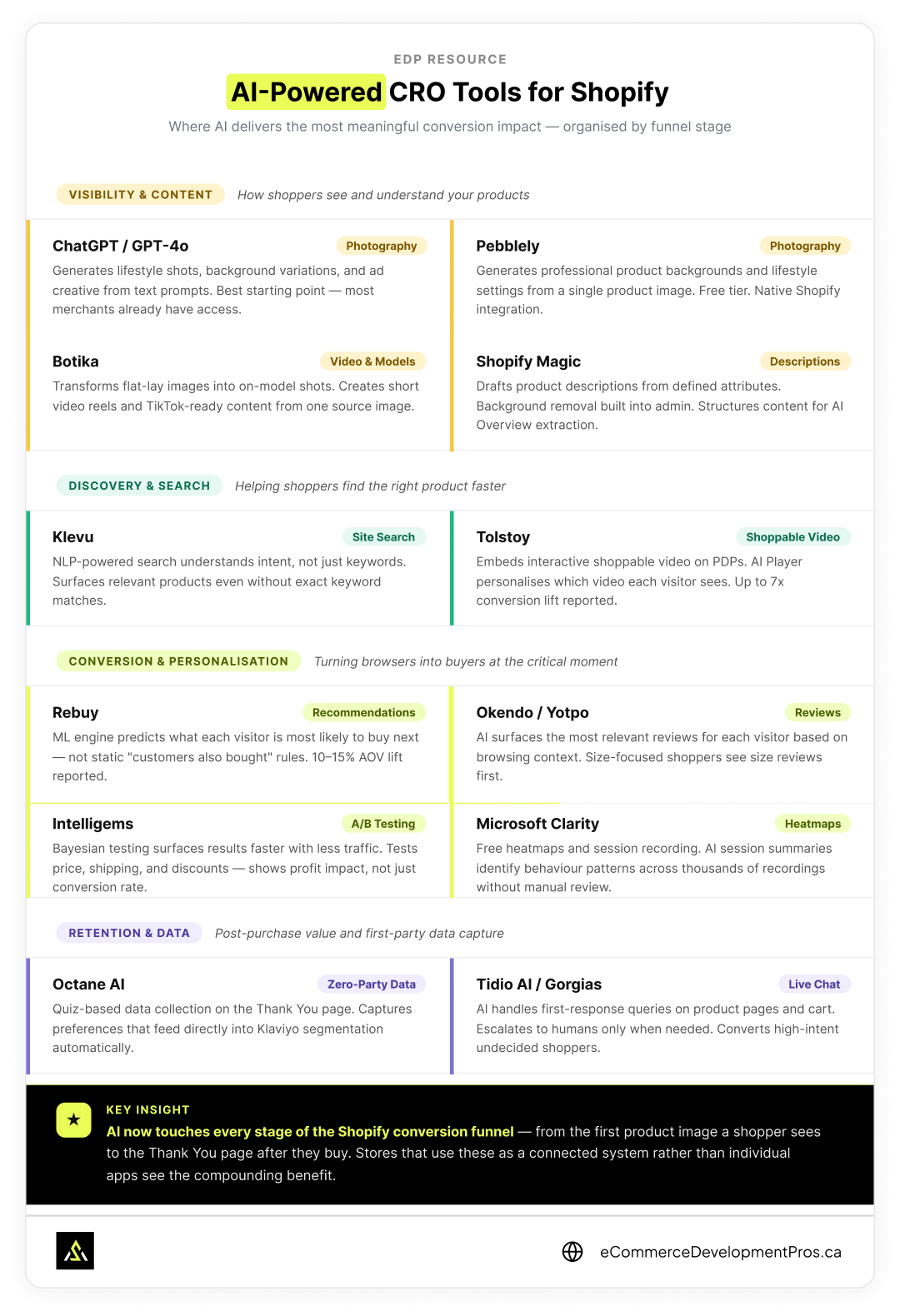
AI-powered CRO tools for Shopify organised by funnel stage — from product visibility and discovery through to conversion, retention, and post-purchase data capture.
The Shopify Conversion Cascade
Most stores diagnose conversion problems by looking at the overall rate and guessing where the leak is. The Shopify Conversion Cascade is how we actually find it.
Every purchase is a sequence of smaller decisions. A shopper doesn’t just decide to buy – they first decide to stay, then to explore, then to evaluate, then to commit, then to follow through. Drop-off happens at each stage, and the stage where you’re losing the most people is rarely where you assume it is.
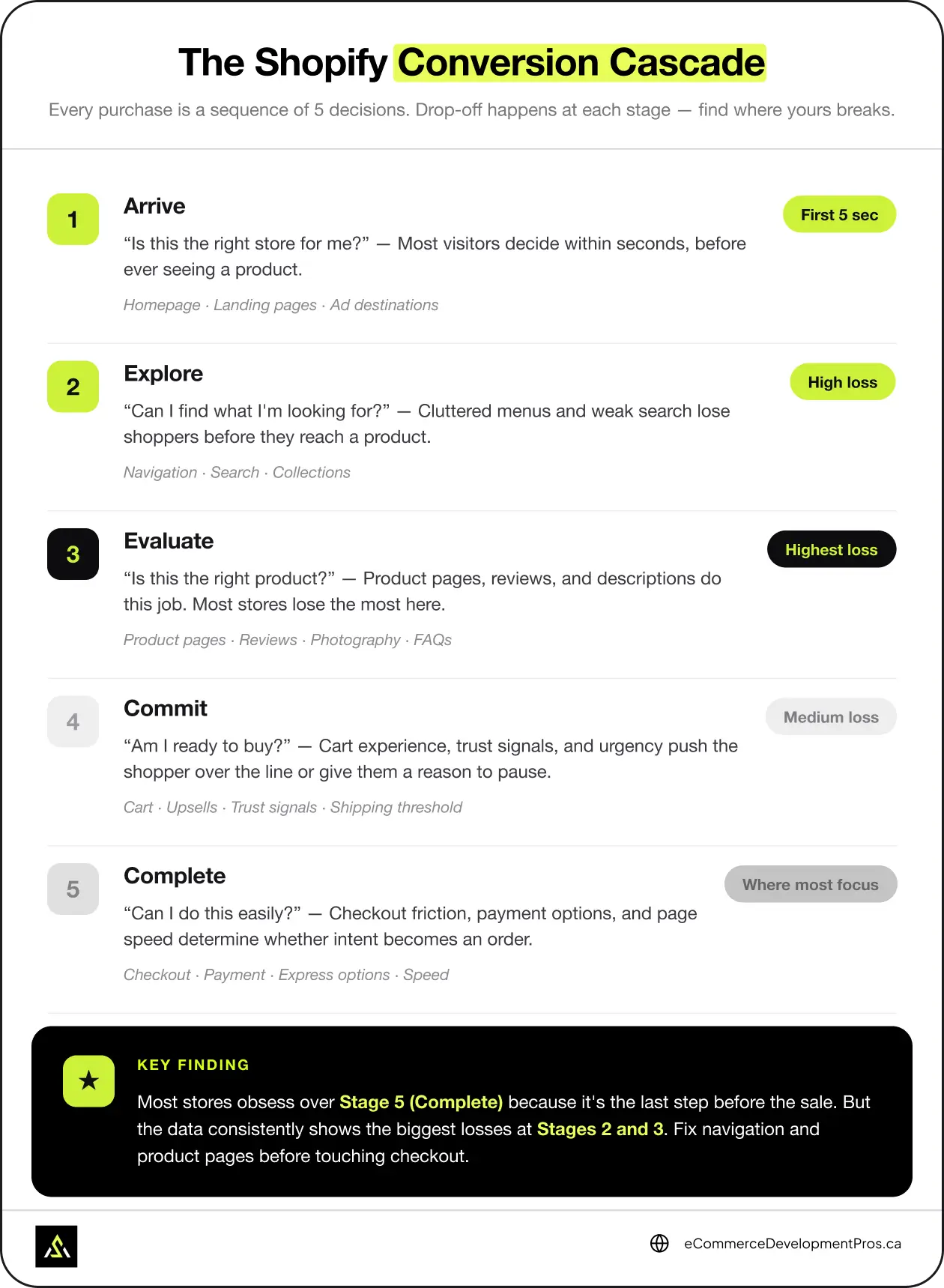
The Shopify Conversion Cascade — five stages every shopper moves through before buying. Most stores lose the most revenue at Stage 3 (Evaluate), not Stage 5 (Complete) where they focus their CRO efforts.
The 5 Stages of the Shopify Conversion Cascade
- Arrive – “Is this the right store for me?” The homepage and landing pages answer this question within seconds. Most visitors decide here without ever seeing a product page.
- Explore – “Can I find what I’m looking for?” Navigation, search, and collection pages do this job. Stores with cluttered menus or weak search lose shoppers here before they reach a product.
- Evaluate – “Is this the right product?” Product pages, reviews, photography, and descriptions all contribute. This is where most stores have their biggest losses – and where most of the strategies in this guide are focused.
- Commit – “Am I ready to buy?” Cart experience, urgency signals, and trust indicators push the shopper over the line – or give them a reason to pause.
- Complete – “Can I do this easily?” Checkout friction, payment options, and page speed determine whether intent turns into a completed order.
The reason this framework matters: most stores obsess over Stage 5 – checkout – because it’s the last thing before the sale. But the data almost always shows the biggest losses at Stage 2 or Stage 3. Fixing checkout on a store that’s losing people at navigation is optimizing the wrong end of the funnel.
Is CRO Right for Your Store Right Now?
Answer these questions honestly:
|
Question |
If Yes… |
|---|---|
|
Are you getting 500+ monthly sessions? |
You have enough data to start CRO |
|
Is your add-to-cart rate below 4%? |
Product pages are the priority |
|
Is your checkout completion rate below 60%? |
Checkout is the priority |
|
Are most visitors bouncing from the homepage? |
First impression or traffic quality is the issue |
|
Is your mobile conversion rate less than half your desktop rate? |
Mobile optimisation is the priority |
If you answered no to the first question, focus on traffic first. CRO is a multiplier – it needs something to multiply.
What Does Shopify CRO Cost, and How Long Does It Take?
Timeframes to see results:
- Quick wins (copywriting, CTA changes, trust signals): 2-4 weeks
- A/B testing cycles: 4-8 weeks per test (depending on traffic volume)
- Full CRO program results: 3-6 months for meaningful, statistically valid improvements
Cost ranges:
- DIY CRO using Shopify apps and this guide: $50-$300/month in app costs
- CRO audit from a specialist agency: $1,500-$5,000 one-time
- Ongoing CRO program (strategy + testing + implementation): $2,000-$6,000/month
The ROI calculation:
If your store does $50,000/month in revenue at a 1.5% conversion rate, moving to 2.5% adds roughly $33,000/month in revenue – with the same traffic.
👉 Use our FREE CRO Calculator to run this for your own numbers.
Common Shopify CRO Mistakes
1. Testing too many things at once
If you change five things simultaneously and conversion improves, you don’t know which change caused it. Test one thing at a time for clean data.
2. Ending tests too early
A/B tests need statistical significance to be meaningful. Most Shopify stores don’t have enough traffic to call a test after one or two weeks. Use a professional testing tool like Intelligems, VWO, or Convert.
3. Copying what works for other stores
Best practices are starting points, not guarantees. What works for a $20 impulse-purchase store won’t work for a $500 considered-purchase store. Test everything for your audience.
4. Ignoring mobile
Optimizing the desktop experience while 70% of your traffic is mobile is a fundamental mismatch. Always prioritize mobile experience changes.
5. Fixing UX problems with discounts
If your store isn’t converting, the instinct is often to offer a discount. But discounts train customers to wait for deals and erode margin. Fix the underlying experience problem first.
6. No baseline measurement
Making CRO changes without a clear before/after measurement system means you don’t know if anything worked. Set up proper Google Analytics 4 e-commerce tracking before making changes.
Prioritized Action List: Where to Start
Before you start – calculate what a 1% conversion lift is worth for your store – that number tells you exactly where to focus first.
Week 1 – Audit
Install Microsoft Clarity (free) if you haven’t already. Run through your full purchase flow on mobile. Identify your add-to-cart rate, checkout completion rate, and overall conversion rate. Set these as your baselines. Watch 10 session recordings.
Weeks 2-3 – Quick Wins
Fix your product page CTA visibility on mobile. Add trust signals (reviews, guarantee, payment badges) to product pages and cart. Update your hero section value proposition. Add return policy near the Add to Cart button.
Weeks 4-6
Add photo reviews to your top 10 products. Implement free shipping threshold messaging in cart. Fix any navigation confusion identified in Week 1. Add product FAQ sections to your 5 highest-traffic product pages.
Months 2-3
Set up behaviour-based email flows in Klaviyo (browse abandon, cart abandon, post-purchase). Implement a sticky mobile CTA bar. Audit and optimize your checkout form fields. Set up your first A/B test with Intelligems.
Ongoing
Run structured A/B tests on your highest-traffic pages. Review your search analytics monthly. Update product descriptions based on customer review language. Review heatmap data quarterly and address emerging friction points.
Don’t just know the strategies – fix them.
You’ve seen all 42. Now find out exactly which ones are costing your store conversions. Our Shopify CRO audit identifies your specific leaks and gives you a prioritised fix plan – so you stop losing sales you’ve already earned.

Stop Guessing What’s Killing Your Conversions
Most stores have two or three specific friction points driving the majority of their abandonment.
Finding them takes data, not guesswork. We take a deep dive into your analytics, watch how real visitors behave on your store, and tell you exactly what to fix first.
FAQs: Shopify Conversion Rate Optimization
What is a good Shopify conversion rate in 2026?
For most Shopify stores, the typical conversion rate is 1-3%. Well-optimised stores in competitive categories often achieve 3-5%. Your own trend matters more than industry benchmarks – consistent month-over-month improvement is the real goal.
How do I know which pages to fix first?
Open Shopify Analytics and look at your conversion funnel. Find the stage where the biggest percentage of visitors drop off – that’s where you start, not at the bottom of the funnel where most stores instinctively focus. If most drop off before adding to cart, your product pages are the priority. If they add to cart but don’t complete checkout, focus there.
What is the average cart abandonment rate?
The average documented cart abandonment rate is 70.19%, according to Baymard Institute’s ongoing research. The reasons are consistent across the research – unexpected shipping costs drive nearly half of all abandonment (48%), followed by stores that force account creation before checkout (24%), and checkouts that ask for too much information (17%) or take too many steps to complete.
Do I need an agency to do CRO?
Not necessarily. Many quick wins – trust signal additions, CTA optimisation, mobile fixes, email flows – can be done in-house using this guide. Where agencies add the most value is in structured A/B testing, audit methodology, and interpreting analytics accurately. See our Shopify CRO service if you want a structured audit.
How long does Shopify CRO take to show results?
Quick wins – fixing your CTA visibility, adding trust signals, tightening product copy – can show measurable improvement within two to four weeks. For statistically valid A/B test results, plan on 4-8 weeks per test minimum. A full CRO program delivers compounding results over 3-6 months.
Is Shopify good for conversion optimisation?
Shopify is one of the better platforms for CRO, for a few specific reasons. The checkout is clean and battle-tested, Shopify Payments removes a lot of the friction that third-party payment setups introduce, and the app ecosystem means most CRO tools – reviews, upsells, personalization, testing – have native Shopify integrations that actually work rather than requiring custom development.
Shopify Plus gives you significantly more control, particularly over checkout customization. On standard Shopify the checkout is largely fixed, which limits what you can test and change in that final stage.
The one genuine limitation is A/B testing. Shopify has no native split testing capability, so you’re reliant on third-party tools like Intelligems, VWO, or Convert. That adds cost and setup complexity, but it’s a solvable problem – not a reason to avoid the platform.
What’s the difference between CRO and SEO?
SEO brings more of the right people to your store. CRO converts more of the people who are already there. They work together – higher-quality SEO traffic is easier to convert, and a higher-converting store makes every SEO traffic gain worth more.
Should I focus on CRO or driving more traffic?
If your conversion rate is below 1%, fix the store first – more traffic amplifies the problem. If you’re already converting at 1.5% or above with healthy margins, there’s no reason to choose – run both in parallel.
What Shopify apps are most useful for CRO?
The right apps depend on where your biggest gap is. These are the categories that move the needle most consistently:
- Reviews – Okendo, Yotpo, Judge.me. Photo reviews matter more than star ratings alone – they show real people with the real product. The AI helps surface most relevant reviews for each visitor in Okendo and Yotpo and is the differentiator worth paying for.
- Personalization and upsell – Rebuy. The AI recommendation engine is what separates it from simpler upsell tools.
- Site search – Klevu for AI-powered intent matching, Boost Commerce for filter-heavy catalogs.
- Email and SMS – Klaviyo. The behaviour-based flow revenue justifies the cost at almost any store size.
- Loyalty – Smile.io or LoyaltyLion. Start simple – a points program doesn’t need to be complex to work.
- Heatmaps and session recording – Microsoft Clarity is free and good enough for most stores. Hotjar if you need more advanced funnel analytics.
- A/B testing – use Intelligems for anything touching price, shipping, or discounts. It shows profit impact, not just conversion rate, which matters because a test that lifts conversions while hurting margins is not actually a win. VWO or Convert for page-level UX and content experiments.
- Shoppable video – Tolstoy for AI-personalized video on product pages.
- Post-purchase – AfterSell or Rebuy for upsells, Octane AI for quiz-based data collection on the Thank You page.
Don’t install everything at once. Each app adds JavaScript to your store and slows page load. Pick the category that addresses your biggest conversion gap first, measure the impact, then add the next one.
How does CRO affect Shopify SEO?
Lower bounce rates, higher time on page, and more completed purchases send positive behavioural signals to Google. Page speed is the most direct overlap – the same optimisations that improve conversion also improve Core Web Vitals scores, which are confirmed ranking factors. You’re fixing both with the same work.
Product descriptions written to answer real buyer questions convert better and rank better. They’re also the format most likely to get cited in Google’s AI Overviews – so the same copy improvement serves conversion, SEO, and AI visibility simultaneously.
How can AI help with Shopify CRO?
AI tools now assist at every stage of the conversion funnel – generating product photography and video (Pebblely, Botika, Tolstoy), powering intelligent site search (Klevu), personalizing product recommendations (Rebuy), surfacing relevant reviews (Okendo, Yotpo), drafting product descriptions (Shopify Magic), summarizing heatmap data (Microsoft Clarity), and optimizing A/B test economics (Intelligems). See the AI-Powered CRO summary section above for the full breakdown.