



 647-812-5125


Every Shopify migration kicks off with the same question: how long will this take? And almost every answer given in the first planning meeting turns out to be wrong—usually too short. Not because anyone is being dishonest, but because the factors that actually drive the timeline rarely get surfaced until the project is already running.
The standard answer you’ll find most places—“it depends on store size”—is technically accurate and almost completely useless for planning. This guide goes further. It explains what the timeline actually consists of, where projects reliably go long, and what you can do before the project starts to move faster without cutting corners.

How Long Does a Shopify Migration Take – Quick Answer
Most Shopify migrations take 2–12 weeks.
- A small store with a pre-built theme and clean data can launch in under two weeks.
- A mid-sized store with custom design and standard integrations typically runs 4–8 weeks.
- Enterprise stores—large catalogs, ERP/CRM connections, complex workflows—often take 8–12 weeks or more.
But the range isn’t random. Three things determine where your store sits within it: the quality of your data going in, how quickly design decisions get made and approved, and whether integration requirements are fully known before the build starts. Get all three right, and you sit at the fast end. Leave any one undefined, and you don’t.
TL;DR: Shopify Migration Timeline at a Glance
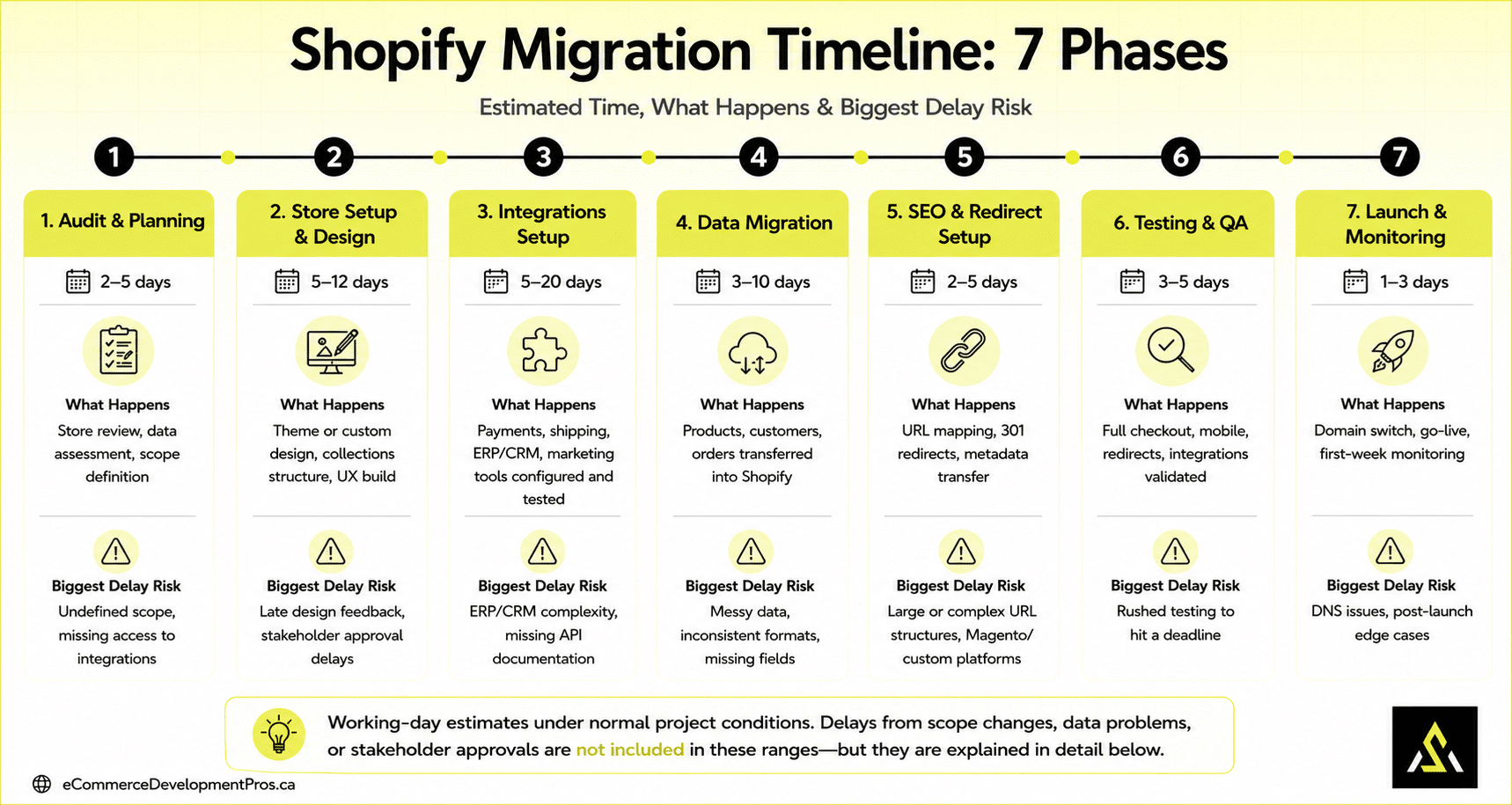
| Phase | Estimated Time | What Happens | Biggest Delay Risk |
|---|---|---|---|
| 1. Audit & Planning | 2–5 days | Store review, data assessment, scope definition | Undefined scope, missing access to integrations |
| 2. Store Setup & Design | 5–12 days | Theme or custom design, collections structure, and UX build | Late design feedback and stakeholder approval delays |
| 3. Integrations Setup | 5-20 days | Payments, shipping, ERP/CRM, and marketing tools configured and tested | ERP/CRM complexity, missing API documentation |
| 4. Data Migration | 3–10 days | Products, customers, and orders transferred into Shopify | Messy data, inconsistent formats, missing fields |
| 5. SEO & Redirect Setup | 2–5 days | URL mapping, 301 redirects, metadata transfer | Large or complex URL structures, Magento/custom platforms |
| 6. Testing & QA | 3–5 days | Full checkout, mobile, redirects, and integrations validated | Rushed testing to hit a deadline |
| 7. Launch & Monitoring | 1–3 days | Domain switch, go-live, first-week monitoring | DNS issues, post-launch edge cases |
EDP Insight
Working-day estimates under normal project conditions. Delays from scope changes, data problems, or stakeholder approvals are not included in these ranges—but they are explained in detail below.
Why Most Shopify Migration Timeline Estimates Are Wrong
There’s a reason migration timelines are so often underestimated. Most estimates only account for one type of time.
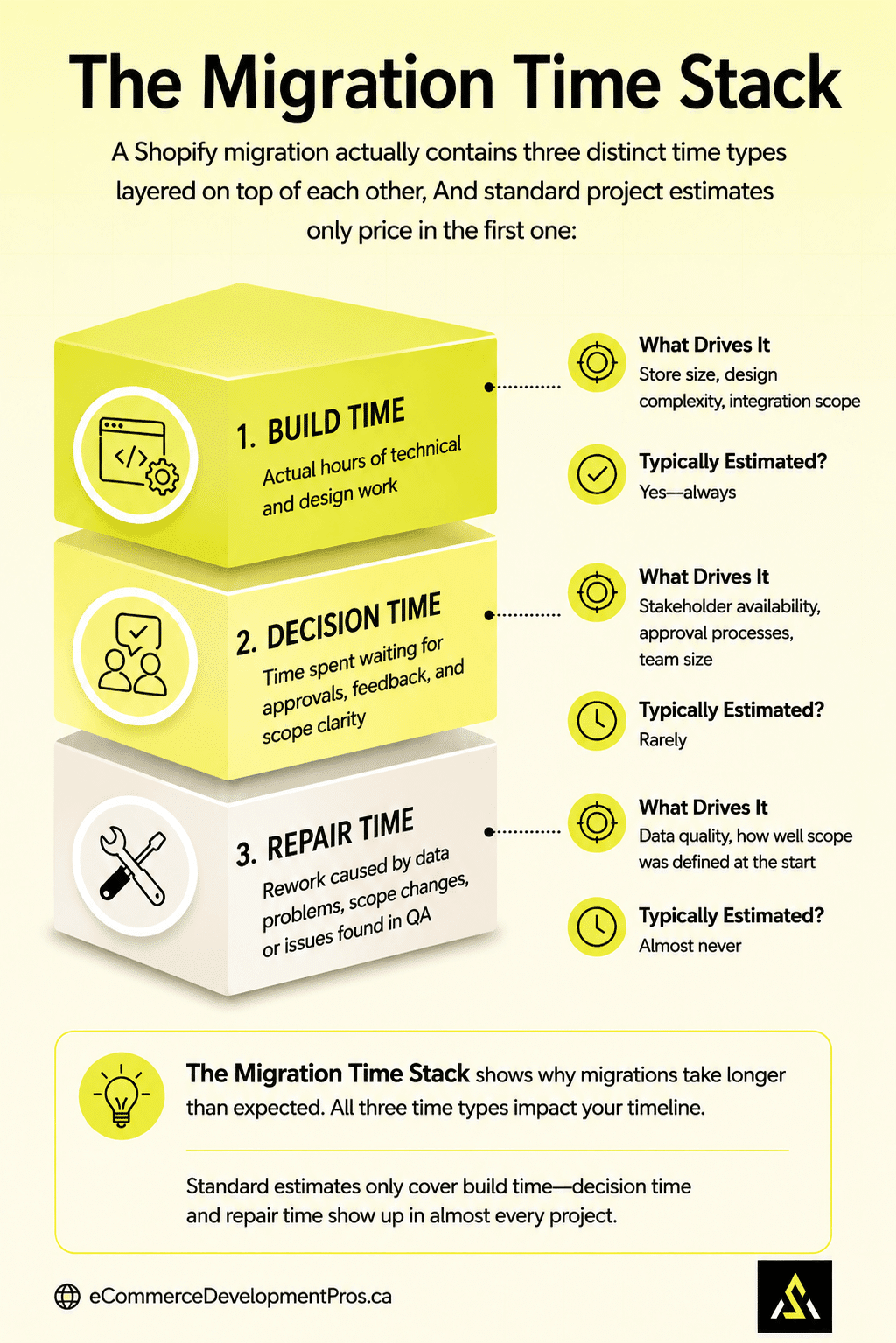
A Shopify migration actually contains three distinct time types layered on top of each other, and standard project estimates only price in the first one:
| Time Type | What It Is | What Drives It | Typically Estimated? |
|---|---|---|---|
| Build time | Actual hours of technical and design work | Store size, design complexity, integration scope | Yes—always |
| Decision time | Time spent waiting for approvals, feedback, and scope clarity | Stakeholder availability, approval processes, and team size | Rarely |
| Repair time | Rework caused by data problems, scope changes, or issues found in QA | Data quality, how well the scope was defined at the start | Almost never |
Decision time and repair time are what push migrations past their original deadlines. Neither shows up in a standard project estimate—but both show up in almost every project we run.
This is what we call The Migration Time Stack: build time is what gets quoted; decision time and repair time are what get discovered. Planning for all three from the start is what separates a migration that launches on time from one that doesn’t.
The Shopify Migration Time Stack
The 7-Phase Shopify Migration Timeline
Every project we run follows a seven-step Shopify migration process. The phases are connected—rushing or skipping one creates problems in the next. Here’s what actually happens at each stage and, more importantly, what determines how long it takes.
Phase 1: Audit & Planning (2–5 Days)
This is where the full scope gets defined. We look at the current store’s URL structure, product data, integration dependencies, and SEO assets. The goal is to know exactly what needs to move, what needs to be rebuilt, and what can be simplified before any build work starts.
What actually takes time here is not the audit itself—it’s getting aligned on decisions.
- Which apps are being replaced?
- Is the URL structure changing?
- Are there custom features that need to be rebuilt in Shopify?
The clearer these decisions are on day one, the faster every subsequent phase moves.
- Document all current URLs and identify the redirect scope
- Inventory all current integrations and confirm Shopify equivalents exist (native or app)
- Flag data quality issues: missing fields, duplicate products, inconsistent image storage
- Define design approach clearly: pre-built theme, customised theme, or full custom build
- Identify all stakeholders who need to approve work and when they’re available
Before any build work starts, it’s worth reviewing Shopify’s official migration guide to confirm which data types can be imported automatically and which require manual handling or a migration app.
EDP Insight
The planning phase is the highest-leverage point in the entire project. One day spent getting alignment here is worth three days of recovery work later.
Phase 2: Store Setup & Design (5–12 Days)
Design is consistently the longest single phase in a Shopify migration—and the most variable. A store using a well-configured pre-built Shopify theme can move through this phase in under a week. A store requiring a fully custom design with multiple stakeholder approval cycles can take three weeks or more.
The time here has two components.
- The first is the design work itself—theme configuration, homepage, product pages, collection pages, mobile layout.
- The second, and the one that’s far harder to control, is the approval process. Every revision cycle and every mid-build change request extend the timeline.
In projects we’ve run, stores that give clear design direction on day one and hold to it finish this phase in roughly half the time of stores where feedback is late, vague, or shifts direction mid-build.
- Theme selection and initial store configuration
- Homepage, product page, collection page, and checkout design
- Mobile-first UX decisions and layout
- Navigation structure and collection organisation
EDP Insight
Design revisions and stakeholder approval delays are the single most common cause of migration timeline overruns. Structured review windows with clear deadlines—not open-ended feedback cycles—are what keep this phase on track.
What This Looks Like in Practice
A WooCommerce store with 1,800 products came to us expecting a four-week migration. Clean products, standard integrations, no custom checkout. We quoted six weeks with a reasonable buffer. It launched in seven.
The extra week came from two places: the product images were stored inconsistently across three different folders with no clear naming convention, which added two days of cleanup we hadn’t scoped for, and the stakeholder who needed to approve the homepage design was travelling during weeks three and four.
Neither of those things shows up in a standard timeline estimate—but both of them show up in almost every project we run. The fix isn’t a longer quote; it’s a structured discovery process before the project starts that surfaces these dependencies before they become delays.
Phase 3: Integrations Setup (5-20 Days)
Most Shopify stores run on a stack of connected tools: search and filters, reviews, payment processors, shipping providers, email marketing platforms, review apps, analytics, and sometimes ERP or CRM systems. Each needs to be configured, connected, and tested—not just installed.
Basic integrations—Shopify Payments, standard shipping rates, Klaviyo email—are typically fast. Complex integrations with ERP systems, custom API connections, or legacy tools that have no direct Shopify equivalent take considerably longer and sometimes require custom development work that should have been scoped in Phase 1.
Integration surprises found mid-project are one of the most consistent causes of timeline slippage. The question “Does this tool integrate natively with Shopify?” should always be answered before the project starts.
Phase 4: Data Migration (3–10 Days)
Data migration covers moving products, customer records, order history, and content into Shopify. The time scales directly with two variables: volume and data quality.
A store with 200 products in a clean, well-structured export can complete data migration in two or three days. A store with 5,000 products that have inconsistent formatting, missing variant data, and images scattered across multiple locations will take significantly longer—and will require cleanup either before or during the migration.
We always recommend cleaning data before the project starts rather than during it. Fixing messy data inside Shopify is slower and more error-prone than fixing it at the source. It’s also the kind of work that delays Phase 2 if it’s discovered mid-design.
For stores migrating from WooCommerce, Etsy, Wix, Square, or Squarespace, Shopify’s Store Migration app handles the bulk product and customer import automatically. For Magento and custom platforms, a manual CSV export or a third-party migration service is typically required.
| Data Type | What Gets Migrated | Common Issues |
|---|---|---|
| Products & variants | Titles, descriptions, images, pricing, SKUs, metafields | Missing variant data, inconsistent image naming, duplicate SKUs |
| Collections | Manual and automated hierarchy structure | Flat Shopify structure vs nested categories from the old platform |
| Customer records | Name, email, address history, tags | Passwords cannot be migrated—customers need to reset |
| Order history | Imported for reference; live orders handled separately | Volume-dependent; often a significant file size |
| Blog & page content | Migrated with metadata where possible | Formatting differences between platforms |
| SEO metadata | Title tags, meta descriptions, alt text | Must be reviewed—not all platforms export cleanly |
Phase 5: SEO & Redirect Setup (2–5 Days)
This phase protects the SEO equity built up on the old platform. Every URL that changes needs a 301 redirect pointing to the correct Shopify equivalent. Title tags, meta descriptions, canonical tags, and structured data all need to carry over correctly.
The time here depends on how many URLs are changing and how cleanly they map to the new Shopify structure. WooCommerce migrations tend to be faster because the URL patterns are more predictable. Magento and custom platform migrations often require significantly more manual mapping work because of deeply nested URL hierarchies that have no direct Shopify equivalent.
For the complete redirect mapping process — including the URL audit, how to build the mapping spreadsheet, and how to implement in Shopify — see our guide to Shopify URL redirects during migration.
Phase 6: Testing & QA (3–5 Days)
This is where problems get caught before they become customer-facing. A thorough QA process covers the complete purchase flow on desktop and mobile, all payment methods, shipping rate calculations, redirect validation, and integration behaviour under real conditions.
Rushing QA to hit a launch date is one of the costliest migration mistakes. Issues that take 30 minutes to fix in a staging environment can take hours to diagnose and resolve on a live store under real traffic—with customers affected. The extra days in QA almost always pay back faster than they cost.
- Full checkout flow on desktop and mobile, including edge cases
- All payment methods: Shopify Payments, Shop Pay, Apple Pay, Google Pay, BNPL options
- Shipping rate calculations for all configured zones
- Redirect validation—test every high-priority URL, not just a sample
- Email flows triggered correctly: order confirmation, abandoned cart, shipping notifications
- Search functionality, collection filtering, and mobile navigation
Phase 7: Launch & Post-Launch Monitoring (1–3 Days)
Launch day is the DNS switch—pointing the domain to the new Shopify store. The switch itself is usually straightforward, but the first 48–72 hours require active monitoring. Search console errors, unexpected 404s, and integration edge cases that didn’t surface in QA often appear in the first days of real traffic.
We treat go-live as the beginning of a monitoring window, not the end of the project. A structured post-launch checklist— Google Search Console coverage errors, conversion rate against the old store baseline, key integration behaviour—should run for at least two weeks after launch.
After launch, check Shopify’s web performance reports in your admin for Core Web Vitals scores. Google uses these as ranking signals — a new store that passes all three metrics (LCP, INP, CLS) starts its indexed life in a stronger standing than one that doesn’t.
The 7-Phase Shopify Migration Timeline

Not Sure Where Your Store Sits in This Range?
The 2–12 week range covers a lot of ground. Where your migration actually lands depends on your platform, your data, your design requirements, and what integrations you’re running. We can give you a realistic estimate based on your specific setup — usually in a single conversation.
What Actually Impacts Your Migration Timeline
Every migration timeline comes down to the same five variables. What’s worth understanding is which ones you control before the project starts and which ones emerge during it.
| Factor | Impact Level | What It Means in Practice |
|---|---|---|
| Store size & data volume | High | 100 SKUs migrate in days. 10,000+ SKUs with complex variant structures and scattered images will take significantly longer. Data cleanup before migration is the single biggest time lever available to you. |
| Source platform | High | WooCommerce migrations move faster not because WooCommerce is simpler—it isn’t—but because data exports more cleanly and URL patterns are more predictable.
Magento migrations run longer primarily because of deeply nested URL hierarchies that can’t be replicated in Shopify’s flat /collections/ structure. Every nested URL needs a manual mapping decision. On a store with 3,000+ products across multiple category levels, that work alone can add a week. |
| Design approach | Very High | A pre-built theme can cut 5–8 days off the design phase compared to a fully custom build. But stakeholder approval speed matters as much as the design complexity itself. A simple design with a slow approval process takes longer than a complex design with a fast one. |
| Integration complexity | Medium–High | Standard apps connect in hours. ERP/CRM integrations with custom logic can add days or weeks, especially when API documentation is limited or the tool has never been integrated with Shopify before. |
| Data quality & planning | Critical | Clean, well-structured data with a fully defined scope is the single biggest timeline accelerator. Messy data or undefined requirements create delays that compound across every phase—this is the one factor that feeds into all the others. |
Where Does Migration Time Actually Go?
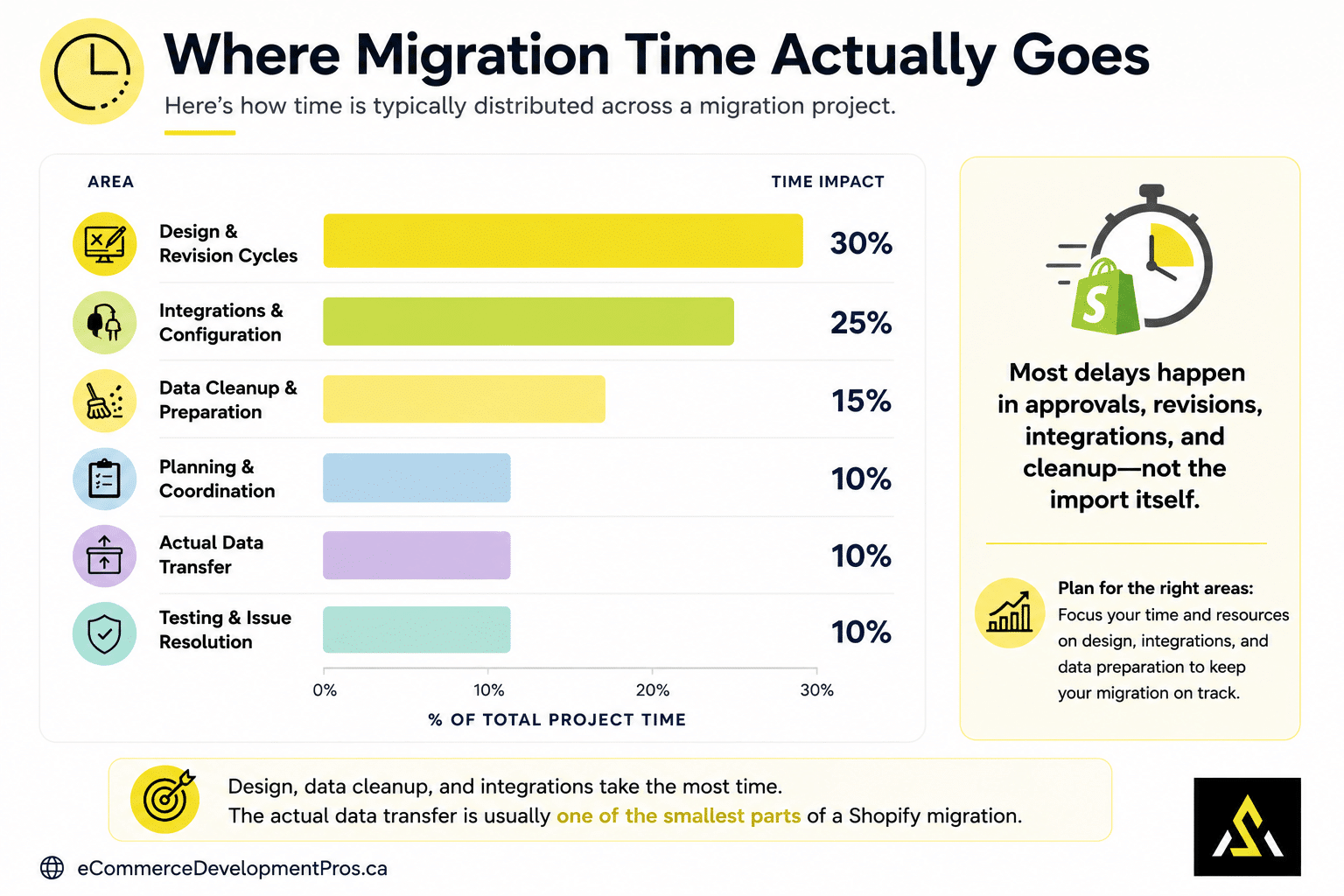
Most people assume data transfer is the time-consuming part. It’s almost never the case. Here’s how time is typically distributed across a migration project—and why the distribution surprises most merchants.
Shopify Migration Time Breakdown
| Area | Time Impact | What Actually Eats the Hours |
|---|---|---|
| Design & revision cycles | Very High | Layout decisions, UX feedback rounds, stakeholder sign-off, mobile refinements—and waiting between all of these |
| Data cleanup & preparation | High | Fixing product data before migration: standardising formats, resolving duplicate SKUs, organising image files, filling missing fields |
| Integrations & configuration | High | Connecting, configuring, and testing every tool in the stack—especially anything that needs custom setup |
| Testing & issue resolution | High | Checkout flows, redirect validation, mobile UX, edge cases—and fixing the issues found |
| Planning & coordination | Medium | Scope alignment, approvals, access setup, and team communication between the agency and the client |
| Actual data transfer | Lower than expected | The import itself, once data is clean and Shopify’s structure is defined, is usually the least time-intensive part |
EDP Insight
If you’re surprised that design and data cleanup are at the top of this list, not data transfer—you’re not alone. It’s the most common misconception we encounter in early project planning conversations.
How Long Does Shopify Migration Take by Store Type?
Store size and source platform together give the most reliable baseline range. Here’s how both factors play out.
By Store Size
| Store Type | Typical Timeline | What It Includes |
|---|---|---|
| Small store | 1–3 weeks | Pre-built theme, up to ~500 products, minimal integrations, basic SEO, and redirect setup |
| Mid-sized store | 3–8 weeks | Customised or semi-custom design, 500–5,000 products, standard integrations, full redirect mapping |
| Enterprise store | 8–16+ weeks | Custom design, 5,000+ products, ERP/CRM connections, complex workflows, extended QA cycles |
By Source Platform
Platform matters for reasons that aren’t always obvious. The speed difference between a WooCommerce and a Magento migration isn’t mainly about platform quality—it’s about structural compatibility with where you’re going.
| Platform → Shopify | Relative Speed | The Real Reason |
|---|---|---|
| WooCommerce → Shopify | Faster | Data exports cleanly, and URL patterns are more predictable. Most apps have direct Shopify equivalents. The main variable is data quality, not structure. |
| Magento → Shopify | Slower | Magento’s deeply nested category URL structure doesn’t map to Shopify’s flat /collections/ format. Every level of nesting requires a manual redirect decision. On a large catalog, that alone adds significant time. |
| BigCommerce → Shopify | Medium | Reasonably clean data structure, but URL and collection mapping still require careful manual work, particularly for stores with product-level SEO built up over time. |
| Custom platform → Shopify | Longest | No standard structure to work from. Data mapping, handling, and integration replacement all need to be designed case by case. Expect the upper range of every phase estimate. |
When Is the Best Time to Migrate to Shopify?
The straightforward answer: when your store is under the least pressure. That means a lower-traffic period, no active major campaigns running, and enough runway before your next seasonal peak to catch and fix anything that surfaces after launch.
| Situation | Recommendation | Why |
|---|---|---|
| Peak trading season (BFCM, holiday, back-to-school) | Avoid | Even small post-launch issues become expensive at peak traffic. Recovery is harder when you’re also managing campaigns and high order volumes. |
| Low-traffic window | Ideal | You have space to catch issues, iterate, and recheck without real buyers hitting problems. This is the window that pays for itself. |
| Planning a redesign or rebrand | Good timing | Combining migration with a redesign means you don’t do the same work twice. The cost and timeline overlap save both. |
| Just before a major paid campaign launch | Risky | New stores need a settling period before being tested with paid traffic. Launching a campaign into a store that hasn’t been validated under real conditions is high risk. |
| No specific time pressure | Plan now | The stores that migrate smoothest are the ones that plan three to four months ahead. Rushed timelines are the leading cause of post-launch problems. |
Should You Migrate to Shopify Before or After the Holiday Season?
Migrate before the holidays only if you can launch and fully test your store six to eight weeks before peak season. For most merchants, that means starting by August.
Otherwise, migrating after the holidays is the safer option. You’ll have more time to test, fix issues, and optimize before the next peak season.
Migration Timing: Before vs. After the Holidays
|
||
|---|---|---|
| Timeline Factor | Before the Holidays | After the Holidays |
| Ideal execution window | Finished and stable by late September | January through April |
| Risk of revenue loss | High — a slipped deadline pushes launch into peak traffic | Low — mistakes cost less when volume is naturally down |
| Staff focus | Split between finishing the build and holiday prep | Fully on the migration, then a clear runway to test |
| SEO impact | Ranking fluctuations land during your highest search volume | Recovery happens during a quiet period |
Is Your Migration Stuck? We Can Help.
If your project is running behind and you’re not sure how to get it back on track — whether it’s a data problem, a design bottleneck, or an integration that isn’t working — we’ve seen it before. Get in touch, and we’ll give you a straight answer on what’s causing it and what to do next.
How to Reduce Your Shopify Migration Timeline
A faster migration doesn’t mean a rushed one. The actions that genuinely shorten timelines fall into two groups: things you can control before the project starts, and things you can control during it.
Before the Project Starts (Highest Leverage)
These are the actions with the biggest impact on your final timeline—and they all happen before a line of work is done.
-
Clean your data
Go through your product export and fix inconsistent formatting, missing variant data, and duplicate records. Standardise your image naming convention. A clean data handoff can save two to four days in Phase 3 alone—and prevents data problems from surfacing during design, which is the worst time to find them.
-
Lock your scope on day one
Every mid-project scope change—“can we also add this feature?” or “actually, let’s change that section”—adds build time, decision time, and often repair time. Define exactly what the migration includes before work starts and protect that definition.
-
Identify all integration requirements in the discovery phase
The question “Does this tool integrate with Shopify?” should be answered before the project is quoted, not discovered mid-build. Custom integration requirements found during the project are one of the most consistent causes of deadline slippage.
-
Know who approves what, and when they’re available
Identify every stakeholder who needs to sign off on design, content, or go-live decisions. Check their availability against your planned milestone dates before the project kicks off. A key approver being unavailable during the design phase adds dead time that can’t be recovered elsewhere.
During the Project (Damage Control)
These actions limit the impact when things come up—because something always does.
-
Use structured approval windows, not open-ended feedback
Set a specific date and format for design feedback—“feedback due by Thursday on these three questions”—rather than sending work and waiting. Open-ended review cycles are where decision time accumulates invisibly.
-
Don’t compress QA to recover time lost elsewhere
If the project is running behind, the instinct is to shorten testing. Resist this. Issues that take 30 minutes to fix before launch take hours to fix after it, with customers affected. QA is the phase where cutting time costs the most.
-
Surface integration issues as early as possible
If an integration isn’t behaving as expected, flag it at Phase 5—not at the end of Phase 6 QA. The later an integration issue is found, the more it disrupts the rest of the timeline.
Following a structured Shopify migration checklist ensures nothing gets missed and that each phase starts with what it needs from the one before.
How Timeline and Cost Move Together
Migrations that take longer almost always cost more—not because of the extra time alone, but because the factors that extend the timeline (custom design, complex integrations, messy data requiring cleanup) also drive cost. The inverse is also true: the actions that reduce timeline—clean data, a pre-built theme, a locked scope—also reduce cost.
For a full breakdown of what drives Shopify migration pricing, see our Shopify migration cost guide.
Is Your Migration Running Behind Schedule?
If you’re already mid-project and things are taking longer than expected, here are the most common causes and what to do about each.
| What’s Happening | Most Likely Cause | What to Do |
|---|---|---|
| Design phase has been running for 3+ weeks | Unresolved design feedback, multiple revision cycles, or a key approver who is unavailable | Call a decision meeting. Identify the specific unresolved items. Set a deadline for final sign-off and hold to it. |
| Data migration is taking much longer than estimated | Data quality issues discovered during migration that weren’t flagged in planning | Pause, assess the full scope of the data problem, and reset the timeline realistically. Partial data fixes during migration compound. |
| An integration isn’t working as expected | Tool doesn’t have a native Shopify integration, or requires custom API work not in the original scope | Escalate immediately. Decide whether to proceed with custom development, find an alternative tool, or change the scope. Don’t discover this in QA. |
| Scope has expanded since the project started | New requirements added mid-build | Document every addition and its timeline impact separately. Separate “v1 launch scope” from “post-launch roadmap” explicitly. |
| QA keeps finding new issues | Earlier phases were rushed, or QA started before the build was sufficiently stable | Stabilise the build before continuing QA. Running QA on an unstable build produces more issues than it resolves. |
Downloadable: Shopify Migration Timeline Planner (XLSX)
Use the companion Timeline Planner to map your own project phases with formula-calculated start and end dates, score your timeline risk factors, and identify your highest-risk phases before the project starts.
Includes: Phase-by-phase time planner with auto-calculated dates · Risk Assessment tab with traffic-light scoring · Pre-launch readiness tracker
Shopify Migration Timeline FAQs
Will my store go offline during the migration?
No. Your existing store stays live while the new Shopify store is built in a separate environment. The only moment of potential disruption is the DNS switch at launch, which typically causes a brief propagation window—usually under an hour—rather than extended downtime. Your current store runs normally throughout the entire build.
How long does a Shopify migration take?
Most migrations take 2–12 weeks, depending on store size, source platform, and how well the project is set up. Small stores with clean data and a pre-built theme can launch in under two weeks. Enterprise migrations with custom design and ERP integrations typically run 8–16 weeks or more.
What slows down a Shopify migration the most?
In our experience, the most consistent causes of timeline overruns are: messy or inconsistent product data that wasn’t cleaned before the project started, design feedback arriving late or changing direction mid-build, integration requirements discovered during the project rather than before it, and scope creep—new features added after the build has begun. Most of these are preventable if the right questions are asked during the planning phase.
Can a Shopify migration be done in a day?
For a very small store—under 50 products, no custom design, minimal integrations, no SEO work required—a basic migration is technically possible in a day. But this excludes any design work, redirect mapping, integration setup, or meaningful testing. For any store with established traffic or an existing customer base, a rushed migration carries significant risk.
What is the fastest way to migrate to Shopify?
The four actions that genuinely accelerate a migration: use a pre-built theme rather than a custom design, clean your product data before the project starts, lock scope on day one and don’t change it, and identify all integration requirements before any build work begins. These four changes together can meaningfully compress a timeline without increasing post-launch risk.
How does my source platform affect the migration timeline?
WooCommerce migrations are typically faster because the data exports cleanly and URL patterns are more predictable. Magento migrations take longer primarily because of deeply nested URL hierarchies that require manual mapping for every level of nesting. Custom platform migrations are the longest because there is no standard structure to work from—everything needs to be mapped case by case.
Does migrating to Shopify affect my SEO rankings?
It can—if URL changes aren’t handled correctly with 301 redirects and metadata is not transferred. With proper redirect mapping, title tag, and meta description transfer, and post-launch Search Console monitoring, SEO impact should be minimal and temporary. For the full SEO approach, see our Shopify migration SEO guide.
When should I plan my Shopify migration?
During a low-traffic period with enough runway before your next seasonal peak. Stores that plan three to four months ahead and avoid migrating near major trading periods have consistently smoother launches. If you’re already planning a redesign or rebrand, migrating at the same time avoids doing the same infrastructure work twice.
Is it too late to migrate to Shopify before Black Friday?
If you’re starting in October or later, it’s too late to migrate safely before Black Friday. Focus on stabilizing your current platform instead, and plan the migration for January when traffic returns to normal.

Need a Realistic Timeline for Your Migration?
Every migration is different. If you want to understand what’s likely to slow your specific project down, get a realistic timeline based on your platform and setup, and avoid the surprises that push most migrations past their deadlines—book a free planning call.