647-812-5125





Shopify Migrations Done Right — The First Time
Years In ecommerce - working across every major platform before Shopify became the standard
Data loss because we check, double-check, and then run AI-verified mapping to be sure.
We ensure 100% uptime - your store stays live — no “maintenance mode,” no downtime panic
For most stores, we take 8 weeks to migrate over and launch with Shopify
The Fear Behind Every Shopify Migration

Will I lose SEO when I move to Shopify?
That’s the biggest fear we hear, and it’s valid.
When stores move platforms, old URLs often change. If those links aren’t redirected properly, Google can’t find your pages — and your rankings drop.
How we handle it:
Before anything else, we audit your existing URLs, meta titles, and other on-page SEO details. Then we create a redirect map — every old URL points to its new Shopify version using 301 redirects.
We also migrate your page titles, meta descriptions, alt text, and page schema so search engines instantly recognize your new site and pass the SEO value over.
Further, our team runs SEO checks in Google Search Console to confirm that every redirect is working and your visibility remains stable.
Result: Your hard-earned SEO equity and rankings are preserved, and SEO rankings carries over to your new Shopify store.

Will all my customers and products migrate over to Shopify?
Yes — and this is where working with a professional Shopify migration agency matters.
Here’s what we actually do.
We start by connecting your old store to one of the migration tools we trust — usually LitExtension or Cart2Cart. They’re both solid. They pull data straight from your old system and push it into Shopify. It handles most of the heavy lifting — products, customers, orders, even images and categories.
Once that’s done, we don’t just hit “done” and walk away. We go into Shopify and start checking things. A team member will open product listings, compare them to your old store, and make sure the details match. We’ll spot-check customer accounts and a few orders, and we’ll run a test checkout to make sure everything works like it should.
Sometimes we’ll find little things — a tag missing, an image path broken, maybe a collection that didn’t map perfectly. When that happens, we fix it right there.
By the time your new store goes live, everything’s exactly where it should be. Products look right, customer data’s there, and your order history’s intact.

Will my customers have seamless access to their accounts after migration?
Yes—customers keep their accounts, but they’ll need to reset their passwords after migration. This is normal and expected when moving to Shopify.
This one catches a lot of people off guard — and honestly, most agencies don’t bring it up until it’s too late.
Passwords don’t carry over during migration, and that surprises almost everyone.
Here’s why:
Every ecommerce platform encrypts passwords differently. That’s what keeps them secure, but it also means we can’t copy them from your old system during the migration.
It’s not a limitation of the tools — it’s just how encryption works.
So when your new Shopify store goes live, your customers will need to reset their passwords to log back in.
That might sound like a hassle, but it doesn’t have to be.
We help you plan how to communicate this clearly so your customers aren’t caught off guard.
Usually, that means sending two short emails:
- One about a week before launch — to let them know a new Shopify-powered store is coming, and they’ll need to reset their password once it’s live (and explain why)
- One when launched — with a direct login link and clear steps to get back into their account.
We’ll guide your team on timing, tone, and setup — and make sure the messaging is clear and easy to follow.
We also help you schedule these through your email platform so they go out to the right customer segments at the right time.
To cover all bases, we recommend adding a small banner or pop-up on your new site during the first few weeks after launch, and updating your FAQ page so your support team doesn’t get buried with “I can’t log in” messages.
Handled this way, customers know what’s coming, what to do, and feel taken care of—not frustrated.
It’s a small yet important detail many agencies miss, but we don’t.

Will you be able to migrate our custom functionality or apps?
Yes, that’s part of what we handle.
Before we move anything, we go through your current store to see what’s running in the background — apps, scripts, custom features, or integrations you depend on. A lot of stores have things like special pricing for wholesale, loyalty programs, or shipping logic that doesn’t come standard in Shopify.
We figure out what’s essential and then match it. Most times, we can replace your existing tools with Shopify apps that do the same thing — or better. If nothing fits, we build a custom Shopify app or integration ourselves.
If you’re using systems like an ERP, CRM, or a third-party API, we connect those too. The goal is to make sure that when you switch to Shopify, the store still does everything it did before — just on a cleaner, faster setup.

Why should I hire a Shopify migration agency instead of doing it myself?
You can move your data to Shopify yourself — no question. Shopify even gives you tools to import products and customers. But migration isn’t just about moving; it’s about rebuilding.
It’s like moving a house versus building one. You might be able to pack up and move your belongings, but rebuilding the house — wiring, plumbing, foundation, aesthetics — is a whole different skill set. A Shopify migration works the same way. You’re not just transferring products; you’re rebuilding design, functionality, apps, SEO, and integrations from the ground up.
We’ve done this numerous times, across every major platform — WooCommerce, Magento, BigCommerce, Squarespace, and even custom-built systems. Each one has its own quirks.
WooCommerce hides SEO data in plugins, Magento exports media differently, BigCommerce handles URLs in its own way. We know those details, and that’s what keeps things from breaking.
Most people doing this for the first time spend weeks figuring that out — fixing imports, redoing redirects, and patching missing data. That’s time better spent running your business while we handle the technical side.

We’ve heard migrations can get messy — what usually breaks when stores move to Shopify?
Most migration issues happen when stores move too fast and rely too heavily on one-click tools without proper testing.
On paper, it looks simple: export your data, import it into Shopify, and you’re done.
But real stores aren’t clean. You’ve got years of product data, old images, mismatched tags, and custom scripts — all layered on top of each other. That’s where things start to fall apart.
- Images don’t load because file paths change
- Images don’t load because file paths change.
- Variants merge in odd ways.
- Discount codes disappear.
- Checkout scripts stop working.
- And if no one sets up redirects correctly, you’ll see 404s all over Google.
We’ve been called in more times than we can count to fix “finished” migrations that broke within days of launch — usually done through one-click tools or by developers who don’t really understand how Shopify’s data structure works.
Here’s what we do differently:
We still use automation — it’s efficient — but we test everything in a staging Shopify store before anything goes live.
We click through product pages, test the cart, run “test” orders, check mobile layouts, and make sure every redirect points where it should.
When we finally launch, we already know the store inside out.
So, when migration to Shopify is complete, instead of spending your first week fixing things, you’re taking orders.
That’s what a good migration should feel like — quiet, smooth, and uneventful.
Shopify Migrations Seamlessly & Securely. Powered by AI Precision.
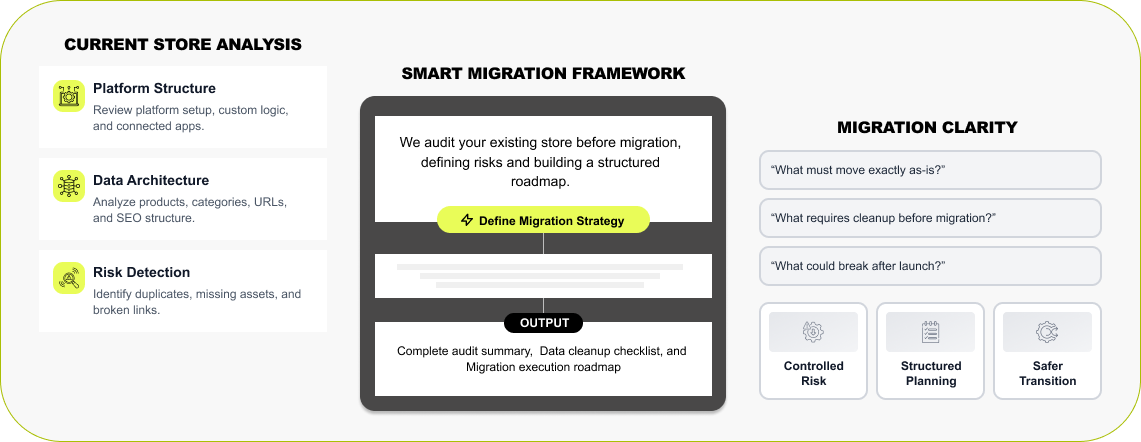

Smart Migration Flow & Store Audit
The first step for every Shopify migration project is to audit your existing system. Our Shopify migration agency runs a complete audit of your current store - understand how you are operating — platform setup, product data, SEO structure, custom logic and functionality, and connected apps. Our AI tools scan your store in the background, flagging things that could cause issues later — missing images, duplicate URLs, broken categories. Then we build a simple roadmap that shows what’s moving, what needs cleanup, and how everything connects to Shopify.
Read More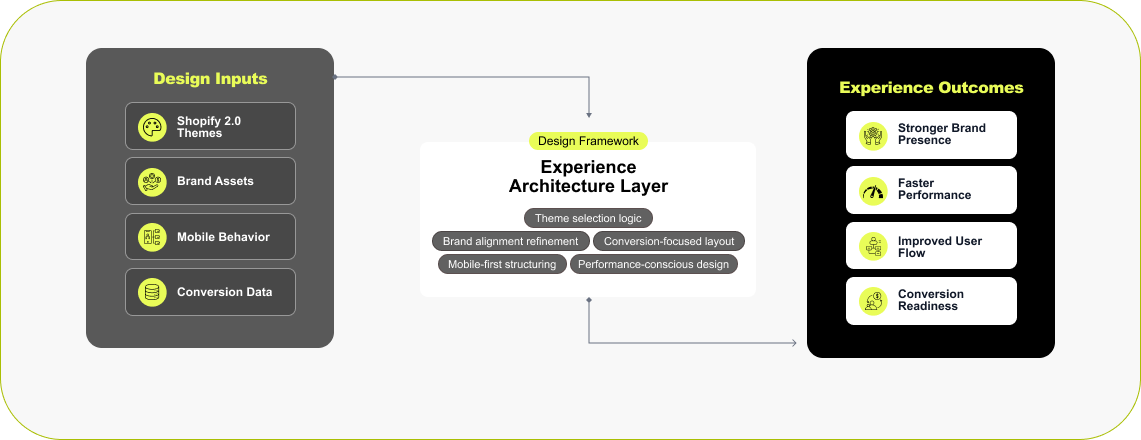

Store Design
When you plan to move to Shopify, it’s often the right time to refresh your store design. About 80% of our clients choose to start fresh — a modern theme, faster site speed, and layouts built to convert better on mobile. We help you pick the right Shopify 2.0 theme and personalize it to fit your brand. If you want something completely unique, our design team can create an on-brand custom layout or build a new theme from scratch. If you prefer to keep your current look, we can rebuild it inside Shopify so it feels familiar but performs better. Same brand. Better experience. Faster store.
Read More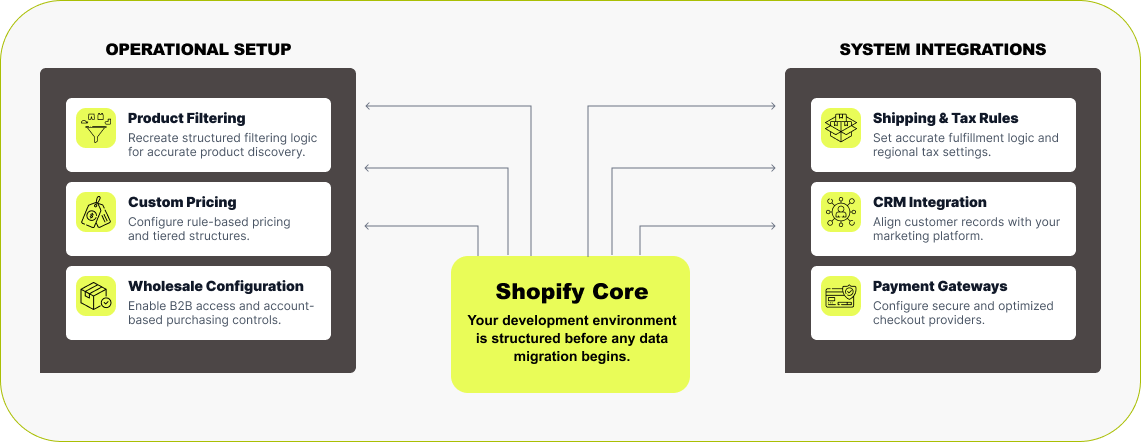

Shopify Development
Before we move any data, we first build your Shopify store. Our team sets up a development store under our Shopify Partner account — that means you don’t pay for a Shopify plan while we’re building. We match all the key functionality from your current platform — product filters, custom pricing, memberships, or wholesale features — using the right Shopify apps or custom code. If you have integrations with ERP, CRM, or third-party systems, we handle those too. Shipping, taxes, payments, and automations are all configured and tested before migration begins. By the time we move your data, your Shopify store already feels complete — stable, fast, and ready for content.
Read More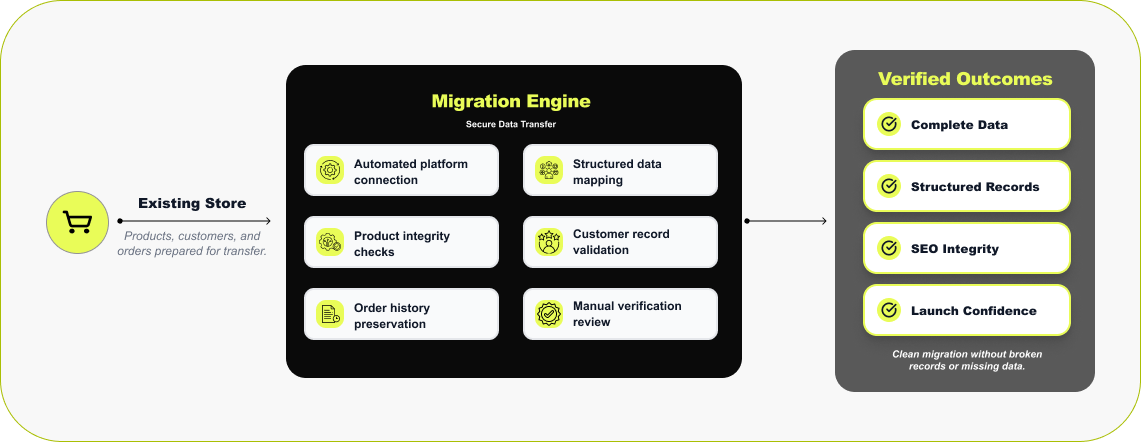

Accurate & Secure Data Migration
Once your Shopify store is built, we start moving your data. We don’t rush this part — it’s where things can easily go wrong if you do. We don’t rely on manual exports or messy spreadsheets. For migration, we use solid tools we’ve trusted for years — LitExtension or Cart2Cart. These tools connect to your current store and move your products, customers, and orders directly into Shopify. After import, our team goes through your data manually — checking products, collections, and checkout to be sure everything landed where it should. Due to different encryption systems used by different platforms, passwords can’t move over, but every other record does — clean, complete, and verified by people.
Read More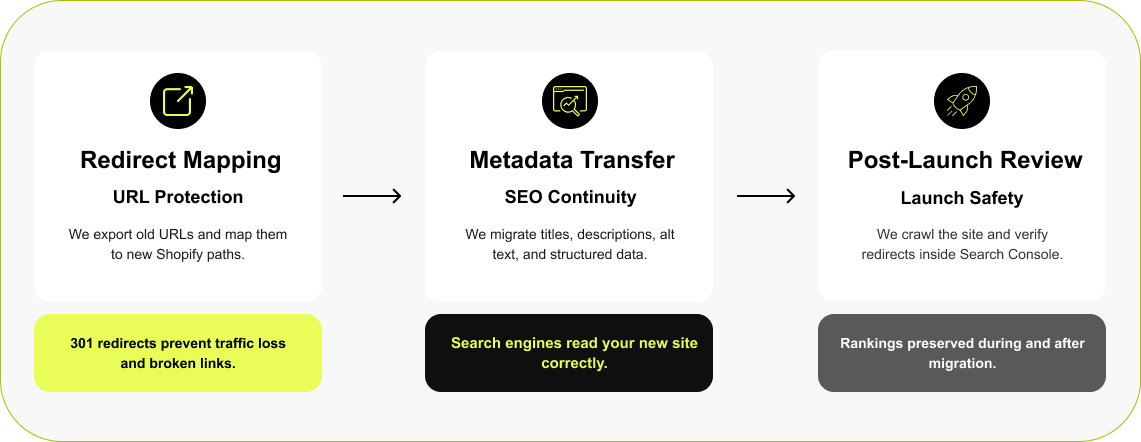

SEO Validation, Redirects & Launch Safety
When you move from another platform to Shopify, your URLs are going to change. If you don’t set up redirects, those old links will break, and that’s usually when traffic and rankings drop. We deal with that early. We take a full export of your old URLs, match each one to the new Shopify link, and set up proper 301 redirects. We also move your SEO data, including page titles, meta descriptions, image alt text, and structured data (schema)— so Google can read the new site the same way it did the old one. After launch, we crawl the site and check everything again in the Search Console.
Read More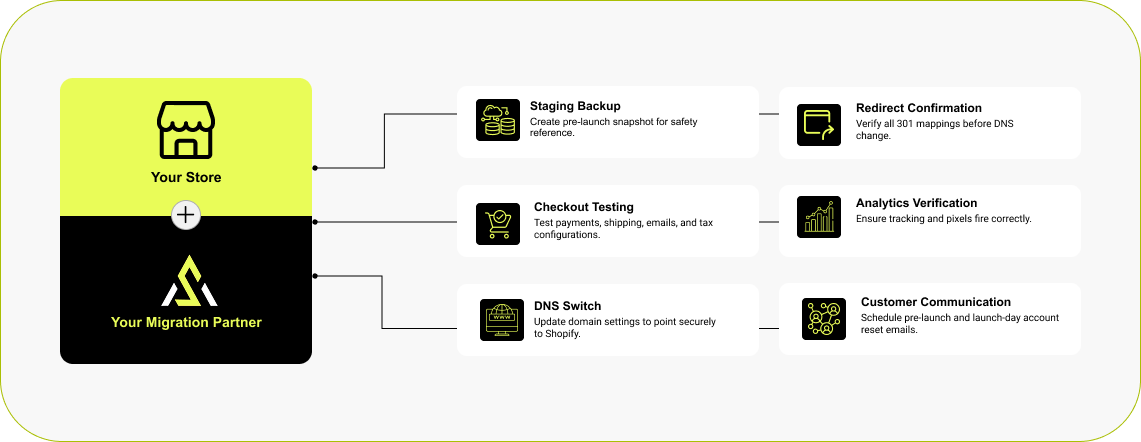

Launch & Communication Strategy
Launch is a series of steps to be performed in a very specific order for a smooth and error-free site. Before we point your domain to Shopify, we make a staging copy of your current store in case we need to look back. Then we go through our launch checklist: we confirm redirects, test checkout and contact forms, review analytics tracking, and verify shipping and payment settings. When everything’s ready, we update the DNS so your domain now points to the Shopify store. Because passwords can’t move over, your customers will need to reset theirs to gain access to their accounts. So, we help plan customer communication and timing. Usually, we suggest sending two emails—first email a week before launch and the second on launch day—and what to say so it’s clear and easy to follow.
Read More


How Much Does it Cost to Migrate to Shopify?
Trusted by Modern Marketing & Growth Teams
The professional attitude, work ethic, and meaningfulness they put into their work were impressive.
 Maryna Gandalf
They are very efficient and task-oriented.
 Peter Murray
Arete Soft Labs works hard to get the job done to the client's satisfaction. They are kind and patient! We requested many design tweaks, and they were always patient with our requests. You can't get better service and loyalty to their clients than what Arete Soft Labs Inc. provides!"
 Mary Quinn
Outstanding Website Design by Arete Labs! The team at Arete Labs was incredibly responsive, attentive to every detail, and went above and beyond to ensure the website reflected the values and strengths of my business.
 Mona Dhawan
Their work is efficient, effective and professional. The launch of my e-commerce website is successful and I appreciate the contribution Deep and his team made . Great job !
 Carol Chen
Brands Who Build, Grow, and Win With Us
Migration to Shopify
We get it — switching platforms is a big decision. Below are answers to the questions we hear most from brands moving to Shopify for the first time. Straight answers, no jargon — just what you need to know before you start your migration.
Why should I migrate my store to Shopify?
+Because Shopify isn’t just a better platform — it’s a smarter foundation for the future of your business.
We’ve migrated dozens of stores, and here’s what clients tell us after switching: the site runs faster, the tools actually work together, and they spend less time fixing things — and more time growing.
But here’s the bigger reason: Shopify is leading the future of ecommerce.
You’re stepping into the best app ecosystem in the industry — 8,000+ and growing — with tools built specifically for Shopify. And many of those apps are already powered by AI. From smarter search to automated product tagging and personalized offers, you’re not just streamlining your store — you’re future-proofing it.
Shopify isn’t playing catch-up in the AI race — it’s at the front, building the next wave of ecommerce technology. With agentic AI now in development through their partnership with Google, we’re talking about fully automated, intelligent workflows that run your store behind the scenes.
So when you migrate to Shopify, you’re not just getting a faster, more robust platform. You’re setting your business up to leverage AI today — and be ready for whatever’s next.
Book a free Shopify migration consultation, and we’ll show you how to make the transition smooth, data-safe, and ROI-positive.Is Shopify really better than my current platform?
+It depends on what you're dealing with now — but if you’re on WooCommerce, Magento, Wix, or something custom, the answer is often a strong yes.
Here’s what we hear from clients after switching:
- Fewer tech headaches: No more patching plugins, chasing developers, or worrying about plugin updates breaking your site.
- Clean, user-friendly backend: You or your team can make day-to-day changes without touching code.
- Conversion tools that come standard: Things like fast checkouts, built-in SEO, and abandoned cart recovery aren’t extras — they’re already there.
- App ecosystem that actually helps you grow: 8,000+ apps, most built specifically for Shopify, with AI features that automate, personalize, and scale.
- AI-first roadmap: Shopify isn’t just adding AI — they’re building next-gen ecommerce tech with Google. That includes AI that can run tasks for you behind the scenes.
Bottom line? If your current platform feels like it’s holding you back, Shopify isn’t just a better option — it’s a smarter one for where ecommerce is going.
Read our Shopify vs WooCommerce vs Wix vs BigCommerce comparison for a detailed breakdown.
What usually goes into a Shopify migration project?
+A Shopify migration is basically a rebuild. So, it involves design, data, features, and setting it up properly within Shopify. It’s not just exporting data from your existing store and uploading to the new Shopify store; it’s making sure the new store runs cleaner, has all the features and functionality, and is faster than the old one.
Here’s what usually happens:
- Design: Some people want to keep their current design, others use the move to refresh things — maybe tighten the layout, modernize the feel, or fix pain points.
- Development: Once the design is set, we rebuild the functionality. Every site has its quirks — custom filters, bundles, pricing rules — we recreate those using the right apps or custom code. The goal is to keep it lean; too many apps slow things down and drive up your monthly costs.
- Integrations: We reconnect everything you already use — email platform, shipping software, CRM, accounting — so all the pieces talk to each other again.
- Data: We bring over all your products, customers, orders, pages, and blog posts using automated tools, followed by manual cleanup.
- SEO: The URL structure on each shopping cart platform is different. So, your store URLs will change and thus will require correct mapping to avoid SEO loss. So, we map every URL, set redirects, carry over your metadata, and make sure search rankings stay intact.
- Testing: Before we launch, we go through the whole store — checkout flow, mobile experience, site speed, and every integration. We make sure all apps and third-party services (email service) communicate with each other and work the way they should.
services (email service) communicate to each other and work the way they should. When it’s done right, the migration doesn’t feel like a new build. It feels like your store finally runs the way you always wanted it to.
How long does it take to migrate to Shopify?
+Honestly, it depends on the store. Most take somewhere between four and eight weeks.
If it’s a smaller site with straightforward products, we can usually wrap it up in about a month. A bigger store — lots of SKUs, custom functions, or third-party systems — can stretch closer to two months.
The real work isn’t in moving data; it’s in making sure everything feels right when it lands — design, checkout, SEO, integrations. We’d rather take a few extra days and have it launch clean than rush something you’ll need to fix later.
Will I lose my SEO rankings or data during migration?
+That’s a fair concern — and it’s the first thing we plan for.
When a migration is done properly, you shouldn’t lose rankings or data. The key is in how it’s handled. We map every existing URL, set up 301 redirects, carry over your metadata, and make sure analytics and tracking are all in place before launch.
Your products, customers, orders, and content are also migrated — cleaned up, reformatted, and checked so nothing gets lost in the move. Most ranking drops people talk about come from poor redirects or skipped SEO setup. We’ve done hundreds of migrations — and with the right prep, your traffic and search performance stay intact.
If anything, most stores see a bump after launch because Shopify’s structure and speed give you a stronger technical SEO foundation than what you had before.
Can I keep my existing domain and URLs when moving to Shopify?
+Yes. We can connect to your existing domain. So, nothing changes for your customers.
For URLs, the structure varies from platform to platform, so your collection and product URLs will change. However, we’ll redirect them to their corresponding new URLs so nobody hits a dead end and Google keeps following the trail.
Will my store go offline during the migration?
+No. We build your new Shopify store separately in a development environment under our partner account — so your existing site stays live while we work (and you don’t have to pay for a Shopify plan during that build phase.)
Once everything’s ready and approved, we schedule a short go-live window — usually late at night or during your quiet hours. That’s when we point your domain to the new Shopify site.
There might be a short window — maybe an hour or so — while the domain switch propagates. We usually do it late at night or during your slowest hours, so customers rarely notice anything.
If you’d like, we can also put a short message on your site ahead of time, letting visitors know when the migration is scheduled — just to keep everything transparent.
Do you provide support after migration?
+Yes, we do. Once your Shopify store is live, we stick around to make sure everything’s working the way it should — orders, emails, tracking, speed, all of it.
If anything comes up in the first few weeks, we fix it. No tickets, no waiting. Once things settle, many clients choose to stay on a maintenance or optimization plan so we can keep improving the store — adding new features, running updates, or handling seasonal campaigns.
In short: we’re here long after launch. The goal isn’t just to migrate your store — it’s to keep it growing.
Trusted Migration & Technology Partners