



 647-812-5125



Google Ads vs SEO for Shopify eCommerce Stores
You’ve just launched your Shopify store. The setup’s done, the design looks polished — now you’re asking the real question:
How do I get people to visit my online store?
Most new brands end up weighing the same options:
👉 Google Ads vs SEO for Shopify eCommerce — which is better when you’re just starting out?
One gives you fast traffic (and fast costs). The other takes time but builds long-term value. So, which path should a Shopify store take first?
For most new Shopify stores, Google Ads is the better first move — it gives you fast data on what converts while you build your SEO foundation in parallel. Once organic traffic picks up, you shift budget away from ads. This post walks you through both channels, when to use each, and how to phase them together.
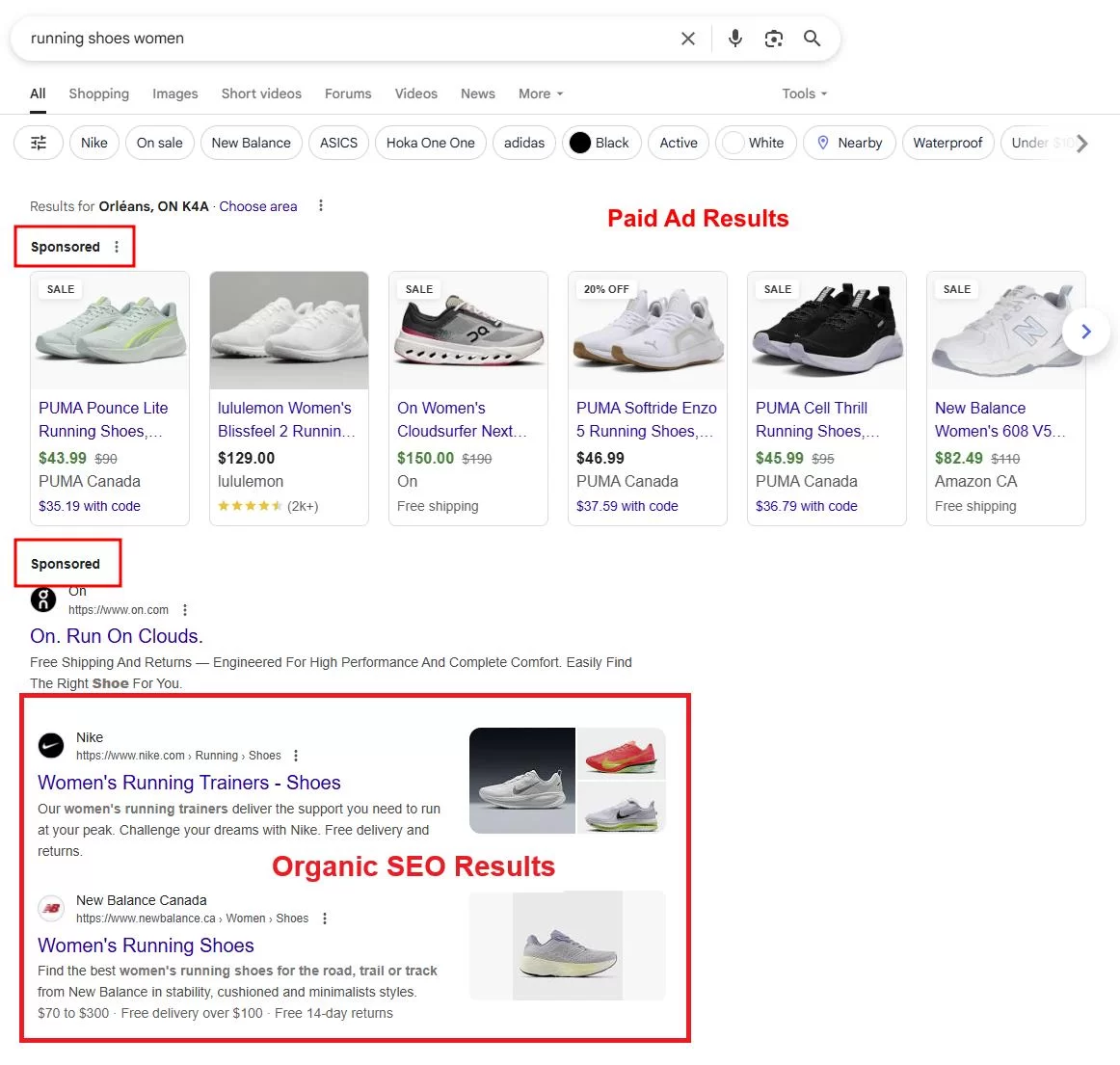
Google Paid ads and organic SEO results
How Do Google Ads Work for Shopify Stores?
Google Ads uses a pay-per-click model that puts your Shopify store at the top of search results immediately — you set a budget, bid on keywords, and start getting traffic the same day. If you want results yesterday, this is your go-to.
Google Ads are especially powerful for high-intent searches , like “buy [product] online” or “[product] near me.”
Why It Works for New Shopify Brands
- Instant visibility: Your store can show up on Day 1.
- Hyper-targeted: Show ads based on location, device, keyword, and more.
- Perfect for product launches: Test what messaging converts before committing to long-term content.
| Pros | Cons |
|
|
When to Use Google Ads:
- Launching a new product or collection
- Running a seasonal promotion or flash sale
- Collecting quick data to shape your future SEO strategy
Performance Max: The Default for Shopify in 2026
If you’re running Google Ads on Shopify in 2026, you’re almost certainly starting with Performance Max. PMax pulls your product feed and runs ads across Search, Shopping, Display, YouTube, and Gmail — one campaign, all channels. Shopify’s Google Channel app syncs your catalog to Merchant Center, and PMax handles the rest.
The catch: it’s a black box. Google decides where your budget goes, and you lose keyword-level control. That works fine once conversion data is flowing — but for a brand-new store with zero sales history, it can burn budget fast. That’s why most Shopify brands see better results starting with a standard Shopping campaign, collecting 30+ conversions worth of data, and then letting PMax take over with something real to optimize toward.
Pro Tip:
Start small. A $300–$500 test budget over 2 weeks with proper tracking can give you clarity on what keywords and messaging convert best.
How Does SEO Work for Shopify Stores?
If Google Ads is the sprint, Shopify SEO is the marathon.
Search Engine Optimization (SEO) means optimizing your Shopify store to rank organically on Google, without paying for every click. It’s slower to ramp up, but delivers compounding returns over time.
For Shopify brands thinking beyond next month’s sales, SEO becomes your most valuable growth channel.
Why It Works for Shopify Stores
- Builds trust — users click organic results more than ads
- No ad spend — great for brands with leaner budgets
- Supports scale — your blog, collection pages, and product pages can all rank
| Pros | Cons |
|
|
When to Use Shopify SEO:
- You have a modest budget but can invest in time and resources.
- Your store sells a diverse product catalog, allowing you to target multiple keyword themes.
- You want to build long-term equity—for example, ranking for “best marketing strategy for Shopify” or “organic traffic vs paid traffic.”
One Thing That’s Changed in 2026: AI Overviews & AEO
Google’s AI Overviews are now a fixture in Google search results. That AI-generated summary box at the top of the page pulls from organic content — and keeps shoppers on Google instead of sending them to your store.
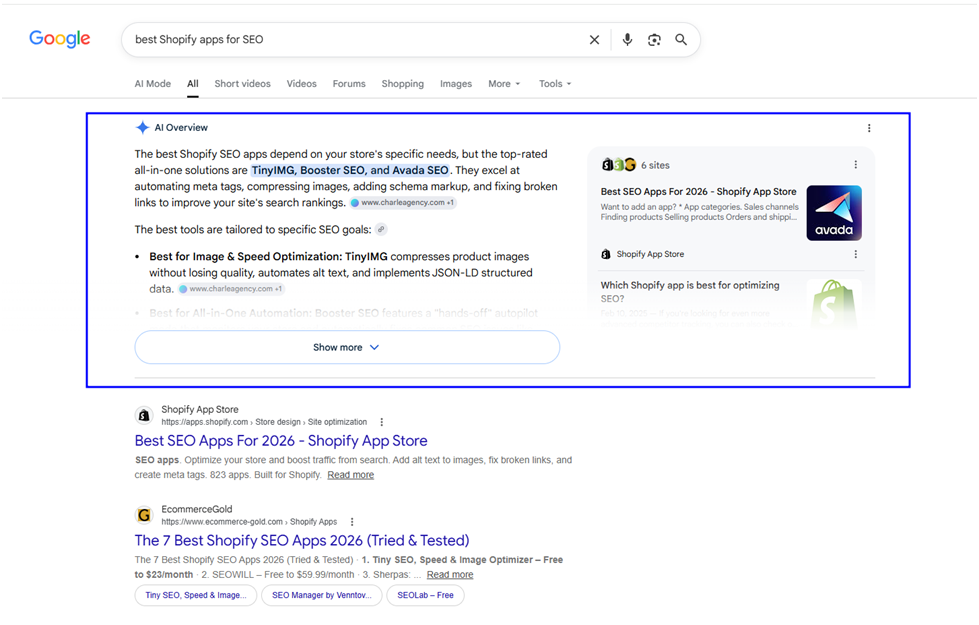
Google AI Overview SERP example 2026
For Shopify SEO, this changes the math on certain keywords. Product pages are mostly safe — people still click through to buy. But informational keywords where you’d normally use blog content to attract traffic? Google is answering those itself. If AI Overviews are eating clicks on terms you planned to rank for, the ROI of SEO on those terms drops — and running ads might actually make more sense.
There’s also a third channel emerging. ChatGPT, Perplexity, and Gemini are answering “best [product] for [use case]” queries directly. If your store isn’t part of those answers, that’s buyers you’re invisible to — regardless of whether you’re running ads or ranking organically. We break this down in our guide to AI visibility for Shopify stores.
The takeaway? SEO in 2026 isn’t just about ranking on page one. It’s about showing up wherever your customers are asking questions — and right now, that includes AI.
What Shopify-Specific Factors Affect Your Choice?
You’re not just doing eCommerce — you’re building on Shopify. And that changes the game.
So before you decide between Shopify SEO vs Google Ads , you’ve gotta look at how your setup, margins, and product type actually affect performance.
Your Product Margins
- Low margins? Paid ads can burn cash fast.
- High margins? Ads might be justified for quick customer acquisition.
- Shopify brands with a $10 profit per sale need different strategies than those with a $100.
Your Launch Stage
- Just starting? Ads help validate product-market fit.
- Established but invisible? SEO becomes a better long-term play.
Your Competition
- Are your SEO keywords dominated by Amazon, Walmart, or big retailers?
- Are your Google Ads CPCs skyrocketing (e.g., $2–$8+ per click)?
- Knowing your battlefield helps you pick the smarter fight.
Shopify Platform Considerations
SEO Strengths:
- Fast-loading themes = Google loves speed
- Clean URLs for products/collections
- SEO app ecosystem: Yoast, Smart SEO, SearchPie
SEO Weaknesses:
- Tag pages are poorly optimized by default
- Duplicate content from supplier product feeds
- Thin content on collection pages (often neglected by store owners)
Google Ads Strengths:
- Native Google Channel App integration
- Supports dynamic product ads
- Works well with Shopify’s analytics + UTM tracking
Pro Tip: If your store auto-syncs dropshipped products, your product descriptions are likely duplicate. This kills SEO performance — but doesn’t hurt your paid ads.
Can You Use Google Ads and SEO Together on Shopify?
Yes, and most successful Shopify brands do exactly that — they layer them based on timing, goals, and budget. And honestly, that makes a lot more sense.
Here’s what that looks like when you’re just getting started:
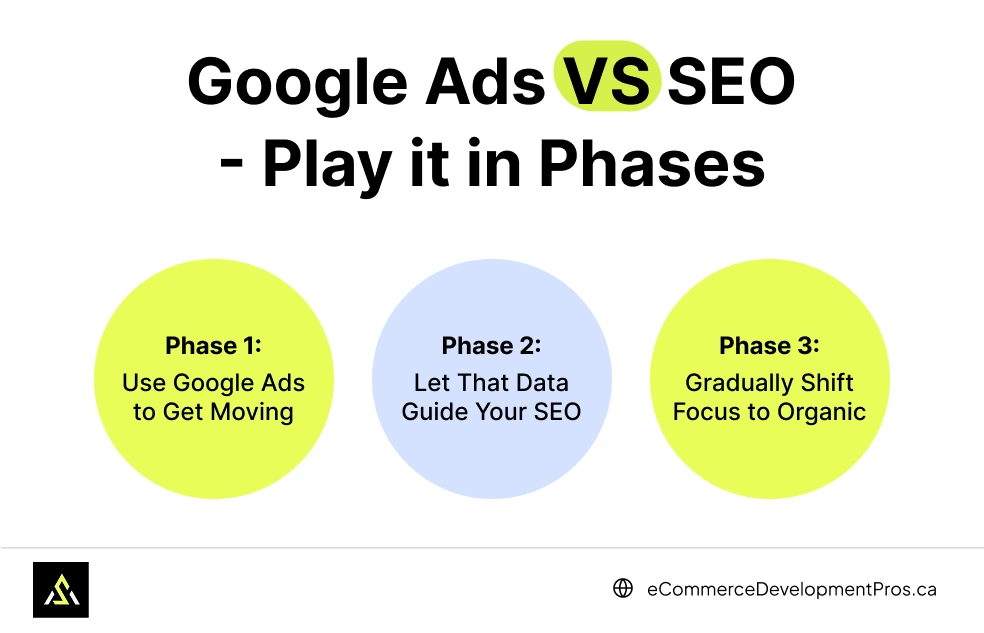
Phase 1: Use Google Ads to Get Moving
If you’re brand new, sitting around waiting for SEO to kick in can feel brutal. So yeah — run some ads.
Not a $5,000 campaign. Start small. A couple of hundred bucks can give you:
- Immediate traffic
- Clarity on what people actually search
- Early sales (hopefully)
Even if you don’t break even right away, you’ll learn a ton.
It’s not just about traffic — it’s about figuring out what resonates.
Phase 2: Let That Data Guide Your SEO
Now you know what headlines get clicks. What products do people like? What keywords are working?
Take that info and start building your Shopify SEO strategy around it:
- Tweak titles
- Add collection page content
- Write blog posts targeting the exact terms from your ad campaigns
This way, your SEO isn’t based on guesses — it’s backed by real data.
Phase 3: Gradually Shift Focus to Organic
Here’s the sweet spot: as your rankings improve, you can start easing off the ad spend.
Not saying you kill ads completely — just dial them back. Keep them running for branded searches and retargeting. But now, SEO becomes your main traffic engine.
And honestly? That’s how you lower your Shopify advertising costs without tanking your growth.
So no, you don’t have to pick sides. Just be smart about when you use each, and let your strategy evolve as your Shopify store grows.
And if you’re still wondering which to prioritize… that’s what the next section is for.
How Much Should You Budget for Google Ads vs SEO?
New Shopify stores should budget $300 to $800 for an initial Google Ads test, and expect to invest $500 to $2,000+ per month if outsourcing SEO. Marketing a new store usually comes with limited resources, so the right split depends on where (and how soon) you need returns.
Google Ads: Faster Results, But Every Click Has a Price
With Google Ads for Shopify stores , you know exactly what you’re spending. You set your daily or campaign budget, and the traffic starts coming in.
But that control doesn’t always translate to affordability.
Clicks can get expensive fast in competitive categories like fashion, skincare, or supplements — eCommerce CPCs average around $1.16 but vary widely by niche, and competitive keywords can push well past $3–$4 per click. If your profit per product is low, even a modest campaign can eat into your margins quickly.
- Startup budget: $300 to $800 for a 2–3 week test
- What you get: Fast data on what products and keywords are working
- Best for: Launching a product, validating demand, or seasonal campaigns
This is a pay-to-play model. Traffic stops the moment the budget runs out.
SEO: Slower Payoff, But Stronger Over Time
Shopify SEO works differently. Instead of paying per click, you invest in optimizing your content and website, then earn traffic organically once pages rank.
It takes longer, and the results aren’t instant, but the long-term gains are significant.
- Upfront investment: Time (if doing it yourself), or $500–$2,000+/month if you hire help
- Time to results: Usually 3 to 6 months for early traction
- Best for: Building a stable, scalable traffic source over time
If you compare the ROI of SEO vs Google Ads , SEO may look slower, but it becomes more cost-effective the longer your store runs. Especially if you reinvest early wins into more content or technical improvements.
Quick Comparison
| Strategy | Startup Cost | Timeline for Results | Great For |
|---|---|---|---|
| Google Ads | $300–$800 (initial test) | Immediate | Short-term traffic and testing |
| Shopify SEO | $0–$2,000+/month | 3–6+ months | Long-term traffic and brand growth |
Using both channels at different stages often gives the best outcome. Start with a small ad test to see what converts, then use that insight to build content and optimize your Shopify SEO strategy.
Common Google Ads Mistakes New Shopify Owners Make
These patterns show up again and again with new Shopify brands, no matter which channel they start with — especially when resources are tight.
These aren’t just tactical missteps. They affect profitability, growth, and how quickly you can scale.
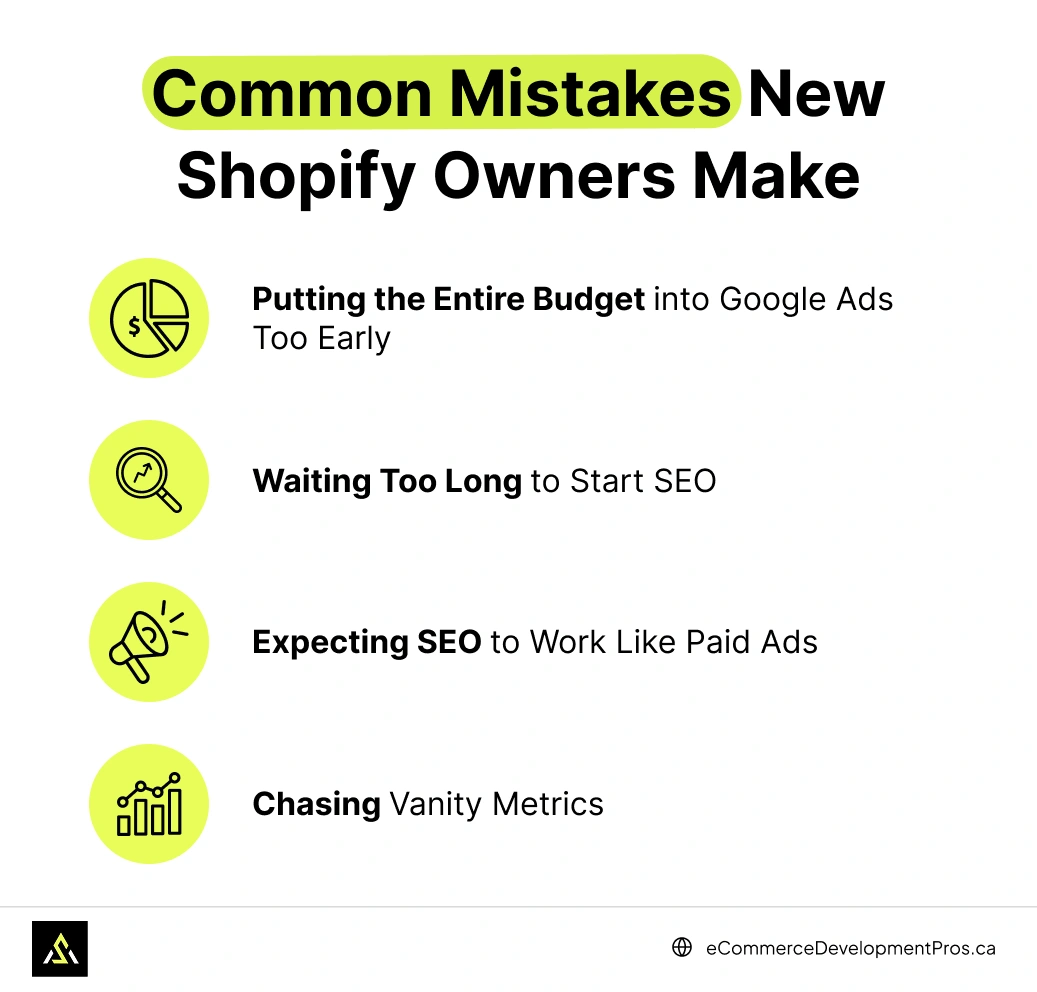
1. Putting the Entire Budget into Google Ads Too Early
It’s easy to assume Google Ads will “just work,” but running ads without first testing your product-market fit can be costly.
Many store owners go all-in, only to realize later that their landing pages weren’t ready or their pricing didn’t convert. With Google Ads for Shopify stores , traffic is immediate… but that doesn’t mean it’s qualified.
2. Waiting Too Long to Start SEO
Another common issue: ignoring SEO until sales stall.
Optimizing your product pages, writing helpful content, and improving site structure takes time. If you wait until your ad budget runs out, your store will feel invisible on search engines — because it is.
Foundational SEO work should start early. Even basic things like titles, image alt text, and proper collection descriptions can give your site a head start.
3. Expecting SEO to Work Like Paid Ads
Some store owners try SEO for two weeks, then stop because traffic didn’t spike.
But SEO is a longer process. Unlike ads, you won’t get instant clicks. The payoff builds over time. Comparing Google Ads vs SEO for Shopify eCommerce purely on immediate returns usually leads to disappointment.
You’re playing two different games. They follow different rules.
4. Chasing Vanity Metrics
It’s tempting to focus on impressions or clicks, especially when using Shopify’s built-in reports or looking at ad dashboards.
But traffic alone isn’t the goal. You want qualified traffic that converts. Whether you’re building a Shopify SEO strategy or running paid campaigns, prioritize:
- Conversion rates
- Average order value
- Customer acquisition cost (CAC)
These are the numbers that actually move your business forward.
Many of these mistakes come down to timing, expectations, and channel fit. If you avoid these early on, your growth curve will look a lot different — and a lot more sustainable.
Google Ads vs SEO for Shopify eCommerce: What Should You Prioritize First?
If you’re launching a new Shopify store, choosing between Google Ads vs SEO for Shopify eCommerce isn’t always straightforward. Both channels work — just in different ways, for different goals.
It’s not about which one is “better.” It’s about what makes the most sense based on where your business is right now.
Here’s a quick reference to help you decide.
SEO or Google Ads for Shopify? Compare by Business Goal
| Your Goal | Better First Move | Why It Works |
|---|---|---|
| Launch a new product or test an idea | Google Ads | Quick data on what’s working (and what’s not) |
| Build long-term traffic and trust | Shopify SEO strategy | Compounds over time and brings in organic traffic month after month |
| You’re on a very tight budget | Start with SEO | No cost-per-click, and you can begin optimizing pages with free tools |
| Running a flash sale or promo | Google Ads | Instant traffic while the offer is still relevant |
If you can afford it, combining both — in the right order — often delivers the strongest results. Use Google Ads early to generate quick wins, then let your Shopify SEO efforts take over as the foundation for consistent, lower-cost growth.
You don’t need to master both channels overnight. Just pick the one that supports your current stage, and build from there.
SEO or Google Ads for Shopify: Action Steps & Tools to Help You Decide Faster
If you’re still on the fence between Google Ads vs SEO for Shopify eCommerce store , here’s how to get clarity without overthinking it. The goal here is to move, test, and learn — not stay stuck trying to make the perfect decision.
Simple Next Steps for New Shopify Brands
- Set up Google Ads with conversion tracking
Use the Shopify Google Channel app to sync your product feed and start with a focused campaign. Prioritize keywords with buyer intent (e.g., “buy [product] online”). - Run a low-risk test budget
Allocate $300–$500 for a 2-week test. Track what gets clicks, what converts, and what doesn’t. You’re not trying to scale — you’re collecting insights. - Audit your SEO basics
Look at your product titles, image alt text, collection pages, and site speed. Even small fixes help. Many stores miss easy wins that can improve rankings. - Pick 5 core keywords
Choose terms tied to your main products or collections. Use tools like Ubersuggest or Google Keyword Planner to gauge search volume. These keywords will shape your initial Shopify SEO strategy. - Turn ad insights into content
Did one search term perform well in ads? Turn it into a blog post. Build a collection page around it. SEO is more effective when it’s informed by real user behavior.
Recommended Tools for Shopify Store Owners
| Use Case | Tool Suggestions |
|---|---|
| Keyword Research & SEO |
|
| Paid Ad Campaign Setup |
|
| Performance Tracking |
|
| On-page SEO Optimization |
|
The most important step is simply to start — pick the channel that fits your stage, run a small test, and let the data guide what comes next.
You don’t need a perfect plan — just a clear next step.
FAQ about Google Ads vs SEO for Shopify eCommerce
Should I do Google Ads or SEO first for my Shopify store?
Google Ads is the better first move for most new Shopify stores. You get traffic right away, and more importantly, you find out which keywords actually lead to purchases.
Run ads for the first 60–90 days while fixing your SEO foundations on the side. Once organic pages pick up, start pulling back on ad spend. Most brands that struggle here made the mistake of picking one channel and ignoring the other.
How much should a new Shopify store spend on Google Ads?
Start with $300 to $500 over two weeks. Put that budget behind 5–10 keywords with clear buying signals — things like “buy [product],” a specific product name, or “[product] near me.”
Stay away from broad match early on. It’ll drain your budget on clicks that go nowhere. Keep scaling what converts and kill what doesn’t. In competitive niches, CPCs sit between $1.16 and $3+ per click as of 2026.
Can I run Google Ads and do SEO on Shopify at the same time?
Absolutely, and most successful Shopify brands run both. Ads show you what’s actually selling — which products get clicks, which keywords lead to orders. You take that data and build your SEO around it.
Think of ads as the fast lane and SEO as the lane that keeps moving long after you stop paying. If budget is tight and you have to choose, start with ads to test demand, then move into SEO once you know what works.
How long before SEO starts driving traffic to my Shopify store?
Most stores see meaningful organic traffic within 3 to 6 months of active optimization. Small technical fixes — meta titles, broken links, page speed — tend to show movement within weeks.
Rankings for competitive keywords take longer. Google has to recrawl your pages, figure out where they belong, and stack them up against everything else targeting those terms. If you’re competing against Amazon or big-box retailers, expect 6–12 months before organic traffic becomes something you can count on.
Are Google Ads worth it for small Shopify stores with tight budgets?
They can be, but only if you’re tracking everything from day one. Too many store owners spend $500 on broad campaigns and have no idea what came from it.
Keep your daily budget around $15–$25, go after high-intent keywords only, and point that traffic at your strongest product pages. If your profit per sale is under $15, the math gets tough — acquisition costs eat the margin. That’s when SEO and organic content make more sense as the primary channel.

Not Sure What to Do First? Let’s Talk.
Still trying to decide between SEO and Google Ads? You’re not alone. Most new Shopify brands run into this early, and the wrong move can cost time and money.
We work with Shopify stores at all stages, and we’ve seen what works (and what doesn’t) across different industries and budgets.
If it helps, we’re happy to take a quick look at your store, share a few ideas, and point you in the right direction. No pressure, no sales script — just a real conversation.