



 647-812-5125


Is your Shopify store costing you sales?
What looked great at launch doesn’t age well. Load times creep up, the design starts feeling stale, and customers bounce before they ever see your products.
Google notices too. Outdated stores get pushed down in search results, which means fewer visitors on top of fewer conversions.
After 17+ years redesigning Shopify stores, we’ve seen the pattern repeat: the cost of doing nothing always exceeds the cost of a redesign.
A Shopify website redesign goes deeper than visuals. It’s a rebuild around speed, mobile usability, SEO structure, and how your brand actually shows up online today. Most stores need one every two to three years — sooner if the numbers are already slipping.
Here are 13 signs it’s time to redesign your Shopify website.
1. Your Store Looks Dated
The user’s first impression is what matters!
You have a few seconds to make that impression whenever a user lands on your online store and decides to stay or leave.
Think about it—would you trust a store that looks like it hasn’t been touched since 2010?
Here’s the Walmart website design from 2010. Would you shop on their website if it had not been redesigned?
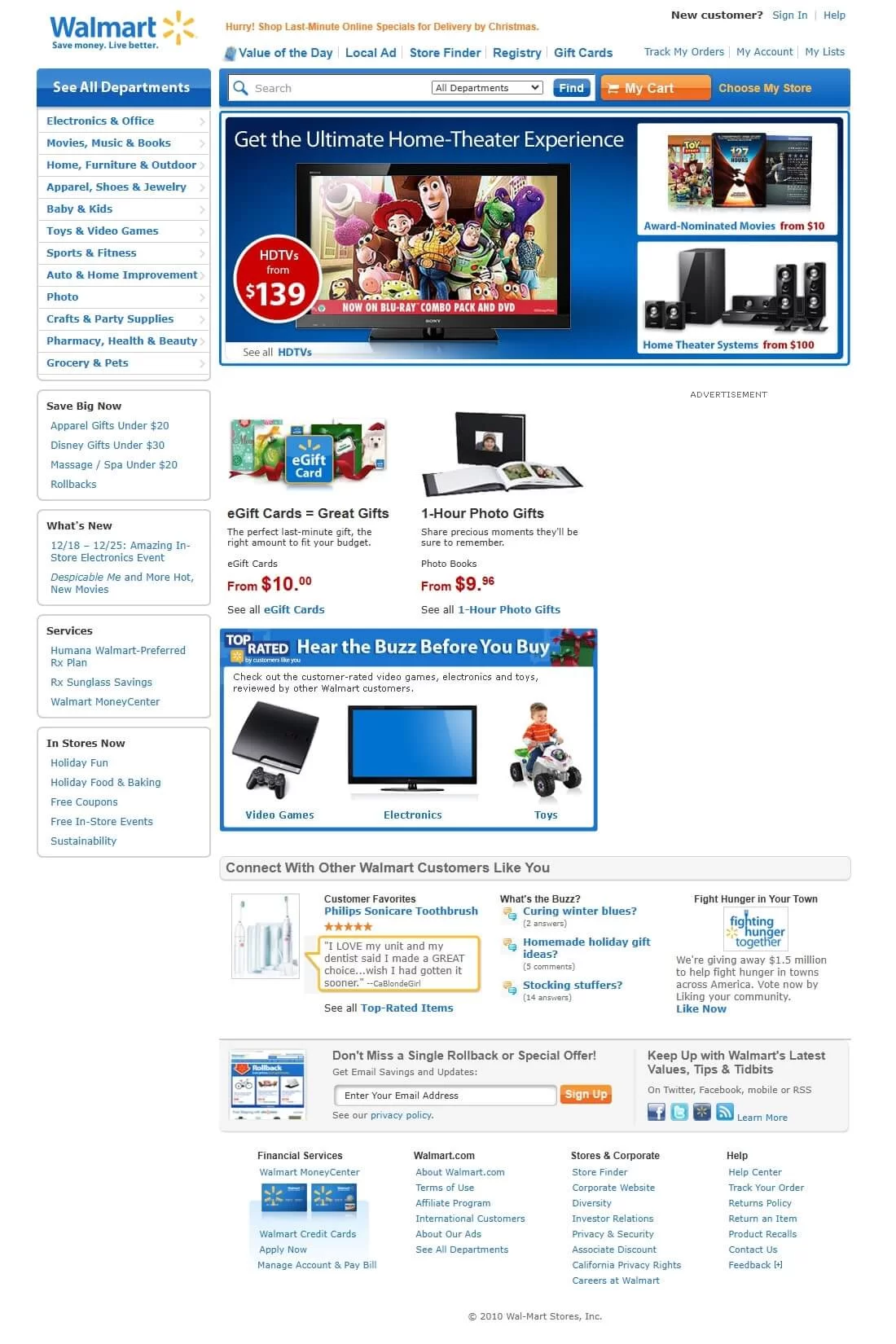
Old Walmart website design example : (Source: webdesignmuseum.org)
Signs Your Design is Outdated:
- Heavy gradients, large fonts, or old-fashioned colour schemes.
- Too little use of whitespace, making the page feel busy.
- Excessive use of flashy animations or banners distracts the user instead of engaging them.
- Design elements that are off-brand or misaligned with audience preferences.
- The website doesn’t look great or function smoothly on mobile devices.
2. Poor Mobile Experience
Take a second and pull up your store on your phone.
Does it load quickly?
Can you navigate it easily without pinching, zooming, or guessing where to tap?
If the answer’s no—or even maybe—there’s a good chance you’re losing customers.
More than 70% of online purchases now happen on mobile devices. If your store isn’t built for that reality, you’re handing sales to competitors who are. Google uses your mobile experience to decide how high (or low) you rank in search results, so a poor mobile setup hurts you twice.

Here are some signs your mobile setup needs help:
- Pages take longer than 3 seconds to load on mobile—people bounce.
- Menus and buttons are too small or crammed too close together.
- Font sizes don’t adjust across devices, so people squint or scroll awkwardly.
- Product images or text get cut off or misaligned.
- The checkout flow is too clunky—or doesn’t support mobile payment options.
- Accessibility gaps like missing alt text, poor contrast, or no keyboard navigation — hurts SEO and can create legal risk.
We’ve seen stores with strong desktop designs lose thousands in revenue simply because their mobile version was an afterthought. Don’t let yours be one of them.
3. Slow Page Load Speeds
In eCommerce, speed isn’t a luxury. It’s survival.
If your Shopify store drags, even for a few seconds, shoppers won’t wait around. Especially on mobile. They’ll bounce, they’ll abandon their cart, and in many cases, they won’t come back.
Google’s research shows that 53% of mobile visitors leave a site that takes longer than 3 seconds to load. That’s not a minor delay. It’s a dealbreaker.
And it hits in all the wrong places: lost revenue, lower search rankings, and a dip in customer trust.
Result?
Lost sales. Fewer return visits. Lower visibility in search.

To keep users engaged—and to stay on Google’s good side—your store needs to load fast. Not just homepage fast, but product-page fast, checkout fast, and mobile fast.
Signs Your Page Load Speeds are Too Slow:
- Bounce rates are climbing. People are landing on your site and leaving almost immediately.
- Conversions are dipping. Slow pages lead to abandoned carts and unfinished checkouts.
- Images take forever to load. Especially product photos—big files, no compression.
- Your performance score is in the red. Tools like Google PageSpeed Insights or GTMetrix flag it—and so does Google.
A one-second delay might not sound like much. But over time, it can quietly cost you thousands in lost orders.
4. Low Conversion Rates
Is your Shopify website getting a good amount of traffic but experiencing poor sales? If so, now is the time to look at your online store’s design and functionality. The average conversion rate for eCommerce stores is 2%-3%.

If you’re consistently below that 2-3% range, it’s a red flag. People are interested enough to click through—but something is stopping them from completing the purchase.
That “something” could be:
- A layout that’s hard to follow
- Pages that feel cluttered or outdated
- A checkout process that takes too long—or asks for too much
Signs of Low Conversion Rates:
- Abandoned carts are piling up. Customers are adding items, but not checking out.
- Sessions are short. People land on your site, look around briefly, then leave.
- Low engagement. Few visitors click on product tabs, reviews, or CTAs.
- Funnel drop-off. Shoppers don’t make it past shipping or payment pages.
Here’s the truth: if people are visiting your store but leaving empty-handed, it’s not just a design issue. It’s a revenue leak.
A redesign isn’t always about making things prettier. It’s about removing friction, building trust, and making the path to purchase feel easy.
That’s exactly what our Shopify redesign service is built around — not aesthetics for their own sake, but design decisions that directly improve conversion
5. Poor Website Navigation
Navigation is like the map of your site. It should get the users in the right direction on your store.
If your website has poor or messy navigation, this may frustrate your customers.
Sadly, 76% of e-commerce websites have mediocre-to-poor navigation performance, indicating a widespread issue in the industry.
However, a user-friendly navigation system helps customers find the products quickly, thus enhancing the user experience.
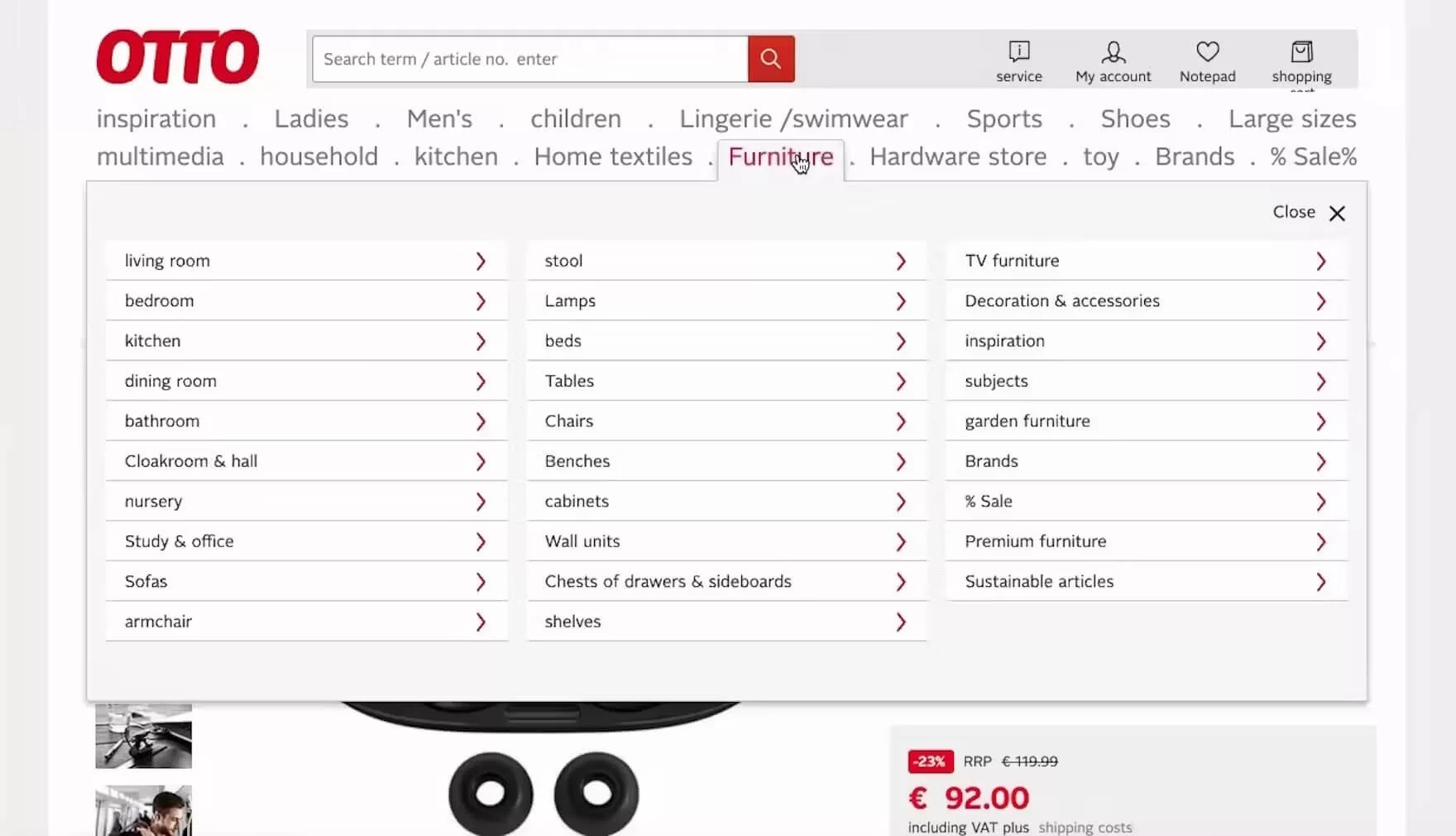
Example of an eCommerce website with poor navigation
Signs of Poor Navigation:
- Too Many Choices: If your website menu is overcrowded (similar to the example above) or complicated, it may confuse your customers even before they begin to browse.
- No smart search functionality: This is 2025, and people are accustomed to the advanced search options available, like predictive search, showing matching options or products while the user starts typing. No smart search will make the process of finding what they are looking for rather difficult and can cost a potential loss of customers.
- No Voice Search Capability: More shoppers are using Siri, Alexa, and Google Assistant to search for products. If your store doesn’t support voice-friendly search, you could be invisible to a growing segment of mobile buyers.
- Hidden or Hard-to-Find Pages: Your website’s key pages, such as product categories, FAQs, policy pages, and contact forms, should never be more than a click away.
- Broken Links or Dead Ends: Clicking a link leads to an error page, which hurts the user experience.
- Confusing Layouts: Are your categories and subcategories aligned with how customers shop? If not, they may abandon their buying journey on your store entirely.
A properly structured navigation helps customers navigate seamlessly through your Shopify store. However, inconsistent, outdated, and misleading content does the complete opposite: it creates confusion, eliminates trust, and just fails to engage your customers.
6. High Bounce Rate or Poor Engagement Rate
Is your website getting visitors, but they leave shortly after arriving without exploring beyond the home page? If so, something is missing. Most of the time, it comes down to design, navigation, content, or speed — and a redesign can address all of it.
So how do you know if your numbers are actually bad? These benchmarks will tell you:

Signs of High Bounce Rate or Low Engagement:
- Your website visitors spend only a few seconds on your site and then leave. In other words, the bounce rate is high.
- Low Click-Through Rates (CTR)
- Users only view the home page and leave without exploring the other pages.
- Website visitors browse your products, but they don’t add anything to their cart.
These signs indicate that your website has design flaws, poor user experience, irrelevant content, or slow load times. Whatever the cause, these indicate missed opportunities to convert visitors into customers.
7. Low or Declining Search Visibility
Organic search still drives a huge share of ecommerce revenue. But shoppers aren’t just Googling anymore. They’re asking ChatGPT, Perplexity, and Gemini for product recommendations before they ever click through to a store.
If your Shopify store’s rankings are slipping and your brand never surfaces in AI-generated answers, the problem usually traces back to how your site is built. Outdated structure, thin content, missing schema — these hurt your visibility in traditional search and AI discovery alike.
Signs Your Search Visibility Is Declining:
- A drop in the number of search engine visitors
- Your brand doesn’t appear in AI-generated answers when shoppers ask about products or services you sell
- Using vendor-supplied product data, which is also used by hundreds of other websites (duplicate content)
- Missing or outdated metadata
- No structured data or FAQ schema to help search engines and AI tools understand your content
- Slow website speed
- Non-responsive design or not fully optimized for mobile and tablet devices
- Broken links or errors, such as 404 pages, duplicate content, or missing alt text for images
- Your store’s search rankings are stgnant or declining, and AI tools aren’t citing your content
While improving your search visibility brings more visitors to your Shopify store, the real challenge is keeping them engaged once they arrive. This brings us to our next critical sign: a high bounce rate or poor engagement rate.
8. Using a Free Theme with Limited Features
Free Shopify themes are an excellent place to launch for any startup or small business.
However, as business grows, most online store owners find that they don’t have the advanced features or flexibility that become a roadblock.
The limited design options, performance optimization, and lack of integration options hold back your store’s growth.
Signs Your Free Theme is Holding You Back:
- You’re stuck with rigid layouts. Want a custom home, collection, or product page for a growing catalogue? Not happening without workarounds—or code.
- It’s missing the tools you actually need. Things like mega menus, smart product filters, or upsell sections usually aren’t baked in.
- The design feels behind the times. Many free themes don’t follow modern UX trends or mobile best practices, which can hurt first impressions.
- Pages are sluggish. Some free themes are bloated or just not well-optimized, which can slow down your site and impact SEO.
- You’re adding app after app just to keep up. What started as “free” quickly becomes expensive when you’re stacking apps to get basic features.
If you’re constantly hitting roadblocks or spending more time patching things than growing your store, your theme may be part of the problem.
9. Your Online Store is Still Using Shopify 1.0 Theme
Shopify released its new theme framework—Online Store 2.0—back in 2021. It came with faster load times, better layout control, easier content editing, and more flexibility overall for merchants.
But here’s what most people don’t realize: if your store was built before that, you’re probably still on the old 1.0 theme—and there’s no automatic upgrade button. Moving to 2.0 means a rebuild and it’s a good time to rethink whether a free, paid, or custom theme fits your next phase.
That might sound like a hassle, but sticking with 1.0 long-term can slow you down more than you think.

Signs You’re Still Using Shopify 1.0:
- Your store was built before mid-2021 and hasn’t had a major redesign.
- You can only edit sections on your homepage—not on product or collection pages.
- The site feels slower than your competitors’, especially on mobile.
- Some apps don’t install properly or don’t show all their features.
- You don’t have access to metafields, so adding custom info to product pages is tricky.
- You always need a developer, even for simple layout changes.
Using Shopify 1.0 in 2025 is kind of like running an old version of your phone’s software. It works—but you’re missing all the tools and shortcuts that make life easier.
If your store has been standing still for a few years, this might be the upgrade that unlocks the next phase of your growth.
10. Your Brand Has Evolved
Brands change. That’s normal.
You might’ve started small, with just a handful of products and a clear idea of who your customers were. But over time, things shift. You expand the product line. Your audience matures. Your tone of voice gets sharper. Maybe you even go through a full rebrand.
The question is—has your Shopify store kept up?
If not, your website might be sending mixed messages. And in ecommerce, confusion kills conversions.
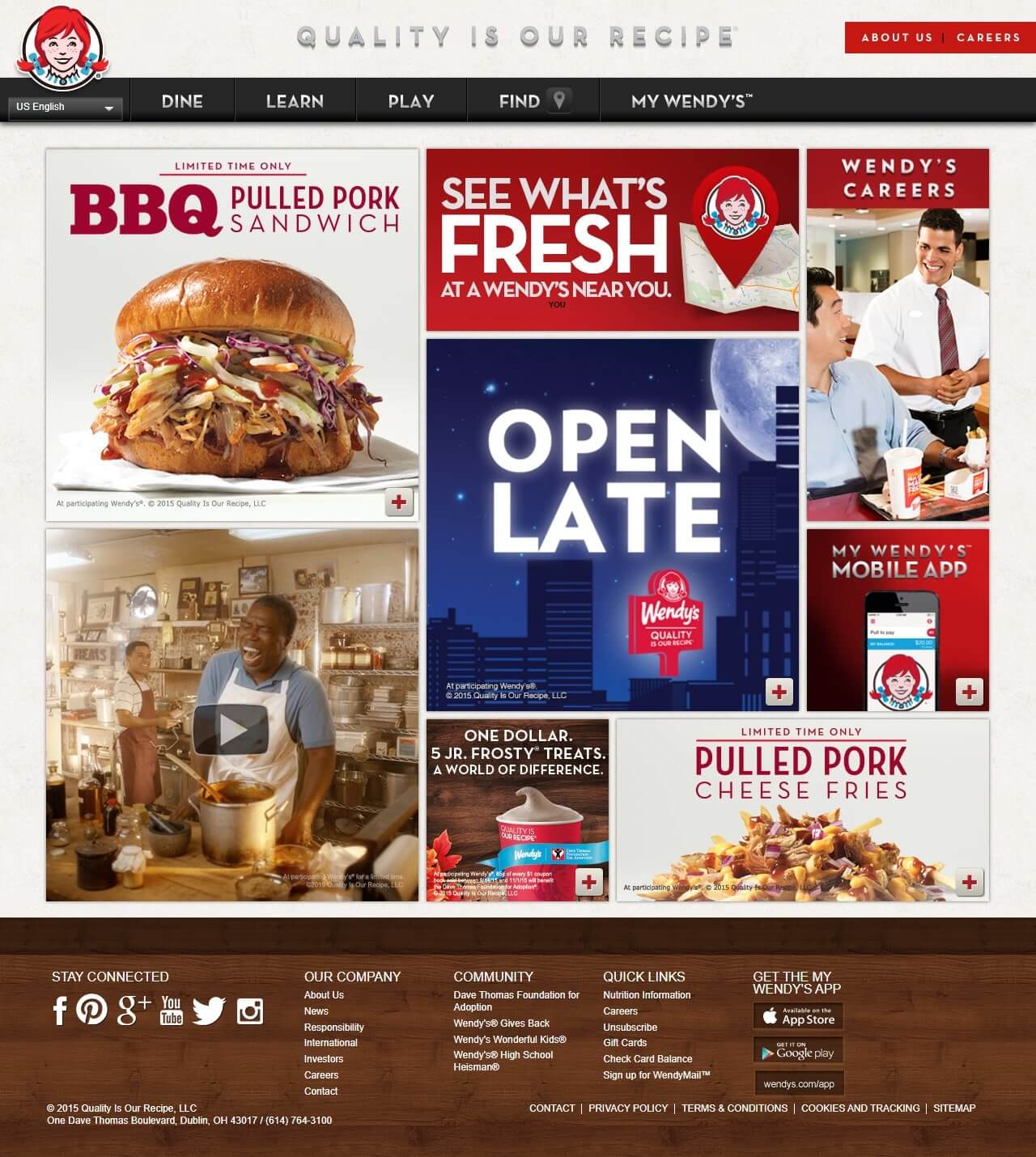
Wendy’s website in 2015
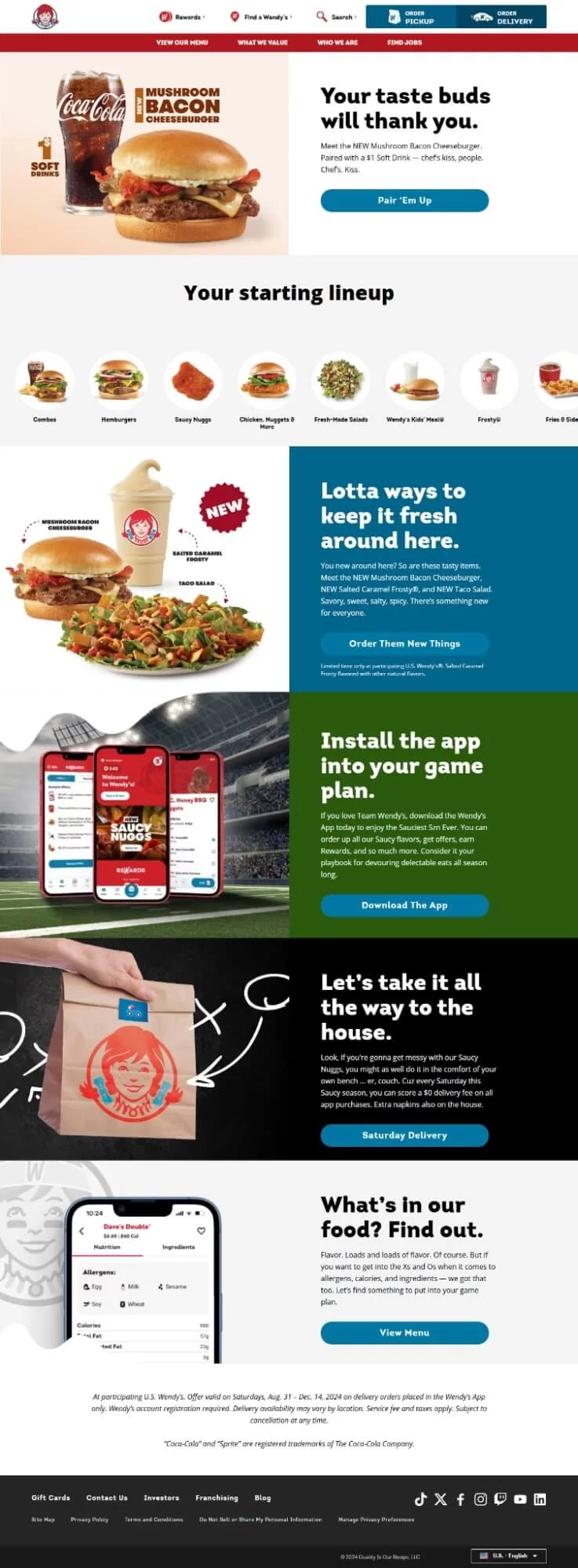
Wendy’s website in 2025
Signs Your Branding Has Outgrown Your Website:
- Mismatch Between Design and Products: Selling luxury items in a store with a budget, casual aesthetic.
- Your logo, colours, or fonts feel outdated—or worse, inconsistent across pages.
- You’re speaking to a new audience, but your visuals still reflect your old one.
- Your product line has grown, but your layout wasn’t built to handle it.
- A disconnect between your brand and your site doesn’t just look off—it can lead to trust issues, hesitation, and drop-offs at checkout.
A mismatch in branding and Shopify store design can create confusion, diminish trust, and affect your bottom line.
11. Inconsistent or Outdated Content
When’s the last time you actually read through your own site?
You’d be surprised how often we see things left behind:
- A Black Friday promo still running in March.
- Size charts that don’t match the products.
- Blogs that stopped in 2021 and never picked up again.
Your website is your voice. If the content is outdated, inconsistent, or flat-out wrong, it sends the wrong message. And in ecommerce, that doesn’t just look sloppy, it erodes trust and costs sales.

Signs of Inconsistent or Outdated Content:
- Outdated or incorrect product details. Copy straight from suppliers often skips the info your customers actually need.
- Different “voices” across pages. Some descriptions sound formal, others casual—like they came from two different businesses. That lack of consistency weakens your brand.
- Expired promotions still live. Like leaving Christmas decorations up in February—it makes shoppers wonder if anyone’s minding the store.
- Poor-quality or mismatched images. Blurry photos or inconsistent backgrounds kill trust instantly.
- A blog that’s gone stale. If your last post is years old, it makes your whole site feel neglected.
- Policy pages that confuse shoppers. Missing, outdated, or unclear info about shipping or returns raises red flags and can stop a sale cold.
12. Frequent Customer Complaints
If your customers are telling you something’s off with your site, it’s time to listen.
When complaints become a pattern, your store’s design, structure, or performance is likely the root cause. And if it’s turning off the people who want to buy from you, imagine what it’s doing to those who don’t even know you yet.

Signs Frequent Complaints Are a Problem:
- Complaints about difficult navigation, broken links, 404 errors, or complicated features to use.
- Your website is slow or has unresponsive elements.
- Complicated or multi-step checkout with no guest checkout option.
- The website doesn’t work very well on mobile devices.
- High cart abandonment rate
- The website looks outdated. It doesn’t instill confidence to shop.
- Incomplete, confusing, or outdated product information that confuses customers.
- Can’t pay with the regional popular payment gateway.
13. You’re Expanding to International Markets
Planning to sell outside of Canada or the U.S.? That’s a huge step forward—but if your Shopify store isn’t set up for it, you might run into trouble.
So, before you launch overseas, ask: Is your store truly built for a global audience?

Signs Your Store Isn’t Ready for International Markets:
- Your site’s only in English. No translation options, even for your best-selling pages.
- Prices show in just one currency. If someone’s buying from Germany or Singapore, they want to see their own currency—not guess with a calculator.
- Shipping info is unclear or overly generic. No regional delivery times, no country-specific rates.
- Missing local payment methods. Customers in Europe might expect Klarna. In Asia, maybe Alipay or GrabPay.
- Taxes and duties aren’t shown clearly. If people don’t know what they’ll owe when the package arrives, they’ll likely back out.
Selling internationally is exciting—but it has to feel smooth for your customer. If it doesn’t, they’ll shop somewhere else.
Is It Time for a Shopify Store Redesign?
This isn’t about chasing trends. It’s about making sure your store still works for your brand, your customers, and your goals.
If your site feels slow, outdated, hard to update, or no longer reflects who you are as a business, it’s probably time.
Redesigning doesn’t have to mean starting over. But it does mean raising the bar on what your online experience should feel like—for your team and your customers.
Take a minute. Go back through the 13 signs.
If more than a few feel familiar, your next move is probably clear, and our Shopify web design service is a good place to start.
Before You Redesign Your Shopify Store: FAQs That Matter
How do I know if my Shopify store needs a redesign?
You may need a Shopify store redesign if sales have dipped while traffic remains steady, customers keep asking the same questions, your site looks dated, loads slowly, or no longer reflects your brand. These are signs that the store experience may need to be reviewed.
Why do other store owners bother with redesigns?
Shopify store owners redesign their websites when small fixes are no longer enough. Common reasons include improving the visual design, replacing an outdated theme, simplifying the backend, improving performance, and making the website better match the current direction of the brand.
Should I make changes to my existing Shopify website instead of a complete redesign?
Making changes to an existing Shopify website can work if the issues are small, such as updating images, adjusting homepage sections, or improving specific pages. However, if the store structure is weak or the theme is outdated, a full redesign may be more effective than repeatedly patching deeper problems.
What are the benefits of a full redesign?
A full Shopify redesign can improve the shopping experience, page speed, navigation, brand presentation, and overall usability. It can also make the store easier to update, reduce workarounds, and create a more flexible foundation for future growth.
How often should I update my store design?
There is no fixed rule, but if your Shopify store has not been reviewed in a few years or feels outdated, it is worth assessing. Small design updates once a year can help keep the store fresh, while a fuller redesign every 2 to 3 years can help maintain performance, usability, and brand alignment.

Wondering Where to Begin?
We’ve been in your shoes—or worked with enough store owners who have.
If some of these signs hit a little too close to home, and you’re not sure what needs fixing (or how big the fix needs to be), we can help.
We offer a quick, no-pressure audit of your Shopify store.
Want us to take a look?