



 647-812-5125


If you are planning a website redesign in late August or September, the answer is almost always to wait. Fix what is hurting your store now, and redesign after the holidays.
We get the same phone calls every August-September:
“The site crawled during Black Friday. We paid for traffic that couldn’t check out.”
“We’re on a theme from 2019, and it shows.”
“Last year cost us. I don’t want to find out the hard way again.”
Different stores, same instinct: rebuild before the season.
These merchants are right about the problems. A slow store during peak traffic costs sales, and paid traffic landing on pages that struggle to load makes the loss worse.
Where it goes wrong is the assumption that a redesign is the fix.
Most of the time it isn’t. And even when it is, September is too late to start one safely.
This post walks through how to tell the difference, how much time a redesign actually needs, and what to do with the weeks you have left.
Does your Shopify store need a redesign or just fixes?
Your store needs a redesign when the problems come from how the store is built. It needs fixes when the store works overall, but certain parts need improvement.
That distinction decides your timing. Fixes take days or weeks. A rebuild takes months, and only one of those fits before the holidays.
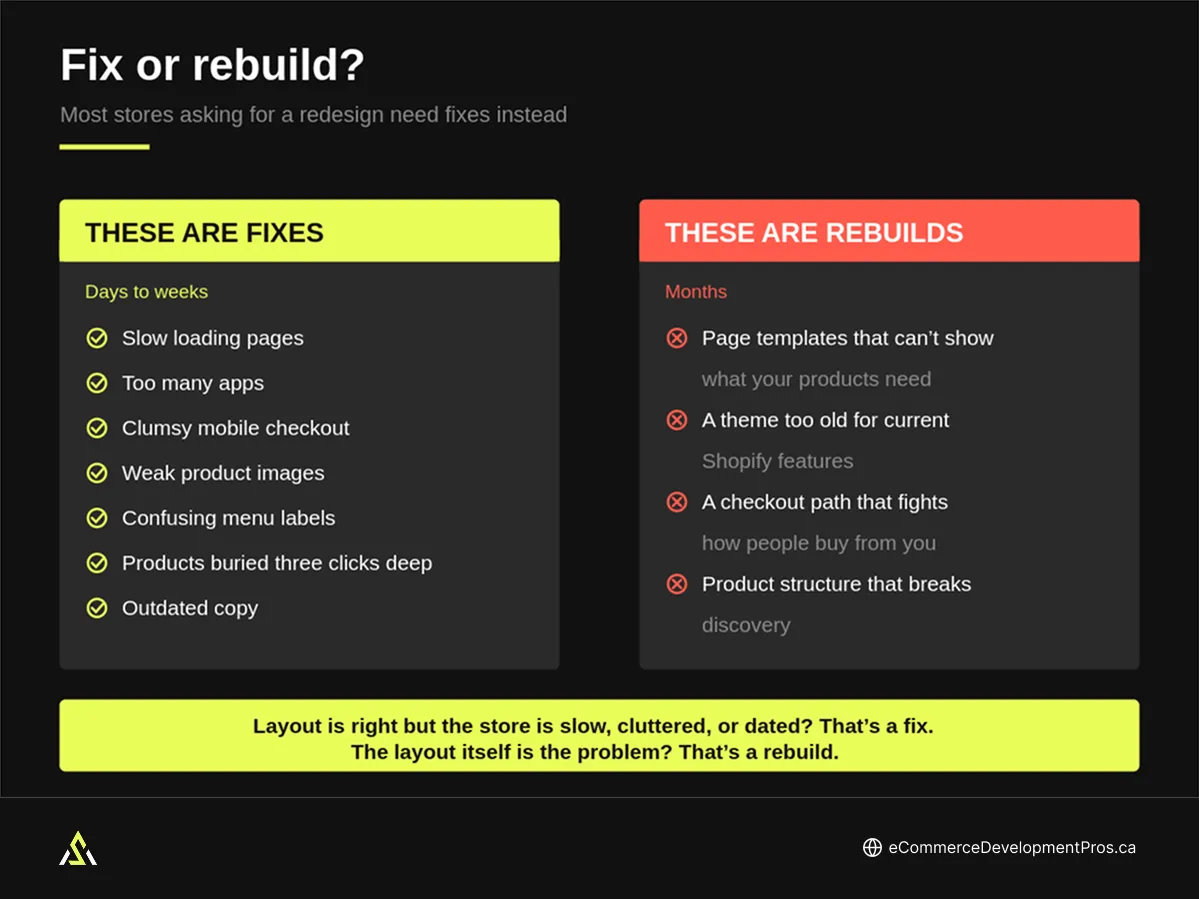
Most stores that ask us for a redesign turn out to need fixes. So name what actually bothers you about your store, then find it in one of these two lists.
These are fixes:
- Slow-loading pages
- Too many apps
- Clumsy mobile checkout
- Weak product images
- Confusing menu labels
- Products buried three clicks deep
- Outdated copy
These are rebuilds:
- Page templates that cannot show what your products need to show
- A theme too old to support current Shopify features
- A checkout path that fights how people actually buy from you
- Product structure that breaks how customers find things
If most of your list came out on the fix side, you do not need a redesign this year. Handle the fixes now and plan the rebuild for the new year.
If you are unsure whether your store is genuinely due for a rebuild, the signs a Shopify store needs a redesign are worth reading before you commit budget.

Not sure which one you’re dealing with?
Send us your store and what’s bothering you about it. We’ll tell you whether it’s a fix or a rebuild, which usually takes one look.
How long does a Shopify redesign actually take?
Between three and twelve weeks, depending on what you are building.
A template refresh with light customization can be live in three to four weeks. A larger store with custom features, a big catalog, or connected systems runs eight to twelve weeks. A fully custom build takes longer than that.
Those numbers are development time. They are not your timeline to launch the website.
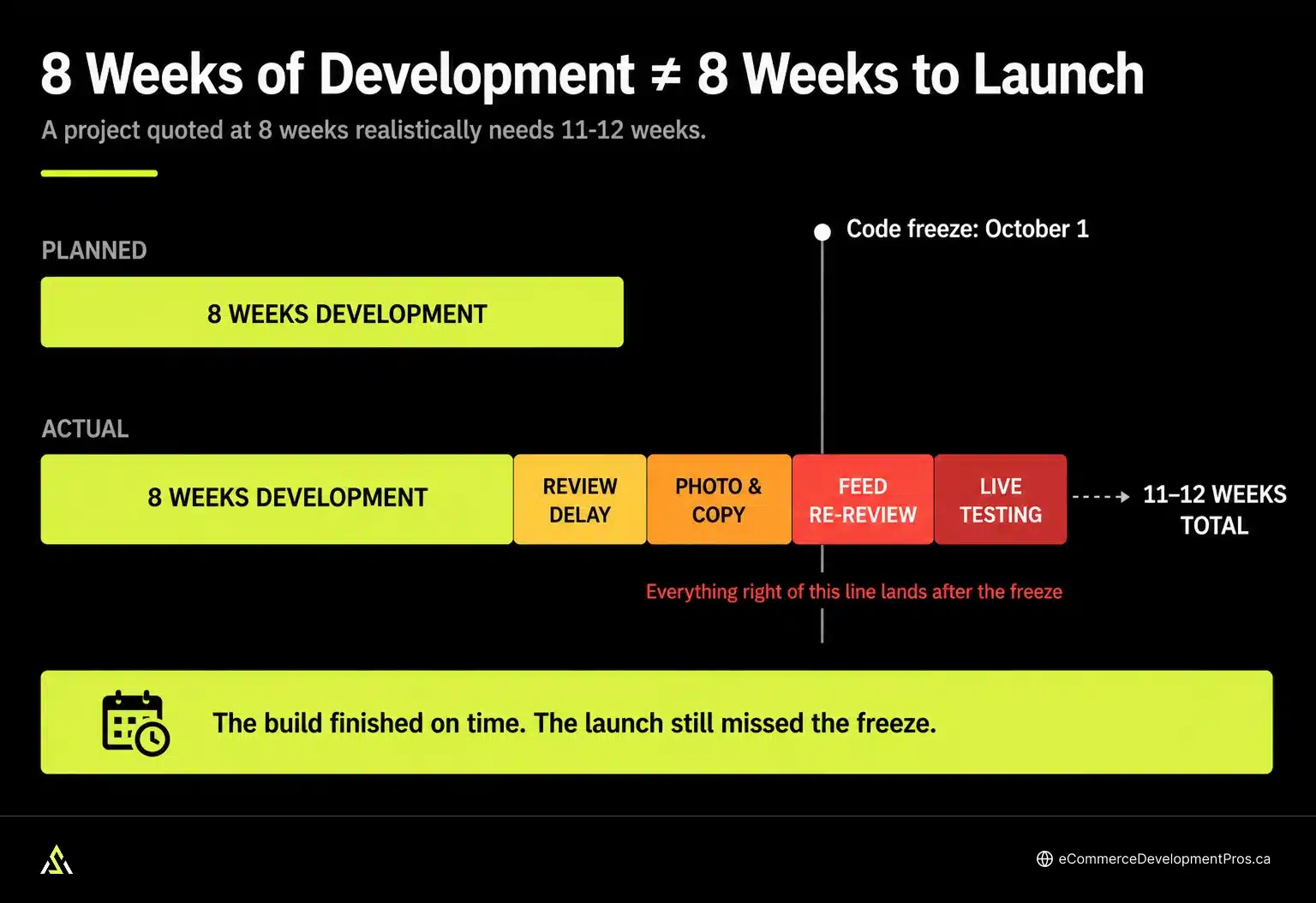
Your timeline also has to hold room for the parts nobody schedules:
- Your own review time. Design feedback and content approvals sit with you, and Q4 is when you have the least room for either. A two-day turnaround in June becomes two weeks in October, and client-side delay is the single most common reason projects run late.
- Photography and copy. New page layouts usually need new images. Booking a shoot, shooting it, and editing the results takes weeks, and adding developers does not speed it up. A finished build waiting on product photos is a build that is not live.
- Connected systems. A redesign can put your product feed out of sync with your store. Broken links, mismatched categories, and product URLs redirecting to a generic page are all listed by Google as causes of product disapproval. A feed sitting in review during Black Friday means your Shopping ads stop running, even though the site launched on schedule.
- Testing under real traffic. A finished build is not a proven one. Staging tells you the code works. Only live customers tell you what actually breaks.
Add those up, and a project quoted at eight weeks realistically needs eleven or twelve. That extra time matters because your redesign needs to be live and stable before your holiday code freeze, not simply finished by then.
EDP INSIGHT
A 2024 project we ran was tracking to a late-September launch. The founder was away for a week, then the final product sheet came in a week late. Two weeks of ordinary delay pushed the launch to mid-October, which left four weeks to plan holiday campaigns instead of ten. The store recovered by Christmas, but the revenue it was built for arrived a quarter later than it should have.
What is a holiday code freeze?
A holiday code freeze is a date you set, ahead of peak season, after which nothing technical changes on your store. No theme updates, no app installs, no checkout edits. Emergency fixes only.
The logic is simple. During your highest-revenue weeks, breaking something costs more than any improvement is worth.
At Ecommerce Development Pros, we recommend setting yours for October 1 and holding it through early January. Cyber Week runs to December 6, and shipping-deadline traffic continues past that, so December 1 is too early to lift it.
Here is why that date decides your redesign. Your new store has to be live and stable before the freeze, not on it. Give it two weeks minimum, because problems surface once real customers arrive, and you need room to fix them while fixing is still permitted.
That puts your real deadline at mid-September.
Is there still time to redesign before Black Friday?
Work backwards from mid-September, and the answer becomes arithmetic.
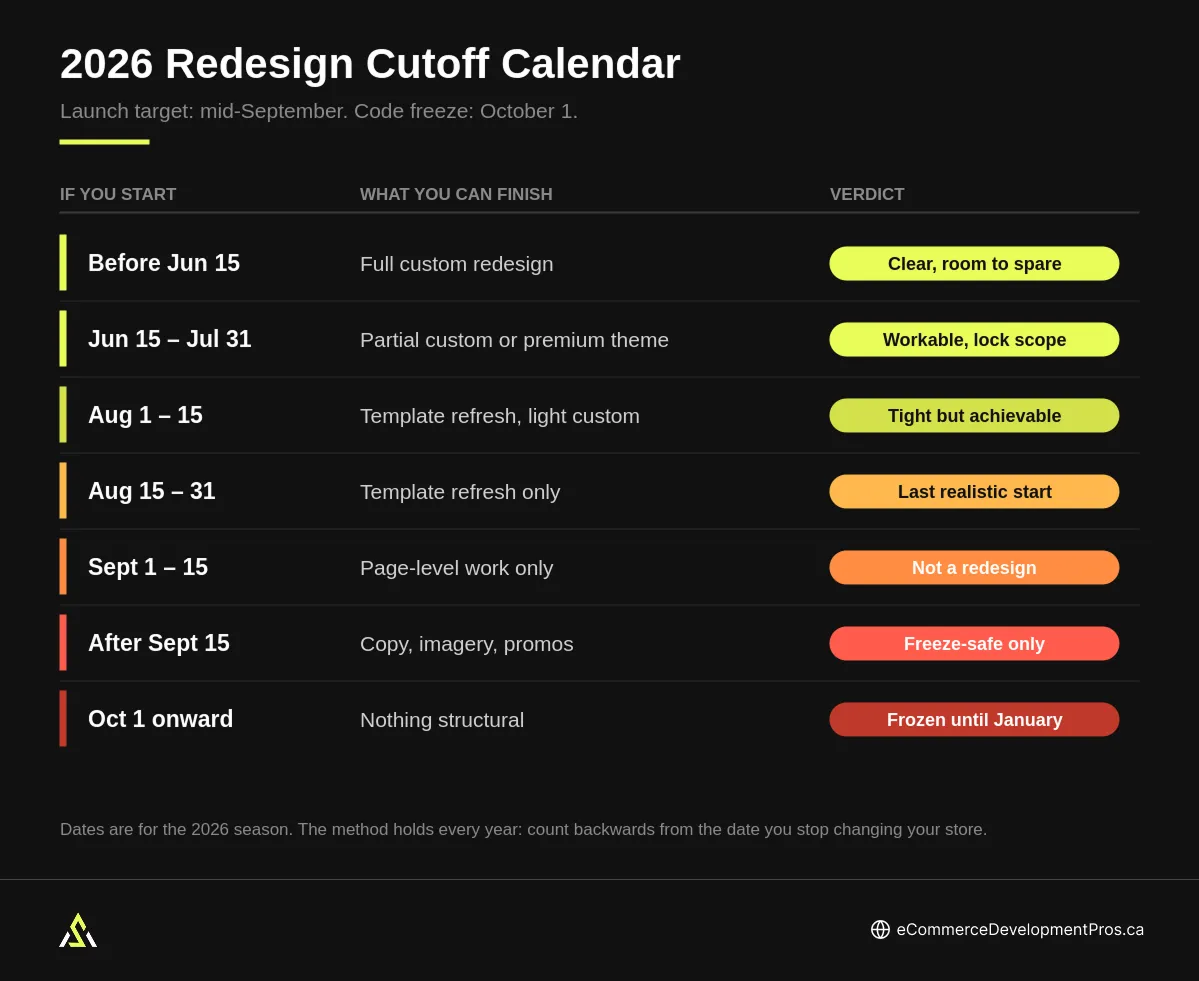
EDP 2026 Redesign Cutoff Calendar
|
Project start date |
What you can finish |
Verdict |
|---|---|---|
|
Before Jun 15 |
Full custom redesign |
Clear, with room to spare |
|
Jun 15 – Jul 31 |
Partial custom or premium theme build |
Workable if scope stays locked |
|
Aug 1–15 |
Template refresh with light customization |
Tight but achievable |
|
Aug 15–31 |
Template refresh only, no navigation changes |
Last realistic start. Needs one decision-maker |
|
Sept 1–15 |
Targeted page-level work |
Not a redesign. Fixes only |
|
After Sept 15 |
Copy, imagery, banners, promotions |
Freeze-safe changes only |
|
Oct 1 onward |
Nothing structural |
Frozen. Plan for the new year |
Dates are for the 2026 season. The method holds every year. Count backwards from the date you stop changing your store.
Read these rows honestly rather than optimistically. Most merchants put themselves one row higher than they belong, usually by assuming approvals will move faster than they ever have.
What happens if you launch a redesign during peak season?
Launching a redesign during peak season means you discover what’s broken when traffic is highest, and your code freeze prevents you from fixing it. The store has never handled real load, so the first stress test is Black Friday.
Your current store has known weaknesses. You have seen it under load. You know which pages slow down first, and most of what breaks is fixable in a day.
A new store has no history. The problems show up for the first time when traffic arrives, and they are rarely the ones you expected:
- A discount code that does not apply to the new collection structure
- Product variants that display fine on desktop and break on mobile
- A checkout step that works until three hundred people hit it at once
- Shipping rules that did not carry over correctly
None of these appear in testing, because testing is a handful of people clicking carefully. They emerge only under real traffic and real customer behaviour.
There is a second cost that gets overlooked. Launch in October and your holiday numbers compare against nothing. You lose the year-over-year read on your most important quarter, which is the data you would have used to judge whether the redesign worked.
Rushing does not just risk a bad Black Friday. It also removes your ability to tell whether the investment paid off.
What to do if your redesign is already behind schedule
You do not necessarily have to abandon it. But if the new store will not be finished, tested, and steady before traffic peaks, the launch date needs to move.
If the project is running behind, you have three options.
- Pause and pick it up after the holidays. Nothing built so far is wasted. The work sits where it is, and you launch into a window with room for testing.
- Cut the scope. Ship only what does not touch structure. New page layouts, better imagery, rewritten copy. Leave navigation, checkout, and URL changes for the new year.
- Launch anyway. You keep the plan and accept the risk of an unproven store handling your busiest weeks.
After months of work, pausing feels like waste. But the work is still there. The real risk is letting the time you have already spent push you into launching before the store is ready.
A delayed redesign costs you time. A rushed one can cost you the busiest period of the year.
What to fix when there’s no time for a redesign
If a redesign will not fit, shift the goal from rebuilding to strengthening what you already have. This is the work we do with merchants who call us in September.
- Speed on the pages that carry traffic. Homepage, collections, product pages, cart. Look for the specific causes rather than treating speed as one broad problem. Oversized images and scripts that block rendering are the usual culprits, and both are quick to fix.
- Your app stack. Check what each app loads on the storefront and remove anything nobody uses. Most stores are running two or three apps that overlap, each adding code to every page. This is often the fastest speed win available, and it does not touch your theme.
- Mobile checkout friction. Fewer form fields, clearer add-to-cart behaviour, and express payment options like Shop Pay. Small frictions get expensive as traffic climbs.
- Navigation and product discovery. Holiday shoppers land on collection pages, not your homepage. Make sure they can reach the right collection quickly and filter down from there.
Then test it properly. Not just clicking through on your laptop, but checking the paths customers actually take, on a phone, with the apps and integrations running.
For the wider operational picture heading into peak, our ecommerce holiday checklist covers the ground beyond your website.
Want these fixes handled before traffic builds?
We run speed and app audits on Shopify stores year-round, and September is when they matter most. Most of what we find is fixable in days.
When is the best time to redesign a Shopify store?
The best time is not January, September, or any particular month. It is whenever you have enough runway to build the store, test it, launch it, and let it settle before your next big selling period.
If you have that runway before the holidays, go ahead. A better store during your highest-traffic months is the best outcome available.
If you do not, strengthen what you have for peak season and start the redesign after it. For most stores, that means January.
Waiting also gives you three things that a rushed build cannot.
- You design from real evidence. Peak traffic shows you exactly where customers struggle, at volume. Session recordings from Black Friday beat months of guessing about what to change.
- You have room to fix causes rather than symptoms. There is time to solve the underlying problem instead of patching around it.
- The new store gets to settle. It can run under normal traffic, gather data, and be improved well before the next holiday season arrives.
The goal is not to hold out for a perfect month. It is to launch early enough that your biggest sales period is not also your testing period.
If you are budgeting for the project, our breakdown of what a Shopify redesign costs covers the typical ranges.
EDP INSIGHT
A redesign brief written in September looks very different by January. Before the season, briefs are usually about how the store looks. After it, they are about the specific pages and checkout steps where customers actually stalled. The second brief builds a better store, and it usually costs less, because the scope is narrower.
How to prepare for a redesign during your code freeze
A freeze stops changes going live. It does not stop everything else, and using those weeks well is what turns a delayed redesign into an early January launch.
- Finish discovery. Scope, priorities, and technical requirements can all be settled without touching the live store. Starting January with this done puts you weeks ahead.
- Get your assets ready. Book the photography now. Write and approve the copy for pages that will change. This is the delay most likely to catch you later.
- Record where you stand. Note your conversion rate by device, your checkout completion rate, and load times on your busiest pages. Without a baseline, you cannot prove the redesign worked, and you will not remember the numbers accurately in March.
- Map your redirects. If URLs will change, that mapping can be finished in a spreadsheet before anyone touches the store. Doing it under launch pressure is how rankings get lost.
Frequently asked questions
When should I redesign my Shopify store?
Redesign when you can name the business problem it solves, and you have enough time to build, test, and stabilize the store before your next peak sales period. If that window has closed, fix the current store for peak and plan the redesign for afterwards.
How long does a Shopify redesign take?
A Shopify redesign typically takes three to twelve weeks depending on scope. A template refresh with light customization can be live in three to four weeks. A larger store with custom features or connected systems runs eight to twelve weeks. Add time on top for reviews, photography, and post-launch testing.
Is it too late to redesign before Black Friday?
If you are starting a full custom redesign after mid-June, or a smaller template refresh after August, yes. Working back from an October 1 code freeze, the store needs to be live and stable by mid-September, and most projects run longer than planned. By September, targeted fixes to your existing store are the better use of the time.
Will a redesign hurt my SEO if I launch it close to peak season?
A redesign hurts your SEO when URLs change and the old ones are not redirected to the new pages. Search engines lose track of your pages, and rankings drop while they recatalogue the site. That recovery normally takes weeks, which is why launching close to peak season is risky. Map every redirect before launch, not after.
Should I redesign my Shopify store or just improve the current theme?
Improve the current theme if the problems are slow pages, unnecessary apps, weak navigation, or mobile friction. Redesign when the problems are structural, such as page templates that cannot show what your products need, or a checkout path that fights how people buy. If targeted fixes solve it, you probably do not need a redesign.

Redesign now, or wait until after the holidays?
Tell us where your store stands and when you were hoping to launch. We will tell you whether there is enough runway to build, test, and settle before peak, or whether waiting is the smarter call.