647-812-5125






WooCommerce to Shopify Migration — Structured Right from the Start
We know WooCommerce and Shopify inside and out and are familiar with the unique way each platform runs. Switching from WooCommerce to Shopify isn’t a technical transfer — it’s an architectural rebuild. Our method combines strategic planning and precise execution to ensure the launch is always controlled and seamless.
Years working across WordPress, WooCommerce, and Shopify ecosystems
0% data loss with structured mapping and verified data validation
We ensure 100% uptime - your WooCommerce store stays live while Shopify is built separately
For most WooCommerce stores, we take 8 weeks to migrate over and launch with Shopify
The Real Concerns Behind Every WooCommerce to Shopify Migration

Will I lose SEO Ranking when migrating from WooCommerce to Shopify?
Search rankings won’t drop if the migration is executed properly. The URL structure is different between WooCommerce and Shopify. Problems arise when redirects or metadata aren’t set up properly. WooCommerce relies on category URLs, whereas Shopify uses a fixed /products/ and /collections/ format, meaning URLs will usually change.
SEO rankings drops generally occur when:
- 301 redirects are not properly configured
- Page titles, meta descriptions, or other on-page SEO elements are missing or only partially transferred
With every old URL mapped to the correct URL on Shopify and metadata fully preserved, SEO rankings should hold steady. Temporary dips can happen, but lasting drops only result from incomplete redirect mapping or SEO transfer.

Will my products, customers, and order history transfer correctly?
Yes — as long as the migration is done with proper data mapping.
When you transfer WooCommerce to Shopify, product data must be aligned carefully because both platforms store information differently. This includes product variants, attributes, categories, customer records, and order history, all of which need to fit Shopify’s structure.
Problems with data usually show up when fields don’t line up properly or when certain details are missed during the transfer. Taking the time to map products, customers, and order records correctly—and checking them before launch—helps ensure everything arrives in Shopify the way it should.

How will my WooCommerce store’s functionality be transferred over to Shopify?
WooCommerce plugins cannot be transferred directly to Shopify.
Almost every WooCommerce store depends on plugins to extend the functionality. The plugins are used for features like custom pricing, subscriptions, filters, or checkout changes. Shopify uses a different architecture, so that functionality must be rebuilt using native features, compatible apps, or controlled custom development.
Issues arise when it’s assumed that plugin logic will simply “carry over.”
When each feature is properly evaluated and rebuilt, the Shopify store performs cleaner and more reliably than the original.

Will my WooCommerce store go offline during migration?
No — if migration planning is done correctly.
When you move from WooCommerce to Shopify, your current store stays live while the new Shopify store is being set up in a separate development space through our Shopify partner account. The transition only happens once store design, data, functionality, and redirects are fully tested and validated.
In most cases, downtime only occurs when the domain is pointed to the new store before everything has been fully tested. If the switch is made carefully—after testing checkout, redirects, and key settings—the transition usually happens without noticeable disruption, and customers can continue accessing the store as usual.

Will my checkout and payment setup work the same way after migrating to Shopify?
For most WooCommerce stores, yes.
Shopify’s standard checkout has everything that most DTC and many B2B brands need. It supports major payment gateways and common shipping and tax configurations, so in many cases, nothing feels dramatically different to customers.
Where things change is customization. On standard Shopify plans, the checkout itself can’t be deeply modified. If your WooCommerce store uses custom checkout fields, conditional logic, or heavily altered flows, those may not translate directly unless you are on Shopify Plus. Shopify Plus allows more flexibility at the checkout level, but that’s a different plan with different costs.
Whether you need standard Shopify or Shopify Plus really depends on how customized your current checkout is. If it’s fairly standard, you’re likely fine. However, if your current checkout flow is customized, you should review those requirements carefully before making the move.
WooCommerce to Shopify Migration — Executed with AI Precision
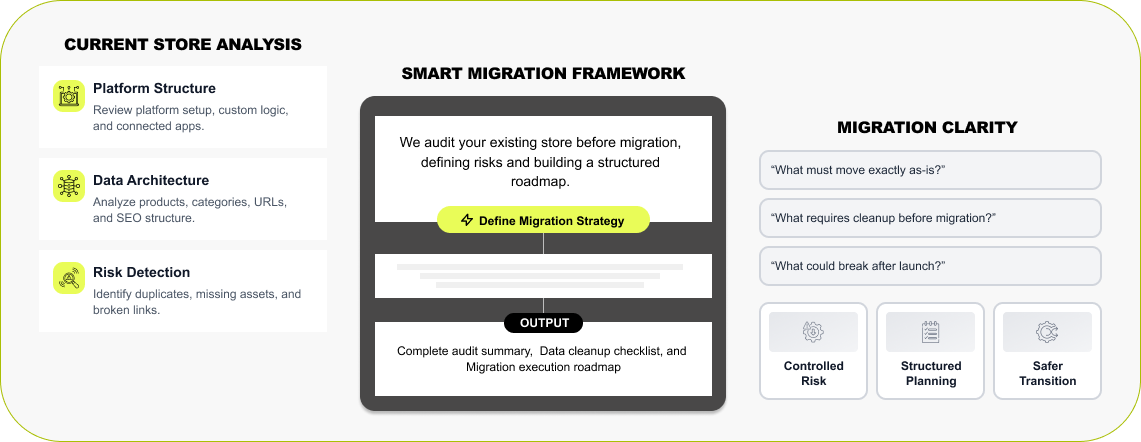

WooCommerce Architecture Review
Every WooCommerce to Shopify migration starts with understanding your store's current functionality. We review your existing setup, active plugins, product data, URL structure, and SEO configuration to see how everything is connected behind the scenes. AI tools help us quickly surface potential gaps during the WooCommerce to Shopify migration process, but nothing is left to automation alone. Each element is reviewed manually, so your data, structure, and functionality are properly aligned before moving to Shopify.
Read More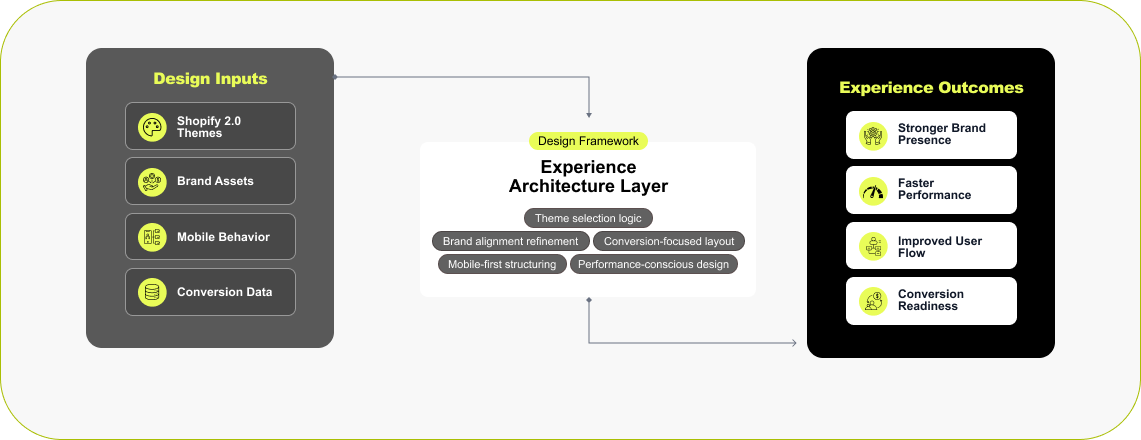

Shopify Store Framework & Setup
When moving from WooCommerce to Shopify, many businesses see it as the right time to rethink the store experience. Some brands choose a fresh design with better mobile performance and faster load times. Others prefer to carry their existing design but improve how it performs. We work with you to choose the right Shopify theme or build a custom layout following brand guidelines, if needed. However, if you like to keep your existing brand look, we can recreate it inside Shopify, too.
Read More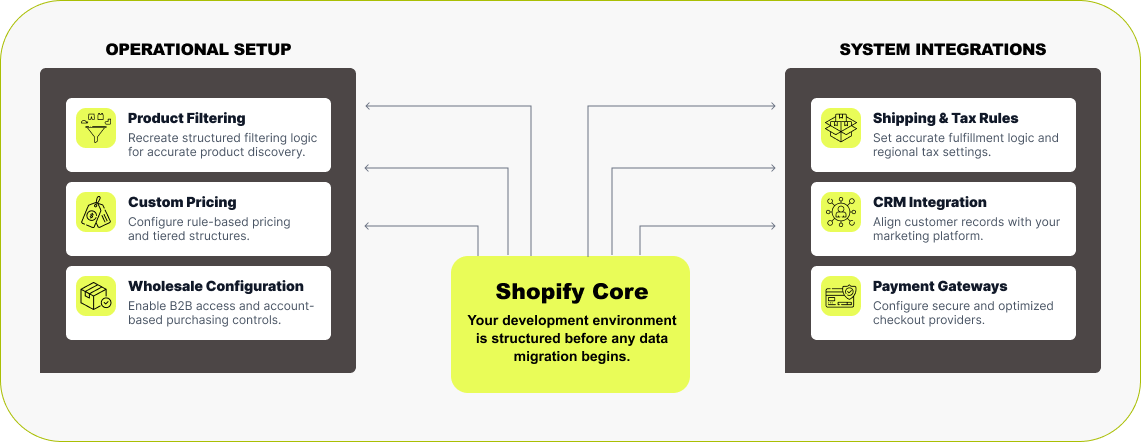

Functionality Rebuild & Feature Alignment
The next step is setting up a Shopify development store where the new site is built before anything goes live. This development store, created through our Shopify Partner account, is used to rebuild the features your business already relies on. The WooCommerce setup is reviewed in detail — filters, product variants, pricing rules, memberships, wholesale logic, and any connected tools — so nothing important is missed when the store is recreated in Shopify. Shipping rules, tax settings, and payment gateways are configured ahead of time so the new Shopify store is ready to operate before any data is moved over.
Read More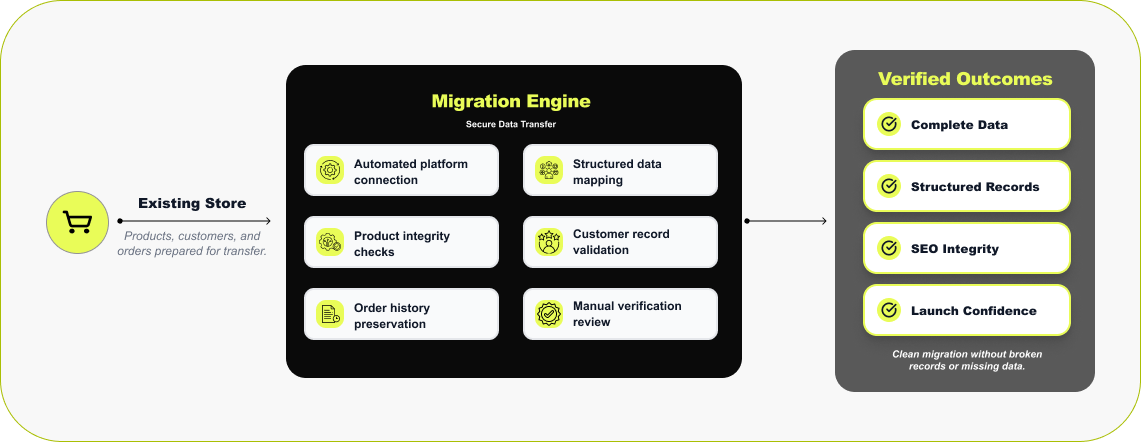

WooCommerce Data Transfer & Validation
Once the Shopify store is built, the next step is moving the data from your WooCommerce store. This stage is handled carefully, and we usually rely on migrating using our trusted migration stack, such as LitExtension or Cart2Cart. These connect directly with the WooCommerce store and transfer products, customer accounts, and past orders into Shopify. After the transfer completes, the data is manually reviewed inside Shopify by our team. Products, collections, orders, and customer accounts are reviewed to confirm that the data has migrated correctly after the transfer.
Read More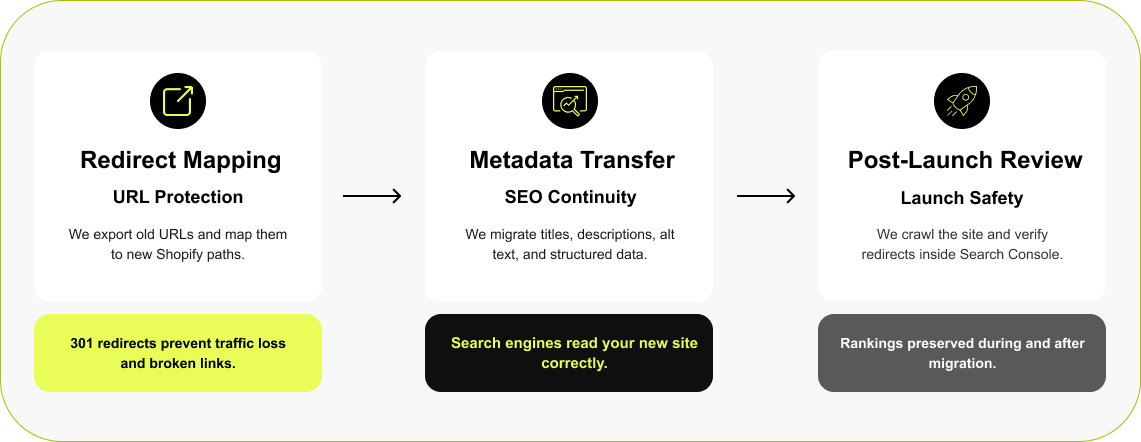

Protecting Rankings During Migration
URLs change when you replatform your WooCommerce store to Shopify. WooCommerce's structure has URLs around categories, while Shopify follows its own pattern, such as /products/ and /collections/. If nothing is done with those old links, search engines will keep trying to visit pages that no longer exist. Before launch, the existing URLs from the WooCommerce store are pulled and reviewed. Each one is then connected to the closest matching page in Shopify with a 301 redirect. At the same time, the SEO details from the old site—titles, descriptions, image alt text, and schema—are carried over so the new store keeps the signals search engines were already using.
Read More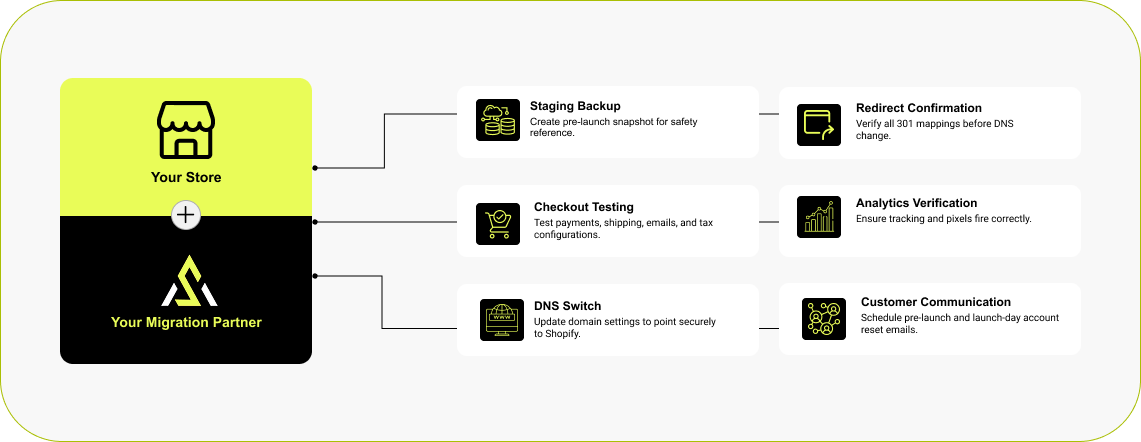

Launch & Communication Strategy
Going live from WooCommerce to Shopify is handled step by step. Before the domain change, we create a reference copy for later reference. A final QA is performed to ensure everything is working as expected. Once everything checks out, the DNS records are updated so the domain starts loading the Shopify store. One important detail: because WooCommerce and Shopify use different password encryption, customer passwords cannot be transferred, and shoppers will need to reset them on their first login. So, we send out communication to customers about the upcoming change and how to access their accounts on the new platform.
Read MoreShopify Stores Designed to Perform in Real-World Ecommerce
The stores shown here were built to solve practical problems—slow performance, cluttered layouts, low conversion, or platforms that had reached their limits. Our focus is on structure, speed, and usability, so each Shopify site works reliably day to day and holds up as traffic, features, and catalog size grow.



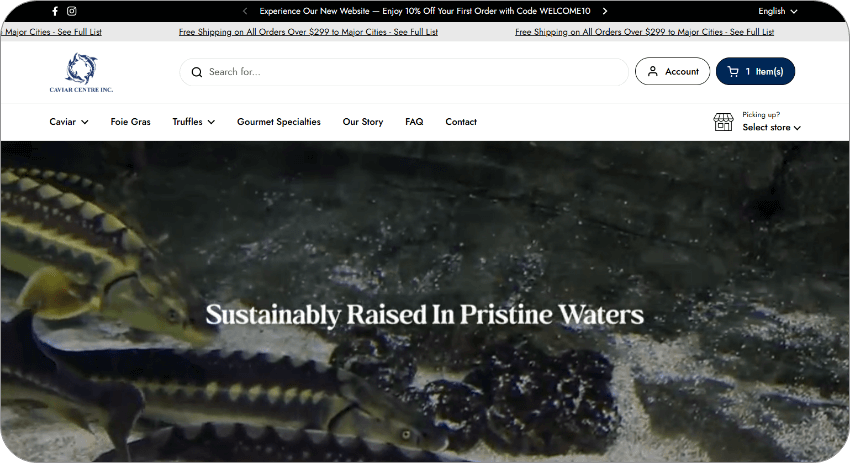
Luxury Fashion
A luxury fashion brand redesigned with a refined, editorial feel—built to support a growing roster of designers while staying fast, structured, and scalable.



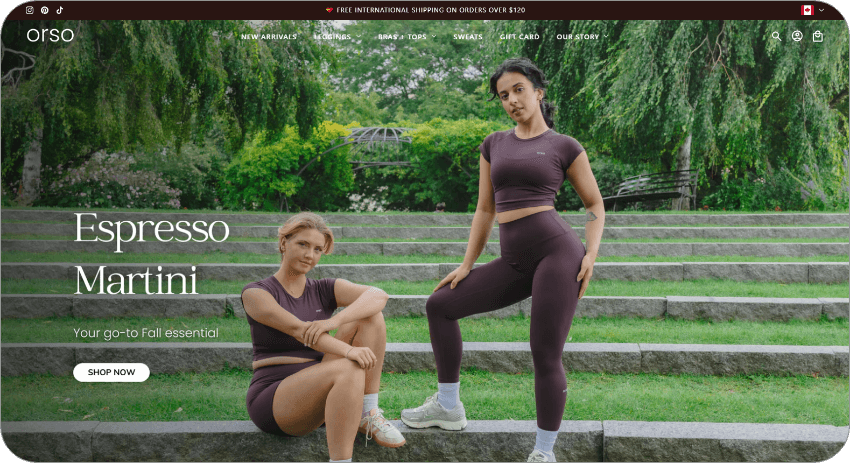
Women’s Activewear
A performance-focused Shopify design tailored for a women-led fitness brand, balancing strong visuals with frictionless shopping.



Fencing Products
A full Shopify redesign paired with SEO, marketing, and ongoing maintenance for a product-heavy, search-driven business.



We supported this Shopify Plus brand with focused social media marketing, aligning campaigns with seasonal demand and high-intent audiences to drive efficient, scalable growth.
How Much Does WooCommerce to Shopify Migration Cost?
Every WooCommerce store is unique. A migration covers everything — rebuilding your store design in Shopify, setting up the right apps, moving your data, and making sure everything runs right before launch. Contact us for a custom quote for your project.
Trusted by Modern Marketing & Growth Teams
The professional attitude, work ethic, and meaningfulness they put into their work were impressive.
 Maryna Gandalf
It was an absolute pleasure working with Arete Soft Labs for our website. They answered all questions in a timely manner and gave professional feedback on our design. Will definitely be using them for all our needs going forward!
 The Bee Commander
The team maintained open and clear communication throughout the project.
 Hary Robinson
Very professional and know their job well. My favourite part working with them is they give you peace of mind which is the most important thing so that you focus n your business. Will definitely consider them for my future digital needs.
 Prachi Chauhan
What was wonderful about this was that they made very complex deliverables sound easy.
 Isolde O'Neill
Brands Who Build, Grow, and Win With Us
WooCommerce to Shopify Migration FAQ
When a business starts thinking about moving from WooCommerce to Shopify, a few questions almost always come up. How long will it take? What will it cost? Will SEO rankings drop? What happens to products, customers, hosting, and existing features? Below are straightforward answers based on real migration experience and the issues we commonly see during the process.
How long does the WooCommerce to Shopify migration take?
+Most WooCommerce to Shopify migration projects fall within a 4 to 8 week window and depend heavily on store size and complexity.
If your catalog is small and mostly standard, migration is faster. Larger stores with lots of SKUs, plugins, subscriptions, wholesale rules, or complicated SEO need extra planning and testing.
There are a few steps involved in the migration process: auditing your existing WooCommerce setup, rebuilding key features in Shopify, moving and checking all the data, setting up redirects, and testing checkout before launch.
How much does it cost for a WooCommerce to Shopify migration project?
+There’s no fixed number because no two WooCommerce stores are built the same way.
Cost usually depends on how customized your current store is. A standard catalogue with minimal plugins is straightforward. A store with custom features, subscription setups, wholesale rules, SEO configurations, and third-party integrations will need more work to rebuild inside Shopify.
Contact us to get an accurate estimate for your migration project.
Will I lose SEO rankings or data when migrating from WooCommerce to Shopify?
+Not if the migration is done carefully. Ranking drops usually happen when old page links stop working after the move. WooCommerce and Shopify generate URLs in different ways, so the original links need to be connected to their new Shopify pages.
During the transition, the existing URLs are reviewed and redirected to the closest matching page in Shopify using 301 redirects. These page redirects help search engines understand that the content has moved rather than disappeared. Key SEO elements—page titles, meta descriptions, and image alt text—are also brought over so the new store keeps the same search signals built over time.
Can I migrate WooCommerce subscriptions or memberships?
+Yes, but they don’t “copy over” automatically.
WooCommerce subscriptions normally run through specific plugins. Shopify uses a different subscription framework. We can move customer subscription data, but the recurring billing setup itself has to be recreated using Shopify-compatible apps.
When it’s rebuilt properly, customers won’t feel the transition. Their subscriptions continue after launch without interruption.
Do WooCommerce product reviews migrate to Shopify?
+They can, yes.
Reviews are stored as structured data in WooCommerce. That data can be exported and uploaded into Shopify review apps that support bulk imports. Star ratings, written feedback, reviewer names, and dates can all be preserved if they’re available in the export.
It’s mostly a formatting and mapping exercise.
Do customer passwords transfer during WooCommerce to Shopify migration?
+No. When moving from WooCommerce to Shopify, customer account passwords cannot be transferred over. The two platforms use different password encryption techniques. Moreover, Shopify does not allow encrypted passwords from external systems to be imported.
Customer accounts, order history, and other account details can still be migrated. After the new Shopify store goes live, customers simply need to reset their password the first time they log in. As part of a migration project, we work with our clients to prepare a communication plan to notify customers so they know what to expect and can access their accounts without confusion.
Can I keep my existing domain when moving from WooCommerce to Shopify?
+Yes. You can keep your existing domain when moving from WooCommerce to Shopify.
When your Shopify store is ready, we update the domain DNS records to connect with your Shopify store. Your customers will not experience any differences except a refreshed design or a better experience.
Official Technology & Shopify Partners