



 647-812-5125
 Back to Ecommerce Glossary
What Is Cost Per Acquisition (CPA)?
Cost Per Acquisition is the amount you spend to get one customer or one conversion. It shows the real cost of turning a click or visit into a sale.
How Do You Calculate Cost Per Acquisition (CPA)?
The formula is:
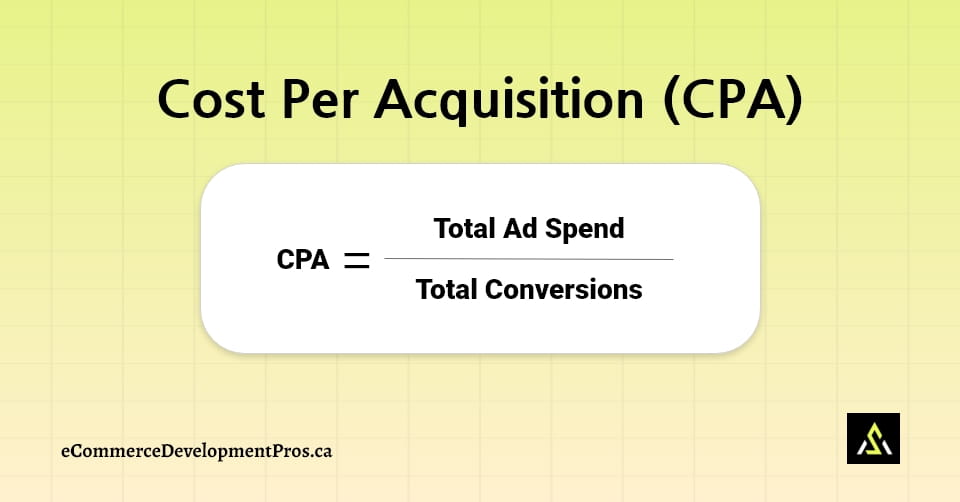
If you spend $150 and get 10 customers, your CPA is $15. This helps you see if your ads are giving you value or just eating money.
How does Shopper’s behaviour Affect Cost Per Acquisition (CPA)?
Cost Per Acquisition (CPA) depends on how shoppers respond to your ads and your store.
- The ad doesn’t match what the shopper expected
- The product photo looks unclear
- Text feels confusing
- Page loads slowly
- The offer doesn’t feel worth it
- Checkout takes too long
- Mobile page feels cramped
If any step feels “off,” the shopper doesn’t convert.
How Cost Per Acquisition (CPA) Shows If Your Marketing Is Working?
Cost Per Acquisition matters because it shows if getting a customer is costing you too much.
- If CPA is high → you spend more money than you should
- If CPA is low → you get customers at a better cost
- A lower CPA helps your budget last longer
It’s a quick way to see if your marketing is working or not.
How To Reduce Cost Per Acquisition (CPA)?
Lowering your CPA often comes down to making your site and ads easier for people to understand and act on. A few practical fixes include:
- Use clear, high-quality photos that show the product properly.
- Keep landing pages short and remove anything that doesn’t help someone decide.
- Show the price and delivery details early so there are no surprises.
- Make sure your main button stands out and is easy to spot.
- Add reviews to build trust and help people feel comfortable buying.
- Improve mobile speed so the page loads quickly on phones.
- Test new ad visuals or copy to see what catches attention.
- Cut out unnecessary steps in the checkout process.
Small improvements like these help more visitors finish their purchase, which naturally brings your CPA down.
How Shopify Helps Lower Cost Per Acquisition (CPA)?
Shopify helps lower Cost Per Acquisition by making it easier for people to finish their purchase. It provides:
- A checkout that loads quickly
- Themes that work well on phones
- Product pages that show the important details
- Payment options people already know and trust
- Easy tools to add reviews where shoppers can see them
When the store is simple to use, more visitors buy, and your CPA goes down.
What Are the Benefits of a Lower Cost Per Acquisition (CPA)?
A lower cost per acquisition helps your store grow without wasting money.
You get:
- More customers for the same budget
- Higher profit
- Ads that perform better
- Easier scaling
- A clearer idea of what shoppers respond to
Lower CPA keeps your costs under control.
What Mistakes Increase Cost Per Acquisition (CPA)?
A few common mistakes push Cost Per Acquisition higher:
- Slow or messy landing pages
- Weak product details
- No clear button or call-to-action
- Ignoring mobile- friendliness
- Not testing new ad versions
- Checkout problems
Fixing these drops CPA quickly.
What Tools Help Improve Cost Per Acquisition (CPA)?
These tools help lower CPA by improving your ads, your pages, and how shoppers move through your store:
 Shows CPA for each ad by calculating how much you spent and how many conversions that ad produced.
 Tracks CPA across campaigns by measuring spend vs. results for every ad set.
 Highlights drop-off points so you can fix pages that stop shoppers from moving forward.
 Shows how visitors move on the site through heatmaps and recordings so you can remove the friction points
 Brings shoppers back with automated emails and SMS.
 Helps build simple landing pages that load clearly.
 Adds reviews so shoppers trust the product more.
These tools help you see why people do or don’t convert.