



 647-812-5125
 Back to Ecommerce Glossary
What Is A/B Testing?
A/B testing is a method of comparing two versions of a product, webpage, or feature to determine which one performs better by showing each version to a random segment of users and measuring their responses.
How Do You Calculate A/B Testing Results?
To calculate A/B testing results, you first split your visitors into two groups so each group sees a different version. Then you compare the conversion rate (CVR) of Version A and Version B using this formula:
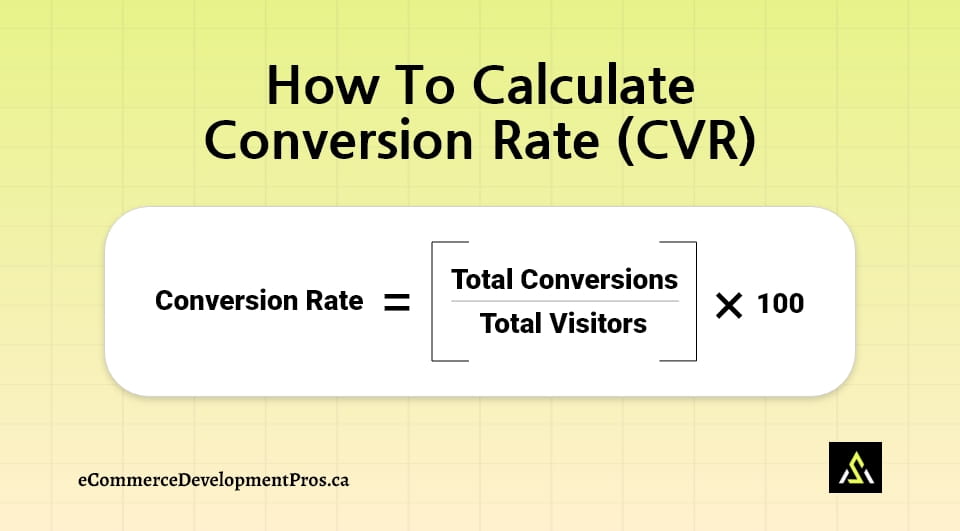
Once both CVRs are calculated:
- If CVR(B) > CVR(A) → Version B performs better
- If CVR(A) > CVR(B) → Version A performs better
The version with the higher conversion rate is the one that encouraged more people to take action—click, sign up, or buy.
What Can You Test With A/B Testing?
A/B Testing lets you test small changes to see which version gets better results.
- Different headlines
- Product images or lifestyle photos
- “Add to Cart” button style
- Short vs. long descriptions
- Offer messages like “10% off”
- Checkout steps or form changes
Why A/B Testing Matters for Online Stores?
A/B testing shows what actually makes people click and buy.
It helps you:
- Spot designs shoppers interact with more
- Find headlines and buttons that lead to higher sales
- Fix small issues that quietly hurt conversions
- Raise your Conversion Rate without needing more traffic
- See what customers notice, ignore, or struggle with
- Make safer changes backed by real behaviour
Stores keep testing because small wins stack up—and often reveal problems they didn’t even know were there.
How To Use A/B Testing to Improve Sales?
You can use A/B Testing to improve sales by finding which version of your page or message makes more people buy.
- Test headlines that explain the product better
- Try different photos to see which gets more clicks
- Change the button text or colour to make it clearer
- Compare short vs. long descriptions
- Test offers like free shipping or small discounts
- Keep the winning version and test again
How Shopify Supports A/B Testing?
Shopify doesn’t run A/B Tests on every part of your store, but it gives you enough ways to try things without making a mess. You can switch between versions, change small parts, and see what feels better for real shoppers.
Most stores end up using things like:
- A second copy of the theme to test a different layout
- Simple page-builder apps that let you try a new design fast
- Email tools that test subject lines or messages
- Small changes in checkout (only when the setup allows it)
- Quick edits in the product page to see what people react to
It’s not fancy, but it’s enough to test ideas without breaking anything.
What Mistakes Should You Avoid With A/B Testing?
A/B Testing doesn’t work well when the tests are unclear or changed too quickly.
- Running several tests at once on the same page
- Stopping the test before enough people have seen it
- Choosing big changes instead of small, clear ones
- Ignoring data and going with a guess
- Testing features that don’t affect buying decisions
Which Tools Help With A/B Testing?
Various tools help with A/B Testing, which let you compare two versions of a page or message to see which one works better. Here are some:
 Great for Shopify and eCommerce: lets you test layouts, headlines, images, CTAs etc.
 Used when you need deeper testing such as front end changes, feature flags, etc.
 Good for price testing, shipping-rate tests, discounts/offer experiments, and combinations.
 Easy to test two versions of a page fast
 Helpful for testing email subjects and message styles
These tools make testing straightforward, so you can learn what shoppers respond to.