



 647-812-5125








Why BigCommerce to Shopify Migrations Need a Different Approach
Years across major ecommerce platforms & Shopify
Data loss with structured mapping & validation
Uptime — your BigCommerce store stays live during the build
Typical timeline to migrate and launch on Shopify
Common Risks When Migrating From BigCommerce to Shopify

Will I lose SEO rankings when migrating from BigCommerce to Shopify?
Migrating from BigCommerce to Shopify can cause temporary ranking fluctuations, which typically settle within a few weeks as search engines recrawl the new site. Careful planning reduces the risk of lasting declines. BigCommerce URLs rarely match Shopify's fixed product, collection and blog URL structure. Common migration issues include:
- 301 redirects missing, chained or pointing to the homepage instead of a relevant replacement page
- Important content, titles, meta descriptions, alt text or structured data missed during the rebuild
- Internal links pointing to old URLs, or crawl and indexing restrictions left in place after launch
We map existing URLs to their most relevant Shopify equivalents, preserve important content and metadata, and monitor indexing and search performance after launch. Rankings cannot be guaranteed, but these safeguards help protect the visibility you've already earned.

Will my products, customers, and order history transfer correctly?
Yes, once the data is mapped properly. BigCommerce and Shopify hold product information in different ways — options, variants, and custom fields especially. So product records, variants, categories (which become collections in Shopify), customer accounts, and order history all get lined up against Shopify's structure before anything transfers. The problems we see almost always come down to a field that didn't match or a detail that got skipped, which is why we check the data inside Shopify before launch instead of trusting the import ran clean.

How will my BigCommerce store’s functionality be rebuilt on Shopify?
BigCommerce apps and built-in features don’t transfer directly. Things like custom pricing, product filtering, B2B price lists, or checkout modifications must be rebuilt with Shopify’s native features, compatible apps, or controlled custom development. Each feature is evaluated individually — we don’t assume logic will simply “carry over.” Rebuilt properly, the Shopify store usually runs cleaner than the original.

Will my BigCommerce store go offline during migration?
No — with correct planning. Your BigCommerce store stays live and selling while the new Shopify store is built in a separate development store through our Shopify Partner account. The switch only happens once design, data, functionality, and redirects are fully tested. Downtime only occurs when a domain is pointed before everything is validated — which is exactly what a controlled launch avoids.

Will my checkout and payments work the same after moving to Shopify?
For most stores, yes — and usually better. Shopify’s checkout supports major gateways and standard shipping/tax setups, and it’s a big part of why conversion improves. The exception is heavy checkout customization: deeply modified flows, conditional logic, or custom checkout fields require Shopify Plus (checkout extensibility). If your BigCommerce checkout is fairly standard, you’re fine on a standard plan; if it’s customized, review those requirements before moving.
Why Merchants Move From BigCommerce to Shopify
Merchants rarely leave BigCommerce over a single feature. It's usually the pile-up — conversion they can't lift, features locked behind apps, a roadmap that keeps waiting on developers. Here's what actually pushes them to Shopify.

Higher Checkout Conversion
Shopify’s checkout consistently converts better than BigCommerce’s, and on a store doing real volume, even a few points of lift outweigh the entire cost of migrating. For most merchants, this is the single clearest financial reason to move.

Less Reliance on Paid Apps and Developers
Things BigCommerce hides behind paid apps or custom code — international selling, advanced merchandising — often come built into Shopify. Merchants get tired of paying for and stitching together what should already be there. Our audit flags which apps you can simply drop.

A Deeper App and Theme Ecosystem
When you do need to extend the store, Shopify’s ecosystem is larger and better maintained. That means more design freedom, more integrations, and less time spent forcing a workaround.

Room to Scale Into Shopify Plus
Growing brands like knowing there’s a clear next step. Shopify Plus adds advanced checkout customization, expanded B2B capabilities and expansion stores on the same platform—so upgrading later doesn’t mean replatforming again.
Our BigCommerce to Shopify Migration Process
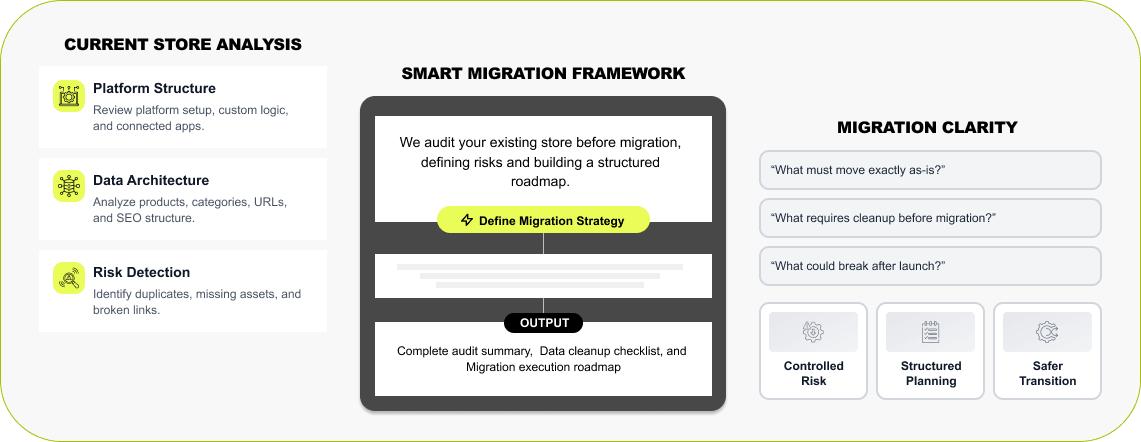

Step 1 — BigCommerce Architecture Review
We start by going through how your store actually works today — the apps you're running, your product and variant data, the URL structure, and how SEO is set up — to see how it all fits together. AI helps us spot gaps in that faster, but a person still reviews each piece, so nothing gets missed before the move.
Read More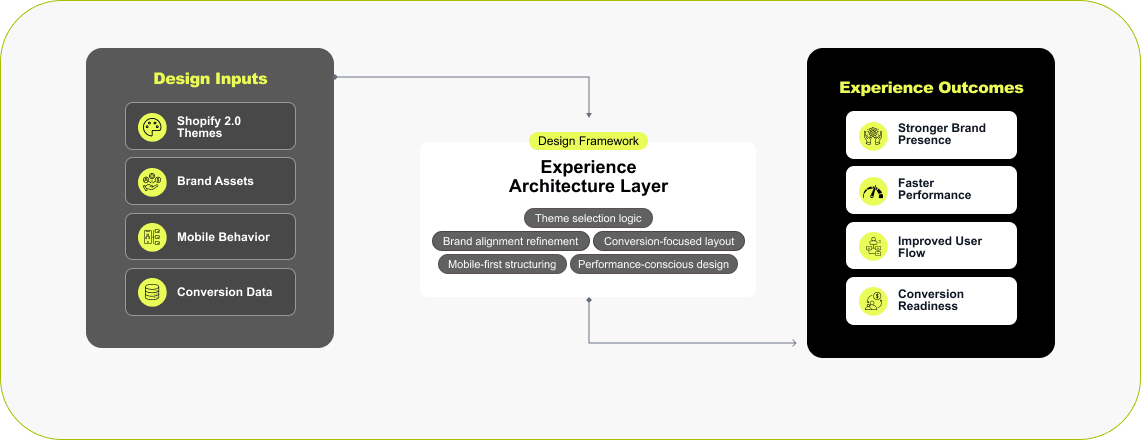

Step 2 — Shopify Store Framework & Setup
Many brands treat the move as the moment to improve the storefront. We’ll either build a fresh, faster, mobile-first design or recreate your existing look inside Shopify — your call. Either way, the foundation is built to perform.
Read More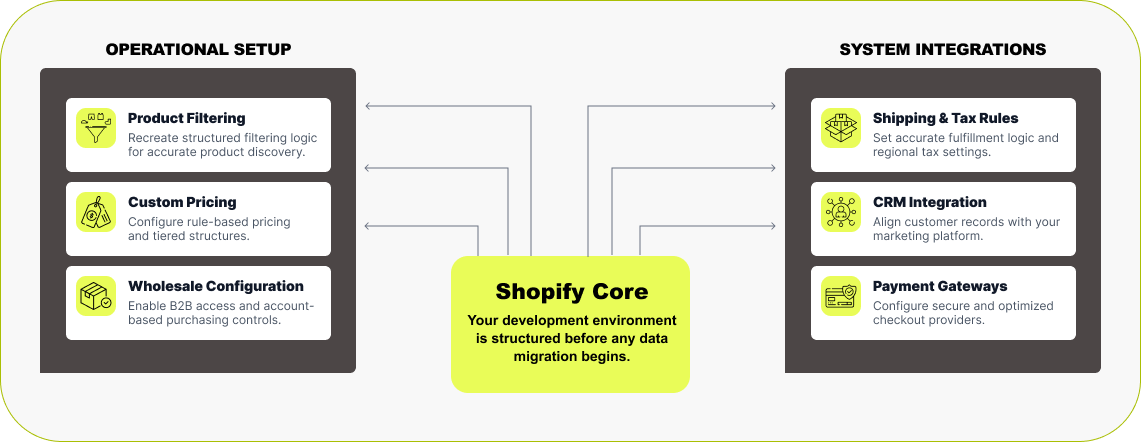

Step 3 — Functionality Rebuild & Feature Alignment
In a separate development store (via our Shopify Partner account), we rebuild the features your business relies on — filters, variant logic, pricing rules, B2B/wholesale, and connected tools. Shipping, tax, and payment settings are configured ahead of time so the store is ready to operate before any data moves.
Read More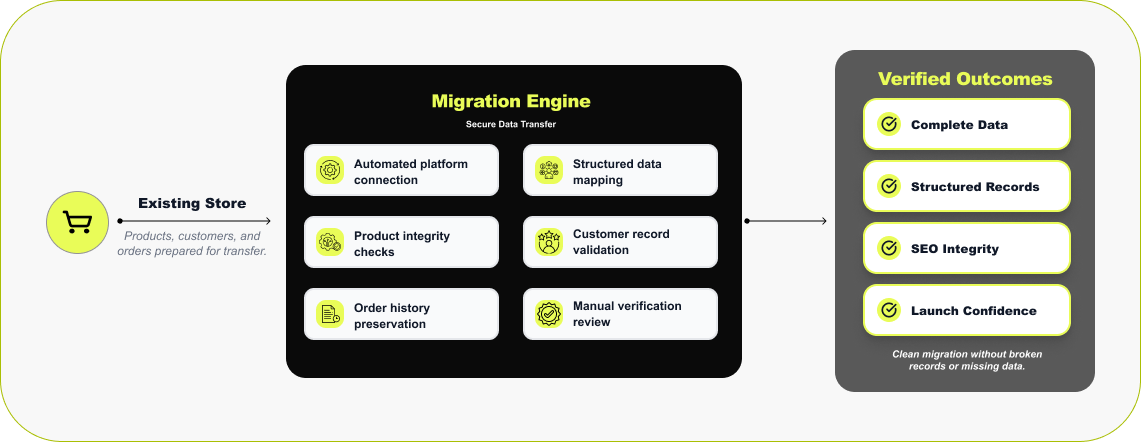

Step 4 — Data Transfer & Validation
Once the store is built, the data comes across. We run it through migration tools we trust — LitExtension or Cart2Cart for standard catalogs, Matrixify when a store is large or complex and needs tighter control over how fields map. These connect straight to BigCommerce and bring products, customer accounts, and past orders into Shopify. After the transfer, we go through it by hand in Shopify — products, collections, orders, customers — to confirm everything landed where it should.
Read More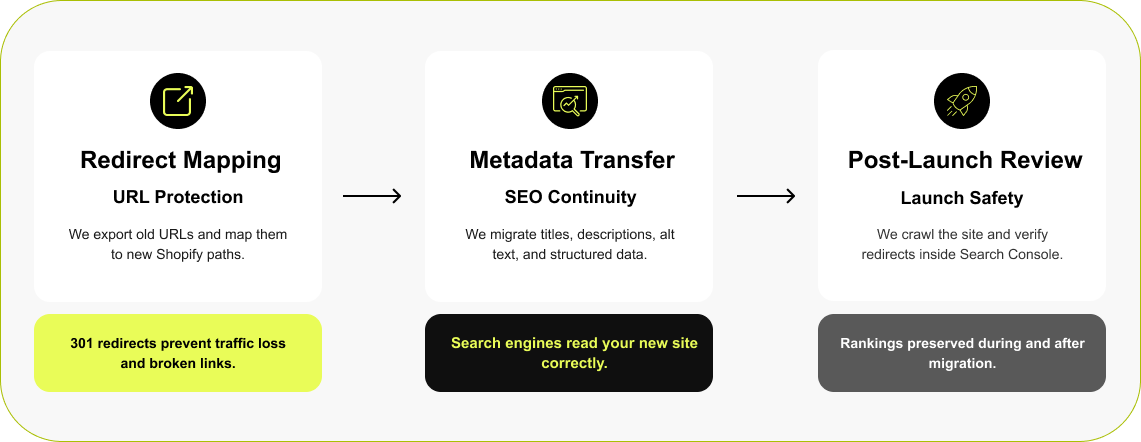

Step 5 — Protecting Rankings During Migration
URLs change when you replatform. Before launch, we pull every existing BigCommerce URL, map each to its closest Shopify page with a 301 redirect, and carry over titles, descriptions, alt text, and schema so the store keeps the signals search engines already trust.
Read More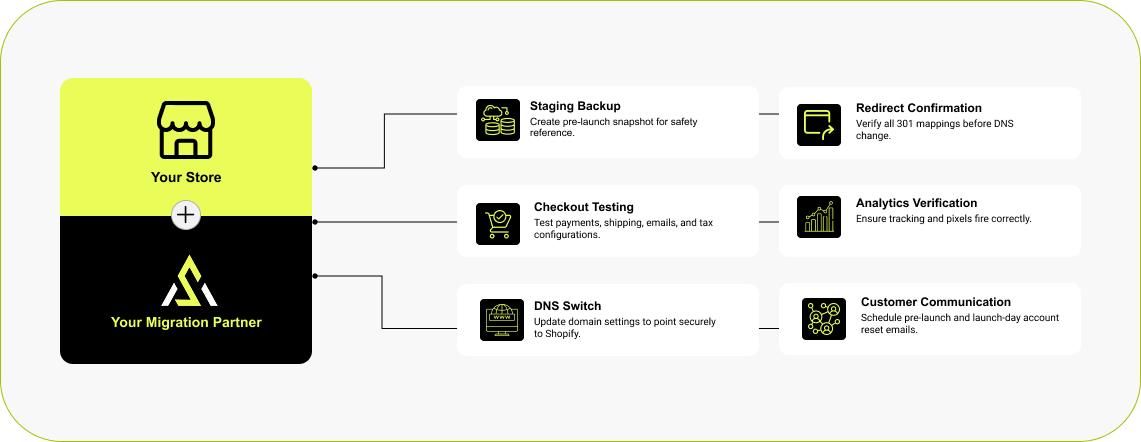

Step 6 — Launch & Communication Strategy
Going live is handled step by step: a reference copy is created, a final QA pass confirms everything works, then DNS records are updated to point the domain at Shopify. Because BigCommerce and Shopify encrypt passwords differently, customers reset passwords on first login — so we prepare customer comms in advance so the transition is smooth.
Read MoreHow Much Does a BigCommerce to Shopify Migration Cost?
Every BigCommerce store is built a little differently, so cost tracks what actually has to be rebuilt. A standard catalog with a few apps is straightforward; a store running custom pricing, B2B rules, detailed SEO, and third-party integrations takes more work to recreate in Shopify. As a rough guide, projects fall into three bands:

Small store
(under 500 SKUs, standard setup)
Standard catalog, few apps, little custom logic.

Mid-size store
(500–5,000 SKUs, some custom features)
A larger catalog with custom features, B2B pricing, or integrations.

Large / complex store
(5,000+ SKUs, ERP/CRM, custom build)
Heavy customization, wholesale/B2B, or many connected systems.
The cleanest way to know your number is a scoped estimate against your real store. Ballpark it with our Shopify cost calculator, see how pricing breaks down in our migration cost guide, or request a free estimate, and we'll size it for you.
Scoped within 48 hours
Migrations We've Handled — And What Happened After
A migration is only a success if the store performs after the move. Here's what happened to two businesses we moved onto Shopify — one enterprise-scale build, one high-volume catalog.
Soccer City
A 3,000-SKU catalog migrated to Shopify in five weeks — with rankings and uptime fully intact
Soccer City had outgrown their existing ecommerce platform after years of catalog growth: 3,000+ SKUs, 100+ collections, and a dual-audience model — direct shoppers plus a network of team stores — that the old platform couldn't support cleanly. With the spring season and the FIFA World Cup approaching, we had a hard five-week launch window. We rebuilt the operational foundation in Shopify: catalog architecture, AI-powered search across the full range, and a custom shared-inventory solution for the team-store network — migrating every product, collection, and order record while the live store kept trading the whole time.
Before Migrating to Shopify
- LCP 4.5s, Core Web Vitals failing
- Bounce rate 67%
- Manual inventory updates across all team pages
- Catalog hard to manage, updates error-prone
- Platform limiting daily operations
After · Shopify
- LCP 1.2s, Core Web Vitals passed
- Bounce rate 39%
- Shared inventory automated across all team pages
- AI-powered search across 3,000+ SKUs
- Platform built to grow with the business
Delivered in 5 weeks — spring-season deadline met, zero downtime, SEO intact.
Read Full Case Study →Caviar Centre
Caviar Centre needed a store that matched the premium nature of the product — cleaner merchandising, a faster and more trustworthy checkout, and a platform that could handle a high-value, perishable range without friction. We rebuilt it natively in Shopify, carried every product and customer record across without loss, and mapped a full set of 301 redirects so the search visibility the brand had earned stayed intact through the move.
What Our Shopify Migration Clients Say

Outstanding Shopify Migration Service
“We hired Ecommerce Development Pros for our Shopify migration project and they did an outstanding job. Smooth transition, clear communication, and everything worked perfectly after launch.”

Trusted Migration Partner
“Moving platforms felt overwhelming at first (we were nervous about SEO and data loss), but they handled the entire process carefully and professionally. Our new Shopify store is faster, easier to manage, and overall much more stable. It honestly feels like we finally have the right foundation to grow.”

Subscription Store Design & Launch
“They didn't just build a store — they helped us think through how to present the brand and products properly. The design feels clean and engaging, not like a typical template store. It's been around 3 months since launch and we're seeing solid progress. Conversion rate has improved to around 2.7%, subscription sign-ups are coming in steady (close to 20% on some products), and we're already seeing repeat orders.”
Brands Who Build, Grow, and Win With Us
BigCommerce to Shopify Migration FAQ
When a business considers moving from BigCommerce to Shopify, the same questions come up. Below are straightforward answers based on real migration experience.
How long does a BigCommerce to Shopify migration take?
+Most projects land in a 4-8 week window, with store size and complexity deciding where you fall. A small, mostly standard catalog moves quickly. Larger stores — lots of SKUs, complex variants, B2B pricing, or heavy SEO — need more planning and testing. The work runs through a few stages: auditing the BigCommerce setup, rebuilding features in Shopify, moving and checking the data, setting up redirects, and testing checkout before you go live.
How much does a BigCommerce to Shopify migration cost?
+There's no fixed figure, because no two BigCommerce stores are built the same. Cost tracks how customized yours is — a standard catalog with a few apps is simple, while custom pricing, B2B rules, detailed SEO setups, and third-party integrations all add work to rebuild in Shopify. The reliable way to get a real number is a scoped estimate against your actual store, and we'll put one together for you.
Will I lose any data when migrating from BigCommerce to Shopify?
+Products, variants, categories, customers and order history can all be transferred. We map fields to Shopify's structure first, then check the data inside Shopify before launch. Customer passwords are the one exception: they reset on first login.
Can I migrate my BigCommerce B2B / wholesale setup?
+Yes, but it doesn't transfer automatically. We audit your BigCommerce B2B setup, including price lists, customer groups, payment terms, and buyer accounts, then rebuild it using Shopify's B2B companies and catalogs (fullest on Plus) or apps on other plans. Wholesale customers keep their pricing and ordering experience. Buyers will need to reactivate their accounts after launch, and we help plan that communication.
Do customer passwords transfer during migration?
+No. BigCommerce and Shopify encrypt passwords differently, and Shopify won't import encrypted passwords from another platform. Everything else — customer accounts, order history, account details — still migrates; it's only the password that resets. Customers set a new one the first time they log in, and we help you send a quick heads-up beforehand so no one's caught off guard.
Can I keep my existing domain when moving to Shopify?
+Yes. Once the Shopify store is ready, we point your domain's DNS records at it. The address stays the same — customers just land on a faster, cleaner store.
Trusted Migration Partners