



 647-812-5125
 Back to Ecommerce Glossary
What Is a Product Detail Page (PDP)?
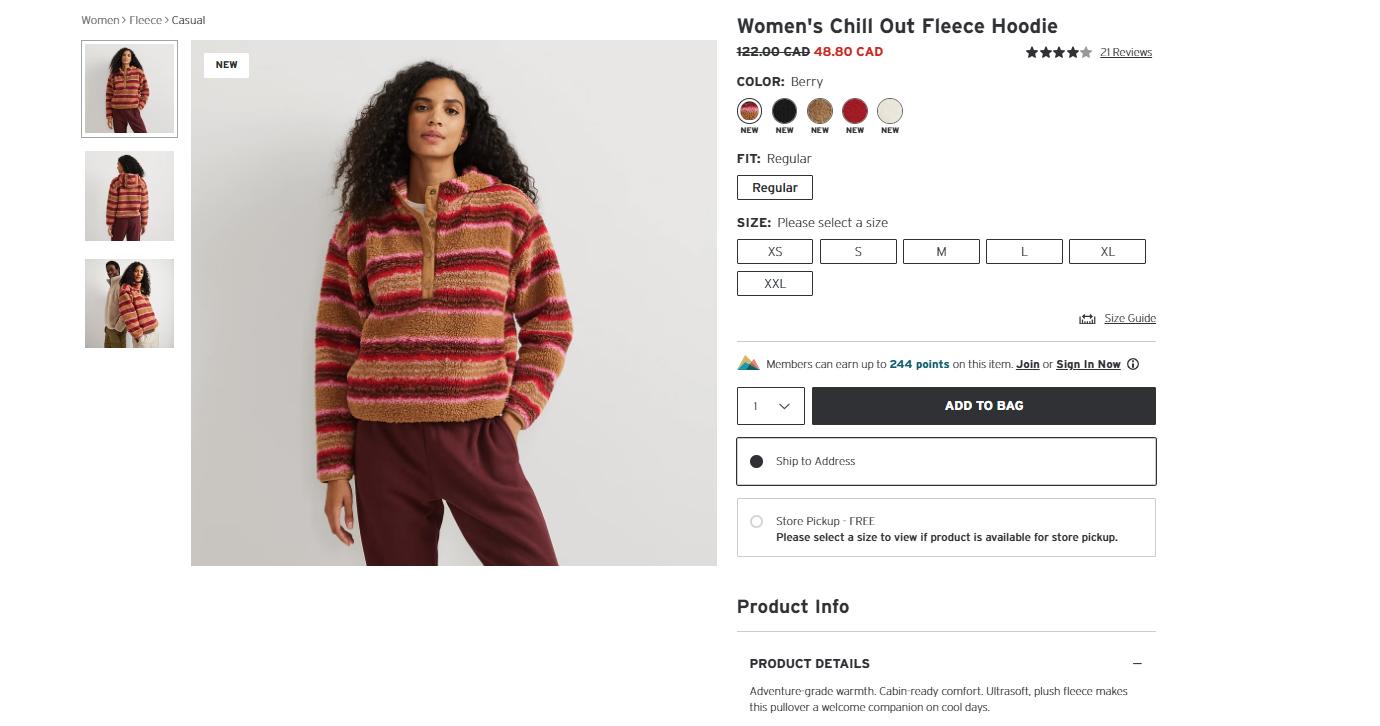
A Product Detail Page (PDP) is the web page that shows information about one product. It shows product images, price, description, options like size or colour, add to cart button, and/ or buy now button.
Why Do People Use a Product Detail Page (PDP)?
Product Detail Page (PDP) is the page where people decide whether to buy a product.
- Look at product photos
- Read the product details
- Check the price
- Choose size, colour, or other options
- Read user reviews
Why Is a Product Detail Page (PDP) Important for Online Stores?
The PDP helps build trust between the brand and the customer by providing high-quality images, accurate descriptions, and customer reviews. These elements reassure buyers, reduce hesitation, and encourage them to complete a purchase, directly improving conversion rates.
What Are the Benefits of a Well-Designed Product Detail Page (PDP)?
A well-designed Product Detail Page (PDP) helps shoppers understand the product before buying.
- Shoppers clearly understand what the product is and how it’s used
- Important details like price, options, and availability are easy to find
- Fewer questions remain before adding the product to the cart
- Trust increases through clear images, descriptions, and policies
- Shoppers move more confidently from viewing to buying
How to Improve a Product Detail Page (PDP)?
A Product Detail Page (PDP) improves through deliberate product page design that makes information easy to see and understand.
- Use clear, high-quality product images
- Write simple and honest descriptions
- Show the price clearly
- Display user reviews to build trust
- Make options like size or colour easy to choose
- Keep the “Add to Cart” button easy to find
- Make sure the page works well on mobile
How Does Shopify Support Product Detail Pages (PDPs)?
Shopify supports Product Detail Pages (PDPs) by keeping product pages structured and easy to use.
- Product details follow a clear layout
- Images load properly on all devices
- Size and colour options are easy to select
- Prices and inventory update automatically
- Checkout is close to the product page
This helps shoppers move from product to cart smoothly.
What Tools Help Improve Product Detail Pages (PDPs)?
Product Detail Page (PDP) issues are easier to fix when you can see how shoppers use the page.
- Analytics tools — show where shoppers leave the page
- Heatmap tools — show where shoppers click or stop scrolling
- Review apps — add customer feedback to the page
- Page builder apps — help adjust layout and content
These tools help identify what needs fixing on the product page.
What Are Common Product Detail Page (PDP) Mistakes to Avoid?
Product Detail Page (PDP) problems usually come from missing or unclear information.
- Poor or unclear product images
- Descriptions that do not explain the product
- Hidden pricing or shipping details
- “Add to Cart” buttons that are hard to find
- Pages that do not work well on mobile
For product page fixes that lift conversions, see our Shopify product page CRO strategies.