



 647-812-5125
 Back to Ecommerce Glossary
What is a Canonical URL?
A canonical URL is the version of a page you want search engines to treat as the main one.
If the same content is available on multiple URLs, it can confuse search engines and dilute rankings. A canonical URL removes that confusion for search engines by clearly identifying the primary page.
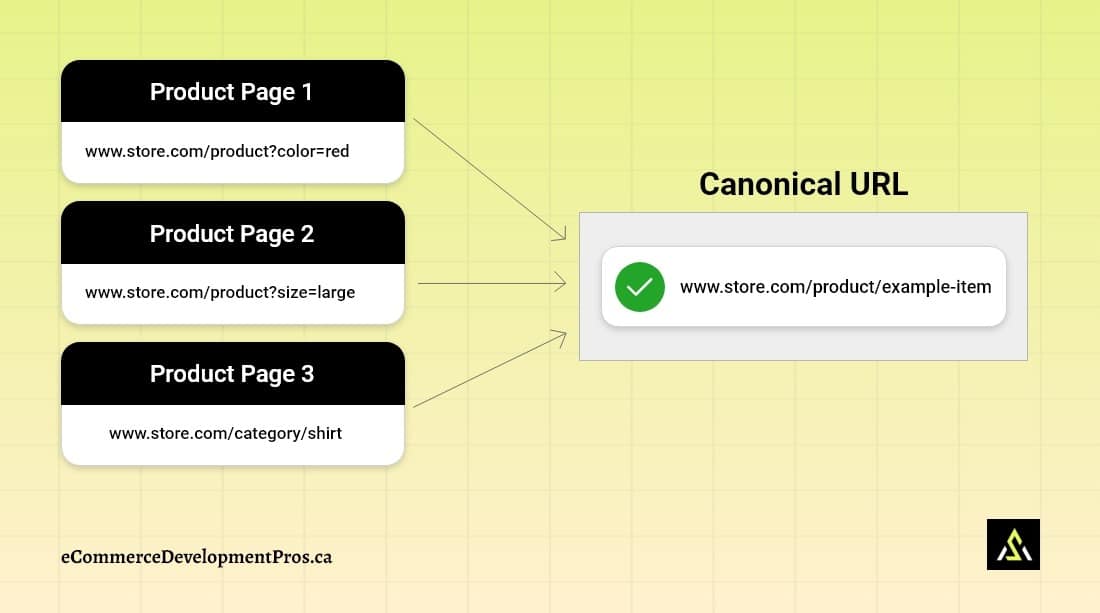
Multiple URL versions (filters, variants, collections) point to one canonical URL, helping search engines identify the preferred page for indexing
What Does a Canonical URL Look Like?
It’s inserted as a small tag within the HTML.
<link rel=“canonical” href=”https://example.com/product-page/” />
That line is enough to tell search engines which version should be treated as the main page.
Users might still land on different versions of the URL — that doesn’t change. But from an indexing standpoint, search engines are guided toward the one you’ve defined
Why Are Canonical URLs Important for SEO?
Without canonicals, things don’t break immediately — but they do get messy over time.
Here’s what typically starts happening:
- Similar pages get indexed as separate entries
- Authority gets split across those pages
- Search engines sometimes rank a version you didn’t intend
- Crawlers spend time on pages that don’t add value
None of this is dramatic on day one. But over time, it adds up.
A canonical tag helps keep everything aligned so signals don’t get diluted across multiple URLs — a key safeguard during any Shopify migration where URLs change.
Where Are Canonical URLs Used in eCommerce?
In eCommerce, products, filters, variants — all of these can quietly generate multiple URLs for the same content, which is why canonicals are a core part of Shopify migration SEO
Common Situations Where Canonical URLs Are Used in eCommerce |
||
|---|---|---|
| Situation | What Happens | Why Canonical Is Needed |
| Products in multiple collections | A single product appears under different collection paths | Keeps one version as the main page instead of duplicates competing |
| Filtered or sorted pages | Filters (size, price, color) create new URL combinations | Prevents a flood of near-identical pages from getting indexed |
| Product variants | Variants may generate their own URLs with similar content | Helps consolidate signals into one main product page |
| Pagination | Category pages are split across multiple numbered pages | Helps search engines interpret the structure properly |
| URL parameters | Tracking or session parameters create extra URL versions | Avoids duplicate indexing caused by parameter variations |
What Are Common Canonical URL Mistakes?
Most of the time, the issue isn’t the canonical idea itself — it’s how it’s used.
Some common problems show up like this:
Common Canonical URL Mistakes |
||
|---|---|---|
| Mistake | What Happens | Why It’s a Problem |
| Missing canonical tag | No clear preferred version exists | Search engines may index multiple versions |
| Canonical pointing to the wrong URL | A different page is marked as primary | You risk ranking the wrong page entirely |
| Multiple canonical tags | Mixed signals are sent | Search engines may ignore them altogether |
| Canonical loops | Pages point to each other as canonical | Creates confusion and breaks indexing logic |
| Using canonicals instead of fixing the structure | Duplicate pages still exist underneath | Doesn’t solve the actual issue |
| Blocking canonical pages | The canonical page isn’t crawlable | Leads to conflicting signals |
What’s the Difference Between a Canonical URL and a 301 Redirect?
Canonical URLs and 301 redirects are both used to handle similar or duplicate pages, but they work in different ways.
The table below shows how they differ:
Difference Between a Canonical URL and a 301 Redirect |
||
|---|---|---|
| Aspect | Canonical URL | 301 Redirect |
| Purpose | Indicates the preferred version | Forces a move to another URL |
| User experience | User stays on the same page | User is automatically redirected |
| Search engine behavior | Treated more like a suggestion | Treated as a directive |
| Use case | When multiple versions still need to exist | When one page replaces another |
| Impact on SEO | Consolidates signals | Transfers signals completely |
A simple way to think about it:
Canonicals guide. Redirects enforce.
How Can You Check the Canonical URL of a Page?
You can check the canonical URL by looking at the page’s source code or using SEO tools.
Here are the most common ways:
- View page source
Right-click on the page and select “View Page Source,” then search for rel=”canonical”.
- Use browser inspect
Open developer tools and check the <head> section for the canonical tag.
- Use SEO tools
Tools like Google Search Console or Screaming Frog can show canonical URLs across multiple pages.
- Crawl your website
Running a site crawl helps identify missing, incorrect, or conflicting canonical tags.
Checking canonical URLs regularly helps ensure that search engines are indexing the correct version of your pages.